
With the GDM extension, clicking a download link in your browser hands the download to GDM. GDM gets the address together with the page it came from (the referrer), your cookies for the site and the browser's User-Agent, so downloads that need you to be signed in still work.
L'estensione funziona con Google Chrome, Microsoft Edge, Brave, Opera e Vivaldi, con Firefox 140 o versioni successive e con Safari 17 o versioni successive su Mac (vedi Safari).
Browsers built on them work too: Chromium and Helium take the extension as Chrome does, Brave Origin as Brave does, Zen and LibreWolf as Firefox does. On Windows, Zen has a bug of its own (see The browser and GDM aren't connected).
Configurazione
L'integrazione con i browser ha due parti: un piccolo programma di supporto con cui il browser comunica e l'estensione stessa.
- Install GDM with the setup and keep Set up browser integration (Chrome, Edge, Brave, Firefox) ticked. This registers the helper. (The portable copy can't do this; see Portable mode.) On Linux and macOS GDM registers it itself, each time it starts, for the browsers installed then.
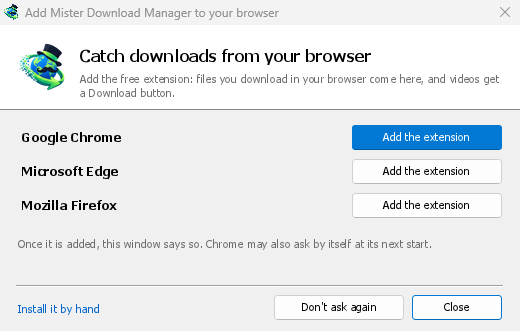
- Add the extension to each browser you use, as below: Firefox from its add-ons store, the others from the Chrome Web Store. Until a browser's extension has reached GDM, GDM's Add GolinksPRO Download Manager to your browser window opens at each start: it lists the browsers it found, and Add the extension opens the store's page in that browser. Install it by hand opens the steps for loading it without the store; Don't ask again stops the window.

Firefox
Firefox 140 or later is needed. Install the add-on from its page on addons.mozilla.org, GolinksPRO Download Manager: click Add to Firefox. Firefox keeps it updated. Zen and LibreWolf install it from the same page. (GDM's Add GolinksPRO Download Manager to your browser window opens that page for you.)
Chrome, Edge, Brave, Opera e Vivaldi
Install the extension from its page in the Chrome Web Store, GolinksPRO Download Manager: click Add to Chrome. In Edge the button is Get: Edge first asks to Allow extensions from other stores (click Allow), then Add extension. The browser keeps it updated. GDM's Add GolinksPRO Download Manager to your browser window opens that page in each browser for you, and Chrome may offer it by itself at its next start once GDM is installed.
To load it by hand instead (a browser that can't use the store, or a build of your own): its files are in the extension folder where GDM is installed: %LOCALAPPDATA%\Programs\GolinksPRO Download Manager\extension if you installed it for yourself, or Program Files\GolinksPRO Download Manager\extension if you installed it for everyone. Every release also has them as their own download, ...-extension-chromium.zip (unzip it first).
- Apri la pagina delle estensioni:
chrome://extensions,edge://extensionsobrave://extensions. - Attiva la Modalità sviluppatore.
- Fai clic su Carica estensione non pacchettizzata e scegli la cartella
extension\chromium.
GolinksPRO Download Manager appears in the list. Leave it turned on. Pin its button to the toolbar to see at a glance whether the browser reaches GDM.
Safari (macOS)
L'app per Mac include l'estensione per Safari: non c'è nulla da scaricare. Sono necessari Safari 17 o versioni successive e macOS 14 o versioni successive.
- Drag GDM to Applications and start it once. GDM's Add GolinksPRO Download Manager to your browser window lists Safari: How to Add shows the steps below.
- In Safari open Settings → Extensions and tick GolinksPRO Download Manager. Click Always Allow on Every Website: the extension needs to read the site to pass your sign-in on.
- Poiché l'app non è autenticata da Apple (le build sperimentali non lo sono), Safari elenca l'estensione solo se sono consentite le estensioni non firmate: Impostazioni → Avanzate → Mostra funzionalità per sviluppatori web, poi Impostazioni → Sviluppo → Consenti estensioni non firmate. Safari dimentica questa impostazione ogni volta che si chiude.
Safari non consente a un'estensione di vedere né di interrompere i download del browser, quindi il funzionamento differisce dagli altri browser:
- Works as in the other browsers: the right-click items, the button over videos, Media on this page, the toolbar button, Alt-click, GDM starting by itself, and every rule in Options.
- A click on a link to a file type GDM takes goes to GDM. A download the page starts by itself (a script, or a link with no file name in its address that the server answers with a file) stays with Safari: use right-click → Download with GolinksPRO Download Manager for those.
- Non disponibile: la condivisione del proxy o della VPN del browser e un download da un modulo.
Dallo zip semplice
The -x64.zip copy has no installer, but you can register the helper yourself. Open a command prompt in GDM's folder and run:
misterdownloadmanager-nmhost.exe --register
Questo è solo per il tuo account Windows. --unregister annulla l'operazione. Poi carica l'estensione come sopra, dalla cartella extension dello zip.
Cosa serve
When you click a download, the extension checks GDM's Options:
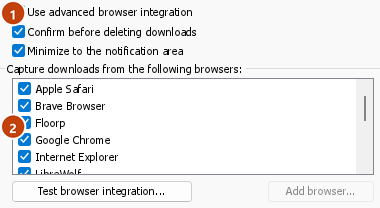
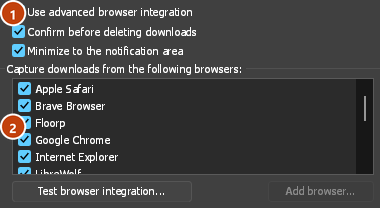
- Options → General → Use advanced browser integration must be on. Turn it off to send nothing to GDM.
- Opzioni → Generale → Acquisisci i download dai seguenti browser deve avere il tuo browser selezionato.
- Opzioni → Tipi di file → Avvia automaticamente il download dei seguenti tipi di file deve elencare il tipo di file. L'elenco inizia con quelli più comuni: ZIP, RAR, 7Z, EXE, MSI, ISO, DMG, DEB, RPM, APPIMAGE, MP3, MP4, MKV, WEBM, PDF, modelli AI come GGUF e SAFETENSORS, file 3D come GLB e STL e molti altri. Tutto il resto può essere aggiunto all'elenco.
- Opzioni → Tipi di file → Non avviare automaticamente il download dai seguenti siti non deve elencare il sito. I nomi sono separati da spazi, e
*corrisponde a qualsiasi parte, come in*.update.microsoft.com. Modifica elenco..., subito sotto, elenca gli indirizzi completi da ignorare, uno per riga (https://example.com/private/*). - Opzioni → Tipi di file → Non acquisire file più piccoli di lascia i file piccoli (una ricevuta, un'icona) al browser. 0 acquisisce qualsiasi dimensione.
- L'estensione deve essere autorizzata a leggere il sito. Quando la limiti ad alcuni siti (o a Al clic), non può passare il tuo accesso, quindi lascia i download di quei siti al browser.
When the browser keeps a download, the extension's button says which of these left it there, with the file's name, and GDM's log has a line for each one (logs\mdm.log in GDM's data folder).
Vengono controllati sia l'indirizzo su cui hai fatto clic sia quello a cui i suoi reindirizzamenti hanno portato, quindi un sito che hai escluso rimane escluso anche quando ti invia a un altro server. Tutto il resto resta al browser. Le modifiche nelle Opzioni raggiungono il browser entro un minuto; non è necessario riavviarlo.
When GDM takes a download, it gets the browser's file name, size and type with it, so Download File Info shows them at once without asking the server again. A download from a form (a button that posts and gets a file back) is posted again by GDM with the form's data; a form that sends a file stays with the browser.
When GDM takes a download, the browser's own copy is cancelled and removed from the browser's download list. In Firefox and the browsers built on it (Waterfox, Zen, LibreWolf), GDM takes it as soon as the server answers, before the browser asks What should … do with this file?: for a file GDM takes, that question never shows (Waterfox asks it for every new type of file). Files GDM doesn't take get the question as before. Download File Info opens in GDM (unless you turned it off in Options → Downloads). Cancelling there doesn't hand the download back to the browser.
Click a download link in the browser: Download File Info opens in GDM. 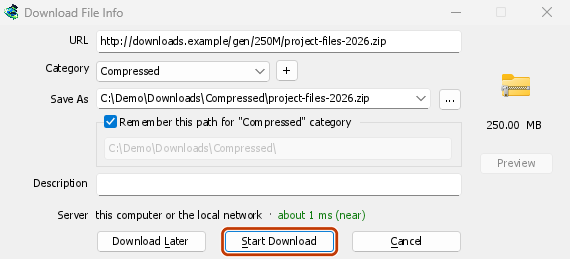

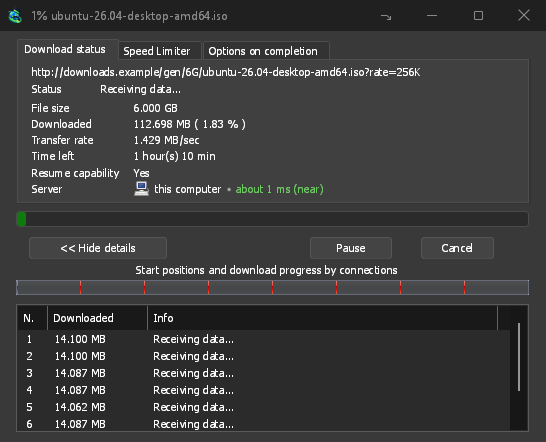
Avvia download: la finestra di avanzamento mostra il download in corso. 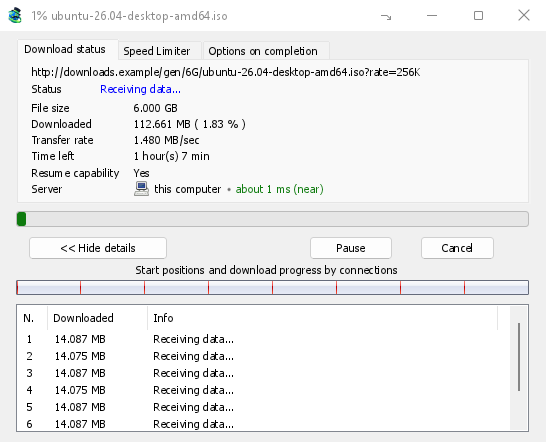
Download completato: apri il file o apri la cartella. 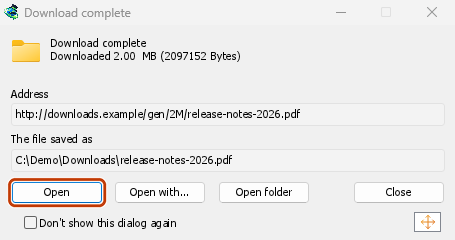
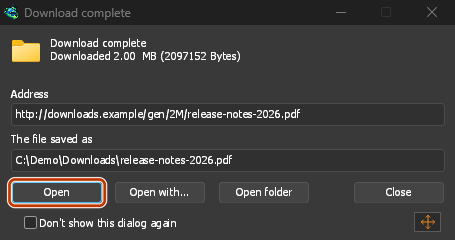
Downloads from a private window use that window's cookies, never the normal ones, and aren't kept in GDM's list after it closes.
Files GDM downloads from the browser are marked as coming from the internet, as the browser marks its own: Windows checks a program with SmartScreen before it runs and Office opens a document in Protected View.
File che il browser aprirebbe
A PDF, a song or a video that the browser would show or play itself goes to GDM too, when its type is in Options → File types (not on the excluded sites). To turn this off, untick Also take files the browser would open in Options → General → Keys.... This needs a Chromium browser (Chrome, Edge, Brave, Opera, Vivaldi) version 128 or later, or Firefox.
Il pulsante della barra degli strumenti
The extension's button shows whether the browser reaches GDM. A red ! means it doesn't; click the button to see why, and How to fix it opens the matching section of The browser and GDM aren't connected. The button also:
- Acquisisci i download da questo browser: deseleziona questa opzione per mettere in pausa l'acquisizione; tutti i download resteranno nel browser finché non la selezioni di nuovo.
- Never take downloads from the current site: adds it to GDM's excluded sites.
- Open GolinksPRO Download Manager and Options....
- Media on this page: what the page has loaded that GDM can download (see below).
Un'estensione VPN o proxy
A VPN or proxy extension is a proxy for the browser only. Switch on Send downloads through this browser's proxy or VPN extension in the extension's toolbar popup (it's off as installed), and GDM downloads what it takes from the browser through the same proxy (with Options → Proxy / Socks → Use proxy/socks from a browser's request, on by default; see Options). Switched off, the extension reads nothing of the browser's proxy.
- Firefox asks you once, at the switch, to allow the extension to read the browser's proxy; switching it off takes that permission back. GDM gets the proxy the browser's own request for the file took, including the ones a VPN extension picks for each request.
- Chrome, Edge, Brave, Opera and Vivaldi can't ask for that permission at the switch, so the
extension has it from the install (Chrome counts it under the access to every site the extension
already asks for, so it adds no line to the install prompt and the update asks for nothing new).
The switch asks nothing. GDM gets the browser's effective proxy, whoever set it (a VPN or proxy
extension, a policy, the command line): a fixed server for the download's scheme (
http,https,socks4,socks5), unless the address is on its bypass list, or its proxy auto-config script (by its address or inline). With no proxy, or the system's, nothing is sent and GDM goes by its own Options. A QUIC proxy can't be shared.
In entrambi, le credenziali del proxy non vengono mai lette: un proxy che richiede le credenziali proprie dell'estensione VPN non può essere condiviso, e il download lo indica invece di procedere senza.
Contenuti multimediali in questa pagina
Alcune pagine riproducono un video senza un collegamento al video, e alcuni lettori lo nascondono anche al pulsante di download. Il pulsante della barra degli strumenti elenca ciò che la pagina ha caricato, così puoi comunque salvarlo:
- Stream: HLS (
.m3u8) e DASH (.mpd), i formati usati dalla maggior parte dei siti per riprodurre video lunghi. Ogni stream compare una sola volta, indipendentemente dal numero di qualità tra cui è passato il lettore; vengono mostrate le qualità (1080p · 720p) e la durata, se l'estensione riesce a leggerle. Viene individuato anche uno stream servito come testo semplice, il cui indirizzo non termina in.m3u8o.mpd: quando apri l'elenco (o fai clic sul pulsante di download sopra il lettore) mentre il lettore riproduce uno stream, l'estensione legge i primi kilobyte dei dati scaricati dal lettore per riconoscerlo. L'estensione non legge nulla finché non glielo chiedi. - File video e audio riprodotti dalla pagina (MP4, WebM, MP3 e simili), con la dimensione del file e, per i video, la risoluzione.
Start the video first: the list fills as the page loads things, and it's emptied when the tab goes
to another page. With Prefix media file names with the page title on, a file from the list is
named after the page, then its own name (The page - clip.mp4). Click Download beside one: a stream opens GDM's Download video from a page
window, which reads its qualities (yt-dlp does the work); a file goes to GDM's list like any other
download. Your cookies for its server, the page as the referrer and your browser's User-Agent go
with it, as they do for a link you click.
Pieces of a stream (its segments) are never listed. A copy-protected stream (DRM: Widevine, PlayReady, FairPlay, as most paid streaming services use) is listed as Protected, with no Download button: no tool may break that protection, and GDM doesn't try.
Non devi fare altro: l'estensione vede già ciò che il browser scarica per acquisire i download. Le informazioni che raccoglie restano nella memoria del browser e vengono eliminate quando il browser si chiude.
Right-click: Download with GolinksPRO Download Manager
Right-click a link, a video, a sound or a picture and choose Download with GolinksPRO Download Manager. GDM downloads it whatever its type: you asked for it, so the file types list and the excluded sites don't apply here (they only decide which downloads GDM takes over by itself). A video that plays as a stream goes to the Download video window with the stream its player loaded (HLS or DASH), as the button over videos sends it, with your cookies for the stream's server and the page as the referrer.
Select part of a page and right-click it for Download selected links with GolinksPRO Download Manager, or right-click the page for Download all links with GolinksPRO Download Manager: the links open in Link grabber, sorted into packages, where you tick the ones you want.
If GDM can't be reached when you choose one of these, the help page opens at the section that explains why.
Il pulsante di download sopra i video
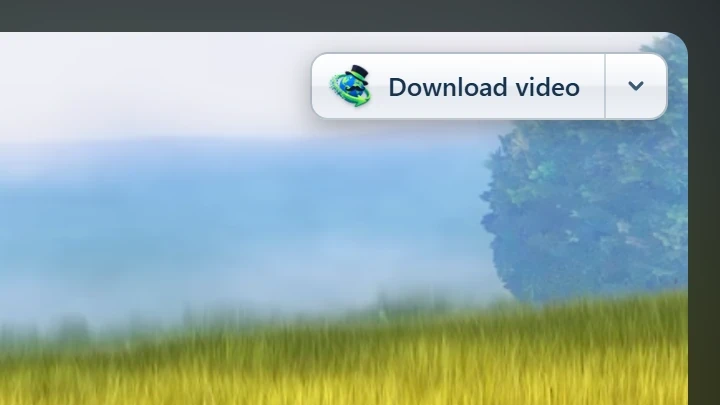
Point at a video on a web page and a small Download video button appears at its edge. Click it and GDM's Download video from a page window opens and looks up the qualities it can download. It takes the video you clicked: its own file when it plays one, or the stream the player loaded (HLS or DASH), else the page. When the button can't tell which one you mean, the toolbar button's Media on this page lists them all. Embedded players work too, and your sign-in for the site, the page that embeds the player and your browser's User-Agent go with it, so videos for members, or that play only on the site that embeds them, can be downloaded. Sound players get the button too.
Non è invadente: appare solo quando passi il puntatore su un video (o quando il lettore ha lo stato attivo della tastiera; Tab lo sposta poi sul pulsante), si attenua quando il puntatore resta fermo ed esclude i video piccoli e i brevi loop senza audio (immagini animate, sfondi). A schermo intero segue il video, se il lettore lo consente. Se un video è protetto da DRM, indica che non può essere salvato.
- Spostalo: trascinalo lungo il bordo del video; si aggancia al bordo più vicino e resta lì su quel sito.
- Its menu (the arrow next to it): Hide on this video, Never on the site (GDM remembers the site), and Button settings..., which opens GDM's Options.
- Turn it off, or see the sites it stays off: Options → General → Customize GDM Download panels in browsers → Edit....

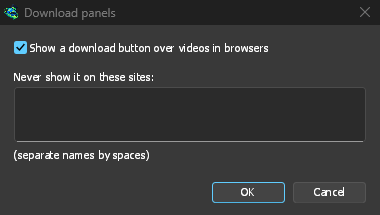
Il pulsante segue il resto dell'integrazione: non appare quando Usa l'integrazione avanzata con i browser è disattivato o il browser non è selezionato.
Tasti per forzare o impedire l'acquisizione
Hold Alt while clicking a link to let the browser download it instead of GDM. In Firefox, Alt+click saves a link only when its browser.altClickSave setting is on (in about:config); otherwise right-click the link and choose Save Link As..., which the browser keeps. Options → General → Keys... says so, and holds Also take files the browser would open.
Per lasciare per sempre nel browser i download di un sito, usa Non acquisire mai i download da nel menu del pulsante della barra degli strumenti, oppure aggiungi il sito a Non avviare automaticamente il download dai seguenti siti. Per lasciare nel browser un tipo di file, rimuovilo dall'elenco dei tipi di file.
When GDM isn't running
You don't need to start GDM first. When the browser hands over a download and GDM isn't running, the helper starts it and passes the download on.
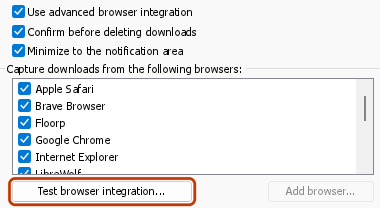
If GDM can't be reached at all (it was uninstalled, or the helper isn't registered), the download stays with the browser, so nothing is lost, and the toolbar button shows a red !. See The browser and GDM aren't connected, or run Options → General → Test browser integration....

Passi successivi
- Tutorial: intercettare i download del browser →
- Change which file types GDM takes →
- Se il browser non passa i download a GDM →
Gratuito, open source, senza pubblicità, senza periodo di prova.
Download GolinksPRO Download Manager