
With the GDM extension, clicking a download link in your browser hands the download to GDM. GDM gets the address together with the page it came from (the referrer), your cookies for the site and the browser's User-Agent, so downloads that need you to be signed in still work.
Расширение работает в Google Chrome, Microsoft Edge, Brave, Opera и Vivaldi, в Firefox 140 или новее, а также в Safari 17 или новее на Mac (см. Safari).
Browsers built on them work too: Chromium and Helium take the extension as Chrome does, Brave Origin as Brave does, Zen and LibreWolf as Firefox does. On Windows, Zen has a bug of its own (see The browser and GDM aren't connected).
Настройка
Интеграция с браузером состоит из двух частей: небольшой вспомогательной программы, с которой взаимодействует браузер, и самого расширения.
- Install GDM with the setup and keep Set up browser integration (Chrome, Edge, Brave, Firefox) ticked. This registers the helper. (The portable copy can't do this; see Portable mode.) On Linux and macOS GDM registers it itself, each time it starts, for the browsers installed then.
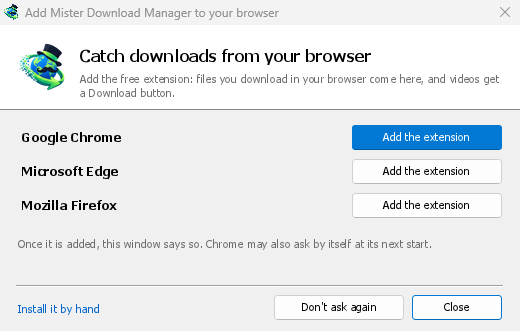
- Add the extension to each browser you use, as below: Firefox from its add-ons store, the others from the Chrome Web Store. Until a browser's extension has reached GDM, GDM's Add GolinksPRO Download Manager to your browser window opens at each start: it lists the browsers it found, and Add the extension opens the store's page in that browser. Install it by hand opens the steps for loading it without the store; Don't ask again stops the window.

Firefox
Firefox 140 or later is needed. Install the add-on from its page on addons.mozilla.org, GolinksPRO Download Manager: click Add to Firefox. Firefox keeps it updated. Zen and LibreWolf install it from the same page. (GDM's Add GolinksPRO Download Manager to your browser window opens that page for you.)
Chrome, Edge, Brave, Opera и Vivaldi
Install the extension from its page in the Chrome Web Store, GolinksPRO Download Manager: click Add to Chrome. In Edge the button is Get: Edge first asks to Allow extensions from other stores (click Allow), then Add extension. The browser keeps it updated. GDM's Add GolinksPRO Download Manager to your browser window opens that page in each browser for you, and Chrome may offer it by itself at its next start once GDM is installed.
To load it by hand instead (a browser that can't use the store, or a build of your own): its files are in the extension folder where GDM is installed: %LOCALAPPDATA%\Programs\GolinksPRO Download Manager\extension if you installed it for yourself, or Program Files\GolinksPRO Download Manager\extension if you installed it for everyone. Every release also has them as their own download, ...-extension-chromium.zip (unzip it first).
- Откройте страницу расширений:
chrome://extensions,edge://extensionsилиbrave://extensions. - Включите Режим разработчика.
- Нажмите Загрузить распакованное и выберите папку
extension\chromium.
GolinksPRO Download Manager appears in the list. Leave it turned on. Pin its button to the toolbar to see at a glance whether the browser reaches GDM.
Safari (macOS)
Приложение для Mac содержит расширение Safari: ничего скачивать не нужно. Требуется Safari 17 или новее и macOS 14 или новее.
- Drag GDM to Applications and start it once. GDM's Add GolinksPRO Download Manager to your browser window lists Safari: How to Add shows the steps below.
- In Safari open Settings → Extensions and tick GolinksPRO Download Manager. Click Always Allow on Every Website: the extension needs to read the site to pass your sign-in on.
- Пока приложение не нотариально заверено Apple (экспериментальные сборки не заверены), Safari отображает расширение только при разрешении неподписанных расширений: Настройки → Дополнительно → Показывать функции для веб-разработчиков, затем Настройки → Разработчик → Разрешить неподписанные расширения. Safari забывает эту настройку каждый раз при выходе.
Safari не позволяет расширению ни видеть, ни останавливать загрузки браузера, поэтому его работа отличается от других браузеров:
- Works as in the other browsers: the right-click items, the button over videos, Media on this page, the toolbar button, Alt-click, GDM starting by itself, and every rule in Options.
- A click on a link to a file type GDM takes goes to GDM. A download the page starts by itself (a script, or a link with no file name in its address that the server answers with a file) stays with Safari: use right-click → Download with GolinksPRO Download Manager for those.
- Недоступно: использование прокси или VPN браузера, а также загрузка из формы.
Из обычного zip-архива
The -x64.zip copy has no installer, but you can register the helper yourself. Open a command prompt in GDM's folder and run:
misterdownloadmanager-nmhost.exe --register
Это только для вашей учётной записи Windows. --unregister отменяет это. Затем загрузите расширение, как описано выше, из папки extension zip-архива.
Что для этого нужно
When you click a download, the extension checks GDM's Options:
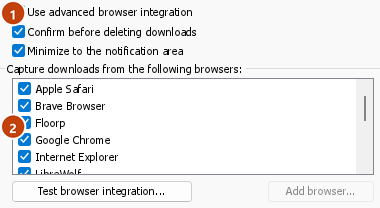
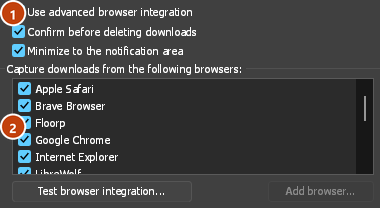
- Options → General → Use advanced browser integration must be on. Turn it off to send nothing to GDM.
- Параметры → Общие → Перехватывать загрузки из следующих браузеров должен иметь ваш браузер отмеченным.
- В Параметры → Типы файлов → Автоматически начинать загрузку следующих типов файлов должен быть указан тип файла. Список начинается с обычных: ZIP, RAR, 7Z, EXE, MSI, ISO, DMG, DEB, RPM, APPIMAGE, MP3, MP4, MKV, WEBM, PDF, модели ИИ, такие как GGUF и SAFETENSORS, 3D-файлы, такие как GLB и STL, и многие другие. Все остальное можно добавить в список.
- Сайт не должен быть в списке Параметры → Типы файлов → Не начинать загрузку автоматически со следующих сайтов. Имена разделяются пробелами, а
*соответствует любой части, как в*.update.microsoft.com. Изменить список... ниже перечисляет полные адреса, которые нужно игнорировать, по одному на строку (https://example.com/private/*). - Параметры → Типы файлов → Не перехватывать файлы размером меньше оставляет небольшие файлы (квитанции, значки) браузеру. 0 перехватывает файлы любого размера.
- Расширению должно быть разрешено читать сайт. Если вы ограничите его работу определёнными сайтами (или выберете По клику), оно не сможет передать ваши данные для входа, поэтому оставит загрузки с этих сайтов браузеру.
When the browser keeps a download, the extension's button says which of these left it there, with the file's name, and GDM's log has a line for each one (logs\mdm.log in GDM's data folder).
Проверяются как адрес, по которому вы кликнули, так и тот, на который привели его перенаправления, поэтому исключённый вами сайт остаётся исключённым, даже если он перенаправляет вас на другой сервер. Всё остальное остаётся в браузере. Изменения в параметрах достигают браузера в течение минуты; перезапускать его не нужно.
When GDM takes a download, it gets the browser's file name, size and type with it, so Download File Info shows them at once without asking the server again. A download from a form (a button that posts and gets a file back) is posted again by GDM with the form's data; a form that sends a file stays with the browser.
When GDM takes a download, the browser's own copy is cancelled and removed from the browser's download list. In Firefox and the browsers built on it (Waterfox, Zen, LibreWolf), GDM takes it as soon as the server answers, before the browser asks What should … do with this file?: for a file GDM takes, that question never shows (Waterfox asks it for every new type of file). Files GDM doesn't take get the question as before. Download File Info opens in GDM (unless you turned it off in Options → Downloads). Cancelling there doesn't hand the download back to the browser.
Click a download link in the browser: Download File Info opens in GDM. 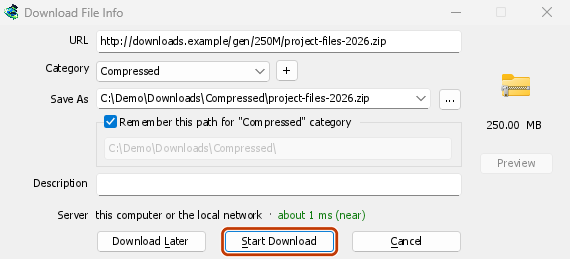

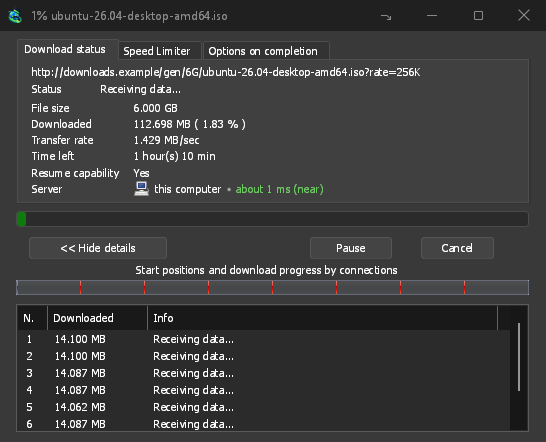
Начать загрузку: в окне отображается ход загрузки. 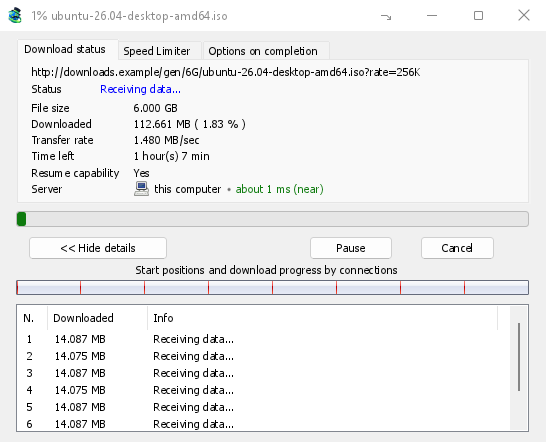
Загрузка завершена: откройте файл или папку. 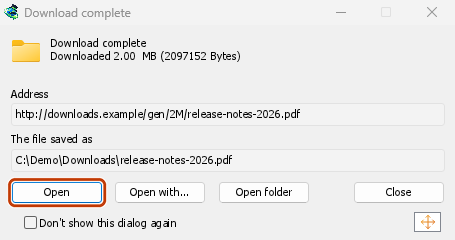
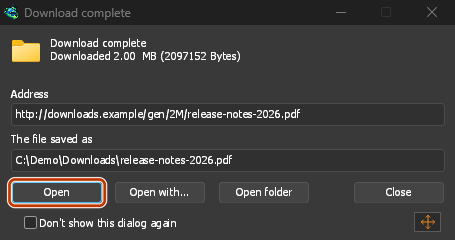
Downloads from a private window use that window's cookies, never the normal ones, and aren't kept in GDM's list after it closes.
Files GDM downloads from the browser are marked as coming from the internet, as the browser marks its own: Windows checks a program with SmartScreen before it runs and Office opens a document in Protected View.
Файлы, которые браузер открыл бы сам
A PDF, a song or a video that the browser would show or play itself goes to GDM too, when its type is in Options → File types (not on the excluded sites). To turn this off, untick Also take files the browser would open in Options → General → Keys.... This needs a Chromium browser (Chrome, Edge, Brave, Opera, Vivaldi) version 128 or later, or Firefox.
Кнопка на панели инструментов
The extension's button shows whether the browser reaches GDM. A red ! means it doesn't; click the button to see why, and How to fix it opens the matching section of The browser and GDM aren't connected. The button also:
- Перехватывать загрузки из этого браузера: снимите флажок, чтобы приостановить перехват. Все загрузки будут оставаться в браузере, пока вы снова не установите флажок.
- Never take downloads from the current site: adds it to GDM's excluded sites.
- Open GolinksPRO Download Manager and Options....
- Media on this page: what the page has loaded that GDM can download (see below).
Расширение VPN или прокси-сервера
A VPN or proxy extension is a proxy for the browser only. Switch on Send downloads through this browser's proxy or VPN extension in the extension's toolbar popup (it's off as installed), and GDM downloads what it takes from the browser through the same proxy (with Options → Proxy / Socks → Use proxy/socks from a browser's request, on by default; see Options). Switched off, the extension reads nothing of the browser's proxy.
- Firefox asks you once, at the switch, to allow the extension to read the browser's proxy; switching it off takes that permission back. GDM gets the proxy the browser's own request for the file took, including the ones a VPN extension picks for each request.
- Chrome, Edge, Brave, Opera and Vivaldi can't ask for that permission at the switch, so the
extension has it from the install (Chrome counts it under the access to every site the extension
already asks for, so it adds no line to the install prompt and the update asks for nothing new).
The switch asks nothing. GDM gets the browser's effective proxy, whoever set it (a VPN or proxy
extension, a policy, the command line): a fixed server for the download's scheme (
http,https,socks4,socks5), unless the address is on its bypass list, or its proxy auto-config script (by its address or inline). With no proxy, or the system's, nothing is sent and GDM goes by its own Options. A QUIC proxy can't be shared.
В обоих случаях логин прокси-сервера никогда не считывается: прокси-сервер, который запрашивает собственный логин расширения VPN, не может быть общим, и загрузка сообщает об этом, а не продолжается без него.
Медиа на этой странице
Некоторые страницы воспроизводят видео без ссылки на него, а некоторые проигрыватели не показывают его и в списке загрузок. Кнопка на панели инструментов показывает, что загрузила страница, поэтому вы всё равно можете сохранить это видео:
- Потоки: HLS (
.m3u8) и DASH (.mpd) — так большинство сайтов передают длинные видео. Каждый поток отображается один раз, даже если проигрыватель переключался между разными вариантами качества. Если расширение может определить качество (1080p · 720p) и длительность, они тоже отображаются. Расширение также находит потоки, передаваемые как обычный текст, адреса которых не заканчиваются на.m3u8или.mpd: когда вы открываете список (или нажимаете кнопку загрузки над проигрывателем) и проигрыватель воспроизводит поток, расширение считывает первые несколько килобайт полученных им данных, чтобы распознать поток. Данные не считываются, пока вы не попросите об этом. - Видео- и аудиофайлы, которые воспроизводила страница (MP4, WebM, MP3 и другие), с указанием размера и, для видео, разрешения.
Start the video first: the list fills as the page loads things, and it's emptied when the tab goes
to another page. With Prefix media file names with the page title on, a file from the list is
named after the page, then its own name (The page - clip.mp4). Click Download beside one: a stream opens GDM's Download video from a page
window, which reads its qualities (yt-dlp does the work); a file goes to GDM's list like any other
download. Your cookies for its server, the page as the referrer and your browser's User-Agent go
with it, as they do for a link you click.
Pieces of a stream (its segments) are never listed. A copy-protected stream (DRM: Widevine, PlayReady, FairPlay, as most paid streaming services use) is listed as Protected, with no Download button: no tool may break that protection, and GDM doesn't try.
Дополнительных действий от вас не требуется: расширение уже видит, что загружает браузер, чтобы перехватывать загрузки. Эти сведения хранятся в памяти браузера и удаляются при его закрытии.
Right-click: Download with GolinksPRO Download Manager
Right-click a link, a video, a sound or a picture and choose Download with GolinksPRO Download Manager. GDM downloads it whatever its type: you asked for it, so the file types list and the excluded sites don't apply here (they only decide which downloads GDM takes over by itself). A video that plays as a stream goes to the Download video window with the stream its player loaded (HLS or DASH), as the button over videos sends it, with your cookies for the stream's server and the page as the referrer.
Select part of a page and right-click it for Download selected links with GolinksPRO Download Manager, or right-click the page for Download all links with GolinksPRO Download Manager: the links open in Link grabber, sorted into packages, where you tick the ones you want.
If GDM can't be reached when you choose one of these, the help page opens at the section that explains why.
Кнопка загрузки над видео
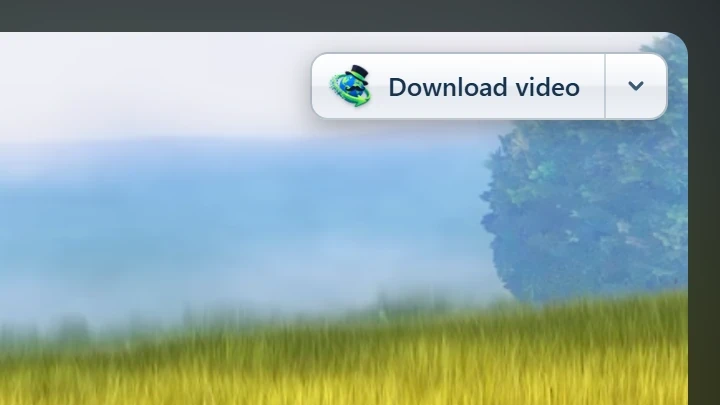
Point at a video on a web page and a small Download video button appears at its edge. Click it and GDM's Download video from a page window opens and looks up the qualities it can download. It takes the video you clicked: its own file when it plays one, or the stream the player loaded (HLS or DASH), else the page. When the button can't tell which one you mean, the toolbar button's Media on this page lists them all. Embedded players work too, and your sign-in for the site, the page that embeds the player and your browser's User-Agent go with it, so videos for members, or that play only on the site that embeds them, can be downloaded. Sound players get the button too.
Она не мешает: появляется только при наведении на видео (или когда плеер имеет фокус клавиатуры; затем Tab перемещает фокус на кнопку), исчезает при остановке указателя и не появляется для маленьких видео и коротких беззвучных циклов (анимированные изображения, фоны). В полноэкранном режиме она следует за видео, если плеер это позволяет. На видео с защитой от копирования (DRM) она сообщает, что видео не может быть сохранено.
- Переместить: перетащите её в любое место вдоль края видео; она привяжется к ближайшему краю и останется там на этом сайте.
- Its menu (the arrow next to it): Hide on this video, Never on the site (GDM remembers the site), and Button settings..., which opens GDM's Options.
- Turn it off, or see the sites it stays off: Options → General → Customize GDM Download panels in browsers → Edit....

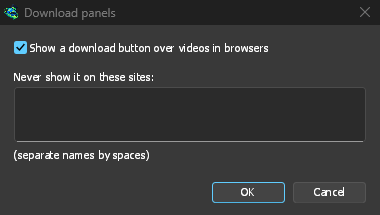
Кнопка следует за остальной частью интеграции: она не отображается, если Использовать расширенную интеграцию с браузером отключена или браузер не отмечен.
Клавиши для принудительного захвата или предотвращения
Hold Alt while clicking a link to let the browser download it instead of GDM. In Firefox, Alt+click saves a link only when its browser.altClickSave setting is on (in about:config); otherwise right-click the link and choose Save Link As..., which the browser keeps. Options → General → Keys... says so, and holds Also take files the browser would open.
Чтобы навсегда оставить загрузки с сайта в браузере, используйте Никогда не перехватывать загрузки с кнопки на панели инструментов или добавьте сайт в Не начинать загрузку автоматически со следующих сайтов. Чтобы оставить тип файла в браузере, удалите его из списка типов файлов.
When GDM isn't running
You don't need to start GDM first. When the browser hands over a download and GDM isn't running, the helper starts it and passes the download on.
If GDM can't be reached at all (it was uninstalled, or the helper isn't registered), the download stays with the browser, so nothing is lost, and the toolbar button shows a red !. See The browser and GDM aren't connected, or run Options → General → Test browser integration....
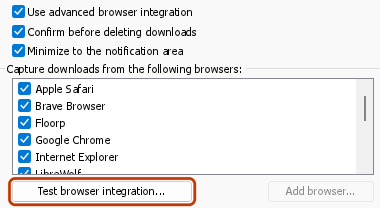

Дальнейшие действия
- Учебник: перехват загрузок из браузера →
- Change which file types GDM takes →
- Если браузер не передаёт загрузки →
Бесплатно, с открытым исходным кодом, без рекламы, без пробного периода.
Download GolinksPRO Download Manager