

With the GDM extension, clicking a download link in your browser hands the download to GDM. GDM gets the address together with the page it came from (the referrer), your cookies for the site and the browser's User-Agent, so downloads that need you to be signed in still work.
Ekstensi ini berfungsi di Google Chrome, Microsoft Edge, Brave, Opera, dan Vivaldi, di Firefox versi 140 atau yang lebih baru, serta di Safari versi 17 atau yang lebih baru di Mac (lihat Safari).
Browsers built on them work too: Chromium and Helium take the extension as Chrome does, Brave Origin as Brave does, Zen and LibreWolf as Firefox does. On Windows, Zen has a bug of its own (see The browser and GDM aren't connected).
Siapkan
Integrasi browser terdiri dari dua bagian: program kecil yang berkomunikasi dengan browser dan ekstensinya.
- Install GDM with the setup and keep Set up browser integration (Chrome, Edge, Brave, Firefox) ticked. This registers the helper. (The portable copy can't do this; see Portable mode.) On Linux and macOS GDM registers it itself, each time it starts, for the browsers installed then.
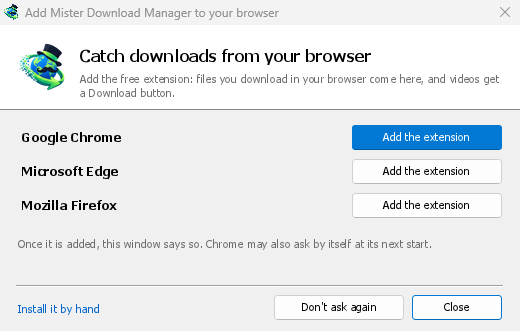
- Add the extension to each browser you use, as below: Firefox from its add-ons store, the others from the Chrome Web Store. Until a browser's extension has reached GDM, GDM's Add GolinksPRO Download Manager to your browser window opens at each start: it lists the browsers it found, and Add the extension opens the store's page in that browser. Install it by hand opens the steps for loading it without the store; Don't ask again stops the window.

Firefox
Firefox 140 or later is needed. Install the add-on from its page on addons.mozilla.org, GolinksPRO Download Manager: click Add to Firefox. Firefox keeps it updated. Zen and LibreWolf install it from the same page. (GDM's Add GolinksPRO Download Manager to your browser window opens that page for you.)
Chrome, Edge, Brave, Opera, dan Vivaldi
Install the extension from its page in the Chrome Web Store, GolinksPRO Download Manager: click Add to Chrome. In Edge the button is Get: Edge first asks to Allow extensions from other stores (click Allow), then Add extension. The browser keeps it updated. GDM's Add GolinksPRO Download Manager to your browser window opens that page in each browser for you, and Chrome may offer it by itself at its next start once GDM is installed.
To load it by hand instead (a browser that can't use the store, or a build of your own): its files are in the extension folder where GDM is installed: %LOCALAPPDATA%\Programs\GolinksPRO Download Manager\extension if you installed it for yourself, or Program Files\GolinksPRO Download Manager\extension if you installed it for everyone. Every release also has them as their own download, ...-extension-chromium.zip (unzip it first).
- Buka halaman ekstensi:
chrome://extensions,edge://extensions, ataubrave://extensions. - Nyalakan Mode pengembang.
- Klik Muat yang belum dikemas dan pilih folder
extension\chromium.
GolinksPRO Download Manager appears in the list. Leave it turned on. Pin its button to the toolbar to see at a glance whether the browser reaches GDM.
Safari (macOS)
Aplikasi Mac sudah menyertakan ekstensi Safari: tidak ada yang perlu diunduh. Diperlukan Safari 17 atau yang lebih baru dan macOS 14 atau yang lebih baru.
- Drag GDM to Applications and start it once. GDM's Add GolinksPRO Download Manager to your browser window lists Safari: How to Add shows the steps below.
- In Safari open Settings → Extensions and tick GolinksPRO Download Manager. Click Always Allow on Every Website: the extension needs to read the site to pass your sign-in on.
- Selama aplikasi tidak disahkan oleh Apple (versi eksperimental tidak), Safari hanya mencantumkan ekstensi dengan ekstensi yang tidak ditandatangani diizinkan: Pengaturan → Lanjutan → Tampilkan fitur untuk pengembang web, lalu Pengaturan → Pengembang → Izinkan ekstensi yang tidak ditandatangani. Safari melupakan pengaturan itu setiap kali keluar.
Safari tidak mengizinkan ekstensi untuk melihat maupun menghentikan unduhan browser, jadi cara kerjanya berbeda dari browser lain:
- Works as in the other browsers: the right-click items, the button over videos, Media on this page, the toolbar button, Alt-click, GDM starting by itself, and every rule in Options.
- A click on a link to a file type GDM takes goes to GDM. A download the page starts by itself (a script, or a link with no file name in its address that the server answers with a file) stays with Safari: use right-click → Download with GolinksPRO Download Manager for those.
- Tidak tersedia: berbagi proxy atau VPN browser, dan unduhan dari formulir.
Dari file zip biasa
The -x64.zip copy has no installer, but you can register the helper yourself. Open a command prompt in GDM's folder and run:
misterdownloadmanager-nmhost.exe --register
Tindakan ini hanya berlaku untuk akun Windows Anda. --unregister membatalkan pendaftaran. Setelah itu, muat ekstensi seperti di atas dari folder extension di dalam file zip.
Yang diperlukan
When you click a download, the extension checks GDM's Options:
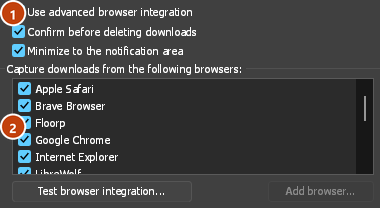
- Options → General → Use advanced browser integration must be on. Turn it off to send nothing to GDM.
- Browser Anda harus dicentang di Opsi → Umum → Tangkap unduhan dari browser berikut.
- Opsi → Jenis file → Mulai mengunduh jenis file berikut secara otomatis harus mencantumkan jenis file tersebut. Daftar ini dimulai dengan yang umum: ZIP, RAR, 7Z, EXE, MSI, ISO, DMG, DEB, RPM, APPIMAGE, MP3, MP4, MKV, WEBM, PDF, model AI seperti GGUF dan SAFETENSORS, file 3D seperti GLB dan STL, dan banyak lagi. Apa pun yang lain dapat ditambahkan ke daftar.
- Opsi → Jenis file → Jangan mulai mengunduh secara otomatis dari situs berikut tidak boleh mencantumkan situs tersebut. Nama dipisahkan oleh spasi, dan
*cocok dengan bagian mana pun, seperti pada*.update.microsoft.com. Edit daftar ... di bawahnya mencantumkan alamat lengkap yang tidak akan ditangani, satu per baris (https://example.com/private/*). - Opsi → Jenis file → Jangan ambil file yang lebih kecil dari membuat browser menangani file kecil (seperti tanda terima atau ikon). Nilai 0 berarti ukuran berapa pun.
- Ekstensi harus diizinkan membaca situs. Jika Anda membatasi aksesnya ke beberapa situs (atau memilih Saat diklik), ekstensi tidak dapat meneruskan informasi login Anda, sehingga unduhan dari situs tersebut tetap ditangani oleh browser.
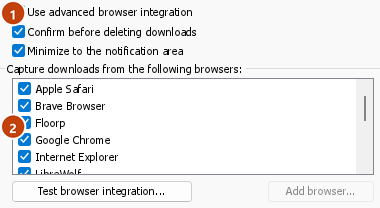
When the browser keeps a download, the extension's button says which of these left it there, with the file's name, and GDM's log has a line for each one (logs\mdm.log in GDM's data folder).
Alamat yang Anda klik dan alamat tujuan setelah pengalihan sama-sama diperiksa. Jadi, situs yang Anda kecualikan tetap dikecualikan meskipun mengarahkan Anda ke server lain. Unduhan lainnya tetap ditangani oleh browser. Perubahan di Opsi akan diterapkan di browser dalam waktu satu menit; Anda tidak perlu memulai ulang browser.
When GDM takes a download, it gets the browser's file name, size and type with it, so Download File Info shows them at once without asking the server again. A download from a form (a button that posts and gets a file back) is posted again by GDM with the form's data; a form that sends a file stays with the browser.
When GDM takes a download, the browser's own copy is cancelled and removed from the browser's download list. In Firefox and the browsers built on it (Waterfox, Zen, LibreWolf), GDM takes it as soon as the server answers, before the browser asks What should … do with this file?: for a file GDM takes, that question never shows (Waterfox asks it for every new type of file). Files GDM doesn't take get the question as before. Download File Info opens in GDM (unless you turned it off in Options → Downloads). Cancelling there doesn't hand the download back to the browser.
Click a download link in the browser: Download File Info opens in GDM. 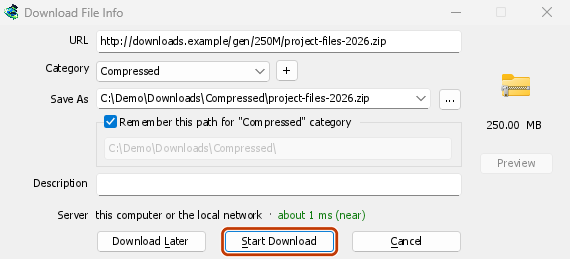

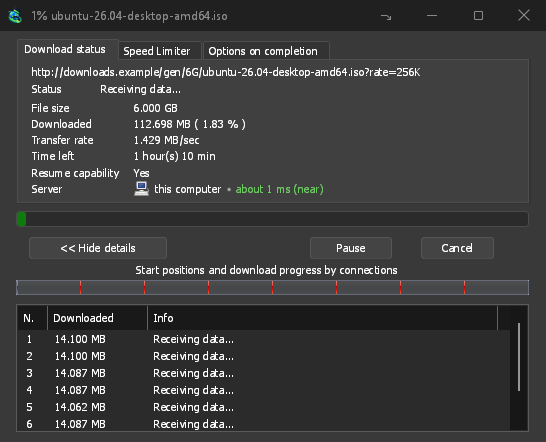
Mulai Unduhan: jendela progres menunjukkan unduhan sedang berlangsung. 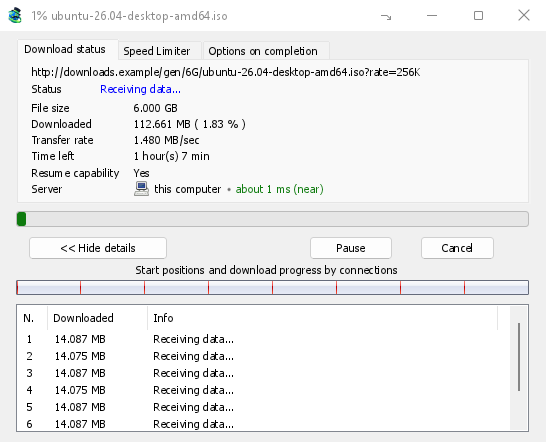
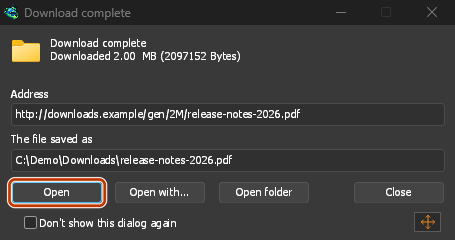
Unduhan selesai: Buka file, atau Buka folder. 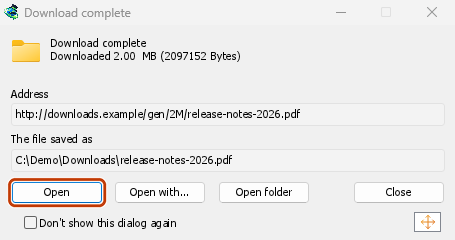
Downloads from a private window use that window's cookies, never the normal ones, and aren't kept in GDM's list after it closes.
Files GDM downloads from the browser are marked as coming from the internet, as the browser marks its own: Windows checks a program with SmartScreen before it runs and Office opens a document in Protected View.
File yang akan dibuka browser
A PDF, a song or a video that the browser would show or play itself goes to GDM too, when its type is in Options → File types (not on the excluded sites). To turn this off, untick Also take files the browser would open in Options → General → Keys.... This needs a Chromium browser (Chrome, Edge, Brave, Opera, Vivaldi) version 128 or later, or Firefox.
Tombol bilah alat
The extension's button shows whether the browser reaches GDM. A red ! means it doesn't; click the button to see why, and How to fix it opens the matching section of The browser and GDM aren't connected. The button also:
- Ambil unduhan dari browser ini: hapus centang untuk menjeda, dan setiap unduhan tetap ditangani oleh browser sampai Anda mencentangnya lagi.
- Never take downloads from the current site: adds it to GDM's excluded sites.
- Open GolinksPRO Download Manager and Options....
- Media on this page: what the page has loaded that GDM can download (see below).
Ekstensi VPN atau proksi
A VPN or proxy extension is a proxy for the browser only. Switch on Send downloads through this browser's proxy or VPN extension in the extension's toolbar popup (it's off as installed), and GDM downloads what it takes from the browser through the same proxy (with Options → Proxy / Socks → Use proxy/socks from a browser's request, on by default; see Options). Switched off, the extension reads nothing of the browser's proxy.
- Firefox asks you once, at the switch, to allow the extension to read the browser's proxy; switching it off takes that permission back. GDM gets the proxy the browser's own request for the file took, including the ones a VPN extension picks for each request.
- Chrome, Edge, Brave, Opera and Vivaldi can't ask for that permission at the switch, so the
extension has it from the install (Chrome counts it under the access to every site the extension
already asks for, so it adds no line to the install prompt and the update asks for nothing new).
The switch asks nothing. GDM gets the browser's effective proxy, whoever set it (a VPN or proxy
extension, a policy, the command line): a fixed server for the download's scheme (
http,https,socks4,socks5), unless the address is on its bypass list, or its proxy auto-config script (by its address or inline). With no proxy, or the system's, nothing is sent and GDM goes by its own Options. A QUIC proxy can't be shared.
Di keduanya, login proksi tidak pernah dibaca: proksi yang meminta login ekstensi VPN sendiri tidak dapat dibagikan, dan unduhan akan menyatakan demikian daripada berjalan tanpanya.
Media di halaman ini
Beberapa halaman memutar video tanpa tautan ke video tersebut, dan beberapa pemutar juga menyembunyikannya dari tombol unduh. Tombol bilah alat mencantumkan apa yang telah dimuat halaman, sehingga Anda tetap dapat menyimpannya:
- Stream: HLS (
.m3u8) dan DASH (.mpd), cara sebagian besar situs memutar video panjang. Setiap stream terdaftar sekali, tidak peduli berapa banyak kualitas yang diubah oleh pemutarnya, dengan kualitasnya (1080p · 720p) dan durasinya saat ekstensi dapat membacanya. Stream yang alamatnya tidak berakhiran.m3u8atau.mpd, disajikan sebagai teks biasa, juga ditemukan: saat Anda membuka daftar (atau menekan tombol unduh di atas pemutarnya) dan pemutar memutar stream, ekstensi membaca beberapa kilobyte pertama dari apa yang diambil pemutar tersebut untuk mengenalinya. Tidak ada yang dibaca sampai Anda meminta. - File video dan suara yang diputar halaman (MP4, WebM, MP3, dan sejenisnya), dengan ukurannya dan, untuk video, ukuran gambarnya.
Start the video first: the list fills as the page loads things, and it's emptied when the tab goes
to another page. With Prefix media file names with the page title on, a file from the list is
named after the page, then its own name (The page - clip.mp4). Click Download beside one: a stream opens GDM's Download video from a page
window, which reads its qualities (yt-dlp does the work); a file goes to GDM's list like any other
download. Your cookies for its server, the page as the referrer and your browser's User-Agent go
with it, as they do for a link you click.
Pieces of a stream (its segments) are never listed. A copy-protected stream (DRM: Widevine, PlayReady, FairPlay, as most paid streaming services use) is listed as Protected, with no Download button: no tool may break that protection, and GDM doesn't try.
Ini tidak memerlukan apa pun lagi dari Anda: ekstensi sudah melihat apa yang diunduh browser untuk menyerahkan unduhan. Apa yang dicatatnya tetap ada di memori browser dan dilupakan saat browser ditutup.
Right-click: Download with GolinksPRO Download Manager
Right-click a link, a video, a sound or a picture and choose Download with GolinksPRO Download Manager. GDM downloads it whatever its type: you asked for it, so the file types list and the excluded sites don't apply here (they only decide which downloads GDM takes over by itself). A video that plays as a stream goes to the Download video window with the stream its player loaded (HLS or DASH), as the button over videos sends it, with your cookies for the stream's server and the page as the referrer.
Select part of a page and right-click it for Download selected links with GolinksPRO Download Manager, or right-click the page for Download all links with GolinksPRO Download Manager: the links open in Link grabber, sorted into packages, where you tick the ones you want.
If GDM can't be reached when you choose one of these, the help page opens at the section that explains why.
Tombol unduh di atas video
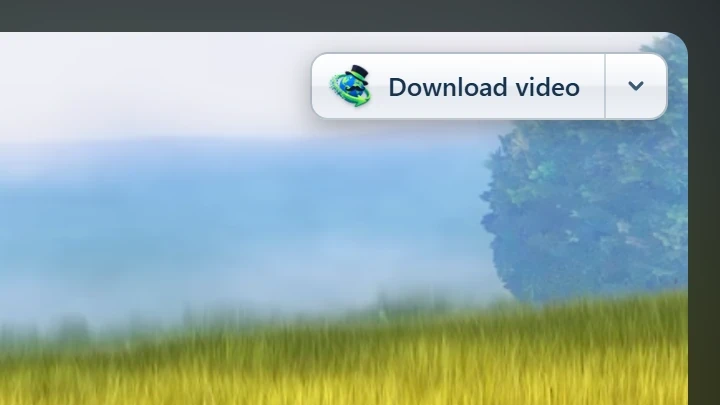
Point at a video on a web page and a small Download video button appears at its edge. Click it and GDM's Download video from a page window opens and looks up the qualities it can download. It takes the video you clicked: its own file when it plays one, or the stream the player loaded (HLS or DASH), else the page. When the button can't tell which one you mean, the toolbar button's Media on this page lists them all. Embedded players work too, and your sign-in for the site, the page that embeds the player and your browser's User-Agent go with it, so videos for members, or that play only on the site that embeds them, can be downloaded. Sound players get the button too.
Tombol ini tidak mengganggu: hanya muncul saat Anda mengarahkan ke video (atau pemutar memiliki fokus keyboard; Tab kemudian bergerak ke tombol), memudar saat penunjuk diam, dan tidak menyertakan video kecil dan loop bisu pendek (gambar animasi, latar belakang). Dalam mode layar penuh, tombol ini mengikuti video saat pemutar mengizinkannya. Pada video yang dilindungi hak cipta (DRM), tombol ini menyatakan bahwa video tidak dapat disimpan.
- Pindahkan: seret ke mana saja di sepanjang tepi video; tombol ini akan menempel ke tepi terdekat dan tetap di sana di situs tersebut.
- Its menu (the arrow next to it): Hide on this video, Never on the site (GDM remembers the site), and Button settings..., which opens GDM's Options.
- Turn it off, or see the sites it stays off: Options → General → Customize GDM Download panels in browsers → Edit....

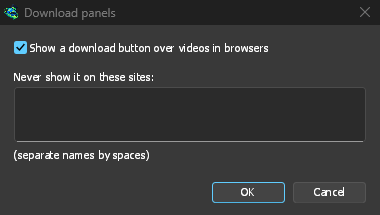
Tombol ini mengikuti integrasi lainnya: tidak akan muncul jika Gunakan integrasi browser tingkat lanjut dimatikan atau browser tidak dicentang.
Tombol untuk memaksa atau mencegah pengambilan
Hold Alt while clicking a link to let the browser download it instead of GDM. In Firefox, Alt+click saves a link only when its browser.altClickSave setting is on (in about:config); otherwise right-click the link and choose Save Link As..., which the browser keeps. Options → General → Keys... says so, and holds Also take files the browser would open.
Untuk menyimpan unduhan situs di browser secara permanen, gunakan Jangan pernah mengambil unduhan dari tombol bilah alat, atau tambahkan situs ke Jangan mulai mengunduh secara otomatis dari situs berikut. Untuk menyimpan jenis file di browser, hapus dari daftar jenis file.
When GDM isn't running
You don't need to start GDM first. When the browser hands over a download and GDM isn't running, the helper starts it and passes the download on.
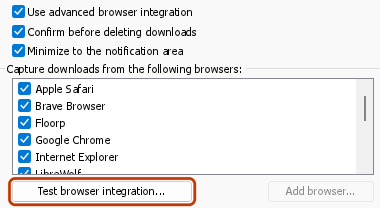
If GDM can't be reached at all (it was uninstalled, or the helper isn't registered), the download stays with the browser, so nothing is lost, and the toolbar button shows a red !. See The browser and GDM aren't connected, or run Options → General → Test browser integration....

Langkah selanjutnya
- Tutorial: menangkap unduhan dari browser Anda →
- Change which file types GDM takes →
- Jika browser tidak menyerahkan unduhan →
Gratis, sumber terbuka, tanpa iklan, tanpa masa uji coba.
Download GolinksPRO Download Manager