

Pertama, lihat apa yang terjadi
Setiap unduhan menyimpan log peristiwa terbarunya: percobaan ulang, pengalihan, jawaban dan galat dari server.
- Arahkan kursor ke Status unduhan dalam daftar untuk melihatnya.
- Atau buka jendela progresnya (klik dua kali unduhan yang belum selesai). Tabel koneksi menunjukkan apa yang sedang dilakukan setiap koneksi, dan Mencoba lagi dengan alasannya saat salah satu gagal.
- Properti File (Alt+Enter) menunjukkan Percobaan terakhir dan Hasilnya.
Unduhan menunjukkan Galat
- Baca alasannya (arahkan kursor ke Status).
- Pilih unduhan dan klik Lanjutkan. Banyak galat terjadi karena server atau koneksi sedang mengalami masalah sesaat.
- Jika tautan telah kedaluwarsa (umum untuk tautan dari situs yang Anda masuki, atau tautan dengan batas waktu di dalamnya), dapatkan yang baru: klik kanan → Segarkan alamat unduhan. Lihat Melanjutkan unduhan yang rusak.
- If it says the file changed on the server, the file isn't the one GDM started with. Right-click → Redownload to start again from the beginning.
- Jika muncul tulisan Google Drive tidak akan memberikan file ini sekarang, berarti batas unduhan Drive untuk file tersebut sudah tercapai. Lihat Tautan Google Drive.
Unduhan dimulai ulang alih-alih melanjutkan
- Look at Resume capability in the progress window. No means the server can't send a file in parts, so GDM can't continue it later.
- Beberapa server melaporkan tanggal baru untuk file yang sama setiap saat. Centang Opsi → Unduhan → Abaikan perubahan waktu modifikasi file saat melanjutkan unduhan.
Unduhan lambat
- Pastikan Pembatas Kecepatan mati: Unduhan → Pembatas Kecepatan → Matikan. Juga lihat Unduhan → Pembatas Kecepatan → Pengaturan... → Batasi semua unduhan bersama-sama hingga, yang berlaku bahkan saat pembatas mati.
- Periksa tab Pembatas Kecepatan unduhan itu sendiri di jendela progresnya.
- Check Options → Connection. A low Default max. conn. number, or an exception for the server, means fewer connections. Rows marked (auto) are servers that refused more connections; GDM can't do more there.
- Periksa Batas unduhan di Penjadwal. Ketika batas tercapai, unduhan menunggu dengan Menunggu: batas unduhan tercapai (Penjadwal).
The browser doesn't send downloads to GDM
- Was GDM installed with the setup, with Set up browser integration ticked? A portable copy can't take browser downloads. Run the setup again to add it.
- Is the extension loaded and turned on? Look for GolinksPRO Download Manager on the browser's extensions page. In Firefox, install it from addons.mozilla.org: a temporary add-on is gone after a restart. See Browser integration.
- Apakah Opsi → Umum → Gunakan integrasi browser tingkat lanjut aktif, dan browser Anda dicentang di bawah Tangkap unduhan dari browser berikut?
- Is the file's type in Options → File types? Only listed types are taken automatically. Download with GolinksPRO Download Manager on the right-click menu takes any link.
- Apakah situs tersebut ada di Jangan mulai mengunduh secara otomatis dari situs berikut?
When none of this helps, the browser keeps the download, so nothing is lost. The extension's toolbar button says why it couldn't reach GDM; see The browser and GDM aren't connected.
Penjadwal tidak memulai antrean
- GDM must be running at that time. Closing the window is fine (it stays in the tray); Tasks → Exit is not.
- Apakah Anda mengklik Terapkan setelah mengatur waktu?
- Setiap hari hanya berjalan pada hari-hari yang dicentang. Sekali pada hanya berjalan pada tanggal tersebut.
- Komputer yang dalam mode tidur tidak akan menjalankan apa pun sampai bangun, kecuali antrean memiliki opsi Bangunkan komputer untuk menjalankan antrean ini dicentang (di Windows, ini memerlukan Izinkan pengatur waktu bangun dalam rencana daya; Penjadwal akan memberi tahu jika mati). Lihat Membangunkan komputer untuk menjalankan antrean.
Video tidak bisa diunduh
Lihat Jika video tidak bisa diunduh.
Tautan magnet membutuhkan waktu lama
A magnet link has to get the torrent's file list from other peers first. That can take a minute or two, and longer for torrents with few peers. If nobody answers in about three minutes, GDM gives up; try again later, or use the .torrent file if the site offers one.
GDM uses a lot of memory
Task Manager menampilkan beberapa angka, dan artinya berbeda-beda:
- Memory (on the Processes tab) is what GDM holds for itself alone, its private working set. With the window open and nothing downloading, that is about 70 MB.
- Working set (Details tab, add the column) adds memory shared with other programs. GDM draws its windows with the graphics card, so the graphics driver's memory counts here too, about 120 MB in all.
- Commit size is memory GDM has reserved, whether in use or not.
Closed to the notification area, GDM gives its memory back to Windows: Memory drops to under 10 MB within seconds and stays low while it waits. Downloads, queues and the scheduler go on as before. The list of every language (View → Language) loads fonts for every script while it's open; GDM lets them go when it closes.
Teks terlalu kecil atau buram
GDM keeps Internet Download Manager's compact sizes. On a large or high-resolution screen, choose View → Interface size (125 %, 150 %, 175 % or 200 %), or press Ctrl + and Ctrl − in any GDM window, as in a browser; Ctrl 0 goes back to 100 %. Every window follows at once, and GDM starts at that size next time. It comes on top of Windows' own display scale (Settings → System → Display → Scale).
Jendela yang lebih besar dari layar pada ukuran tersebut (Opsi pada 200 % di layar 1366 × 768) akan terbuka sebesar yang diizinkan layar, dan sisanya akan menggulir: dengan bilah gulir, roda mouse, atau Tab ke kontrol berikutnya.
GDM tells Windows it draws for each monitor's own scale, so Windows never stretches its windows into blur, and it draws Windows' fonts grid-fitted to whole pixels. If the text still looks blurred, tell us your screen's resolution and Windows' display scale when you report it.
Jendela macet atau tampilannya bermasalah
On Windows, GDM draws its windows with Direct3D 12; on Linux and macOS, with OpenGL, or with Vulkan (Linux) or Metal (macOS) when you choose them. A graphics driver can still misbehave: a window that holds still for seconds, flickers, or shows wrong colours or blocks. Try the other one: choose View → Draw with → OpenGL (or Direct3D, Vulkan, Metal), then quit GDM (Tasks → Exit) and start it again. Choosing the first one goes back the same way.

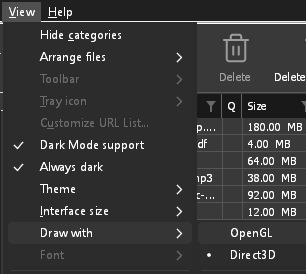
- If Direct3D, Vulkan or Metal can't start on your computer (no driver for it, some virtual machines), or its first window doesn't show within 10 seconds of its own (the time GDM spends loading your list and its icons doesn't count, however slow the computer is just after it starts), GDM draws with OpenGL, and View → Draw with says so and why. Choosing it again tries it again at the next start.
- Di Linux, Vulkan memerlukan driver Vulkan untuk kartu grafis Anda: driver Mesa (
mesa-vulkan-driversdi Ubuntu dan Debian,vulkan-radeonatauvulkan-inteldi Arch) untuk AMD dan Intel, serta driver NVIDIA sendiri untuk NVIDIA. - If neither can start, GDM draws with a software renderer (Microsoft's on Windows, Mesa's on Linux), so the window still opens (Remote Desktop, a virtual machine without a graphics driver). It works, but keeps the processor busier.
- If the graphics card is reset while GDM runs (a driver update), GDM starts again by itself. Lost twice in 10 minutes, it goes back to OpenGL, and View → Draw with says why.
- Memperbarui driver grafis dari situs pembuat kartu (Intel, AMD atau NVIDIA) memperbaiki banyak masalah ini.
- A freeze whose report shows the window thread inside the graphics driver as it shows a frame (
ig4icd64.dllorig9icd64.dllfor Intel,nvoglv64.dllfor NVIDIA,atio6axx.dllfor AMD, underopengl32.dll) is the driver's OpenGL stuck, not GDM: on Windows, choose View → Draw with → Direct3D (the default) and restart GDM, and update the graphics driver. If Draw with says Direct3D didn't start there, the line under it says why. - A freeze or crash report says which one was drawing, on which graphics card and driver, and why that one (chosen, the default, or the other one failing), on its
Drawing with:line near the top: include it when you report a problem. A freeze report also says whether GDM was busy, waiting, or hardly ran at all (a computer too busy to run it); see Crash reports.
The setup or GDM won't start
- Jika Windows mengatakan Windows melindungi PC Anda, klik Info lebih lanjut, periksa bahwa file tersebut
MisterDownloadManager-<version>-setup.exedari halaman Rilis, lalu klik Tetap jalankan. - GDM runs only once. Starting it again brings the running copy's window to the front. If nothing appears, look for GDM's icon in the notification area.
- Linux, from the AppImage or the tar.gz: if the system lacks a library GDM's window needs (such as
libxkbcommon-x11), GDM names it on the terminal and in a message box, with the command that installs it (sudo apt install libxkbcommon-x11-0, or your distribution's). The .deb and .rpm bring these libraries themselves. In a Wayland session GDM opens its window on Wayland instead. - Linux, the first start is slow: GDM looks up the system's fonts for every script once, all together, while it starts (fontconfig); a first start on a busy computer can take a few seconds more. Install your distribution's Noto fonts if some scripts or symbols show as boxes.
My antivirus or VirusTotal flags GDM
Beberapa program antivirus menandai penginstal baru hanya karena jarang melihatnya, dan mesin pembelajaran mesin paling sering melakukannya. Di VirusTotal, beberapa mesin kecil yang menandai pengaturan baru sementara yang besar tetap bersih biasanya adalah positif palsu. Kami melaporkan ini kepada vendor saat kami melihatnya.
Untuk memeriksa bahwa salinan Anda adalah yang asli:
- Download GDM only from the website or GitHub Releases.
- Dapatkan SHA-256 file Anda. Di Windows, jalankan
certutil -hashfile "MisterDownloadManager-0.5.0-setup.exe" SHA256; di Linux,sha256sumdan nama file. - Bandingkan dengan baris file yang sama di
SHA256SUMS.txtrilis tersebut.
Jika cocok, itu adalah file yang kami publikasikan. Setiap rilis dibuat di GitHub dari kode sumber publik, sehingga siapa pun dapat membaca apa saja yang ada di dalamnya.
If your antivirus quarantined GDM, restore it and add an exception for its folder. If it flags something other than the setup or GDM's own programs, or a copy from anywhere else, don't run it, and please tell us.
Unduhan HTTPS gagal dengan "tidak ada sertifikat" (Linux)
A minimal Linux system (often with the AppImage, the tar.gz or a build from source) may have no CA certificates, which GDM needs to check a secure server. Plain http:// and ftp:// downloads still work; each https:// or ftps:// one stops at once saying the computer has no certificates to check the server with. Install the ca-certificates package (sudo apt install ca-certificates, sudo dnf install ca-certificates), then resume the download. The .deb and .rpm bring it.
Lokasi data Anda
- Versi terinstal atau file zip biasa:
%APPDATA%\misterdownloadmanager. Daftar dan pengaturan tersimpan didownloads.json. - Versi portabel: folder
datadi sebelahmisterdownloadmanager.exe. - Linux:
~/.local/share/misterdownloadmanager; Mac:~/Library/Application Support/misterdownloadmanager. - Kata sandi (Login Situs, proksi, akun debrid) ada di rantai kunci sistem, bukan di
downloads.json; lihat Opsi → Login Situs.
To back up your list, quit GDM (Tasks → Exit) and copy downloads.json.
Pembaruan
Help → Check for updates... tells you whether a newer version is out, and what is new in it. Check for updates at every start in that window lets GDM look by itself: a few seconds after it starts, and once a day while it stays open. When there's a new version, its window opens in front.
When there is one, Update now downloads it, checks it, puts it in place and restarts GDM; your list, settings and downloads stay as they are:
| Anda menginstal | Apa yang dilakukan Perbarui sekarang |
|---|---|
| Windows, pemasangan | Menjalankan installer baru tanpa menampilkan jendelanya. Instalasi untuk semua pengguna meminta izin administrator. |
| Windows, zip portabel atau biasa | Mengganti program di foldernya (folder data salinan portabel tetap dipertahankan). |
| Mac | Mengganti aplikasi di folder Applications. |
| Linux, AppImage atau .tar.gz | Mengganti AppImage, atau program di foldernya. |
| Linux, .deb atau .rpm | Membuka paket yang sudah diperiksa di penginstal paket sistem, yang akan meminta kata sandi Anda. |
| Linux, paket manajer paket lain (pacman, ...) | Tidak ada: jendela akan memberi tahu, dan pembaruan sistem Anda akan membawa versi baru. |
GDM installs an update only when the release's list of checksums is signed by GDM's release key and the file matches it; anything else is refused, and Download opens the Releases page instead. Updating this way starts with version 0.2.1: earlier versions open the Releases page.
AppImage juga dapat diperbarui dengan alat AppImage (AppImageLauncher, Gear Lever, AppImageUpdate): AppImage menyimpan alamat pembaruannya, dan setiap rilis memiliki file .AppImage.zsync, sehingga alat tersebut hanya mengunduh bagian yang berubah. Fitur ini tersedia mulai AppImage untuk versi setelah 0.2.4.
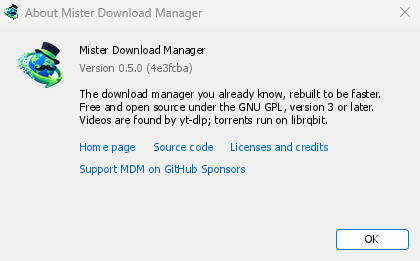
Help → About GolinksPRO Download Manager shows the version you have.
Melaporkan masalah
Choose Help → Report a problem. It opens the bug report form on GitHub with your GDM version, your system and its version, how GDM was installed and its interface language already filled in. Describe what happened, what you expected and the steps that make it happen. For a download, include the address if you can share it, and the reason shown under Status.
Anda juga dapat membuka formulir sendiri; formulir itu meminta detail yang sama.
Langkah selanjutnya
Gratis, sumber terbuka, tanpa iklan, tanpa masa uji coba.
Download GolinksPRO Download Manager