

Najpierw sprawdź, co się stało
Każde pobieranie przechowuje dziennik swoich ostatnich zdarzeń: ponownych prób, przekierowań, odpowiedzi serwera i błędów.
- Najedź kursorem na Stan pobierania na liście, aby je zobaczyć.
- Lub otwórz okno postępu (kliknij dwukrotnie niedokończone pobieranie). Tabela połączeń pokazuje, co robi każde połączenie, a Ponawianie z przyczyną, gdy jedno z nich zawiedzie.
- Właściwości pliku (Alt+Enter) pokazują Ostatnia próba i jej Wynik.
Pobieranie zgłasza błąd
- Przeczytaj przyczynę (najedź kursorem na Stan).
- Wybierz pobieranie i kliknij Wznów. Wiele błędów to chwilowe problemy serwera lub połączenia.
- Jeśli link wygasł (częste w przypadku linków ze stron, na które się logujesz, lub linków z limitem czasu), uzyskaj nowy: kliknij prawym przyciskiem myszy → Odśwież adres pobierania. Zobacz Wznów przerwane pobieranie.
- If it says the file changed on the server, the file isn't the one GDM started with. Right-click → Redownload to start again from the beginning.
- Jeśli widzisz komunikat Google Drive nie udostępni teraz tego pliku, oznacza to, że osiągnięto limit pobierania tego pliku z Dysku. Zobacz Linki do Google Drive.
Pobieranie zaczyna się od nowa zamiast wznawiać
- Look at Resume capability in the progress window. No means the server can't send a file in parts, so GDM can't continue it later.
- Niektóre serwery zgłaszają nową datę dla tego samego pliku za każdym razem. Zaznacz Opcje → Pobrane pliki → Ignoruj zmiany czasu modyfikacji pliku podczas wznawiania pobierania.
Pobieranie jest wolne
- Sprawdź, czy Ogranicznik prędkości jest wyłączony: Pobrane pliki → Ogranicznik prędkości → Wyłącz. Sprawdź również Pobrane pliki → Ogranicznik prędkości → Ustawienia... → Ogranicz wszystkie pobierania razem do, co obowiązuje nawet przy wyłączonym ograniczniku.
- Sprawdź własną zakładkę Ogranicznik prędkości pobierania w jego oknie postępu.
- Check Options → Connection. A low Default max. conn. number, or an exception for the server, means fewer connections. Rows marked (auto) are servers that refused more connections; GDM can't do more there.
- Sprawdź Limity pobierania w Harmonogramie. Po osiągnięciu limitu pobieranie czeka z komunikatem Oczekiwanie: osiągnięto limit pobierania (Harmonogram).
The browser doesn't send downloads to GDM
- Was GDM installed with the setup, with Set up browser integration ticked? A portable copy can't take browser downloads. Run the setup again to add it.
- Is the extension loaded and turned on? Look for GolinksPRO Download Manager on the browser's extensions page. In Firefox, install it from addons.mozilla.org: a temporary add-on is gone after a restart. See Browser integration.
- Czy Opcje → Ogólne → Użyj zaawansowanej integracji z przeglądarką jest włączone, a Twoja przeglądarka zaznaczona pod Przechwytuj pobierane pliki z następujących przeglądarek?
- Is the file's type in Options → File types? Only listed types are taken automatically. Download with GolinksPRO Download Manager on the right-click menu takes any link.
- Czy strona znajduje się w Nie rozpoczynaj automatycznego pobierania z następujących stron?
When none of this helps, the browser keeps the download, so nothing is lost. The extension's toolbar button says why it couldn't reach GDM; see The browser and GDM aren't connected.
Harmonogram nie uruchomił kolejki
- GDM must be running at that time. Closing the window is fine (it stays in the tray); Tasks → Exit is not.
- Czy kliknąłeś Zastosuj po ustawieniu czasu?
- Opcja Codziennie uruchamia zadania tylko w zaznaczone dni. Opcja Raz o uruchamia je tylko w wybranym dniu.
- Uśpiony komputer niczego nie uruchamia, dopóki się nie wybudzi, chyba że w kolejce zaznaczono opcję Wybudź komputer, aby uruchomić tę kolejkę (w systemie Windows wymaga to włączenia opcji Zezwalaj na liczniki czasu budzenia w planie zasilania; Harmonogram informuje, kiedy jest wyłączona). Zobacz Wybudź komputer, aby uruchomić kolejkę.
Nie można pobrać filmu
Zobacz Jeśli nie można pobrać filmu.
Link magnet długo się ładuje
A magnet link has to get the torrent's file list from other peers first. That can take a minute or two, and longer for torrents with few peers. If nobody answers in about three minutes, GDM gives up; try again later, or use the .torrent file if the site offers one.
GDM uses a lot of memory
Menedżer zadań pokazuje kilka wartości, które oznaczają różne rzeczy:
- Memory (on the Processes tab) is what GDM holds for itself alone, its private working set. With the window open and nothing downloading, that is about 70 MB.
- Working set (Details tab, add the column) adds memory shared with other programs. GDM draws its windows with the graphics card, so the graphics driver's memory counts here too, about 120 MB in all.
- Commit size is memory GDM has reserved, whether in use or not.
Closed to the notification area, GDM gives its memory back to Windows: Memory drops to under 10 MB within seconds and stays low while it waits. Downloads, queues and the scheduler go on as before. The list of every language (View → Language) loads fonts for every script while it's open; GDM lets them go when it closes.
Tekst jest za mały lub rozmyty
GDM keeps Internet Download Manager's compact sizes. On a large or high-resolution screen, choose View → Interface size (125 %, 150 %, 175 % or 200 %), or press Ctrl + and Ctrl − in any GDM window, as in a browser; Ctrl 0 goes back to 100 %. Every window follows at once, and GDM starts at that size next time. It comes on top of Windows' own display scale (Settings → System → Display → Scale).
Okno większe niż ekran w danym rozmiarze (Opcje przy 200% na ekranie 1366 × 768) otwiera się tak duże, jak pozwala na to ekran, a reszta przewija się: za pomocą pasków przewijania, kółka myszy lub klawisza Tab do następnego elementu sterującego.
GDM tells Windows it draws for each monitor's own scale, so Windows never stretches its windows into blur, and it draws Windows' fonts grid-fitted to whole pixels. If the text still looks blurred, tell us your screen's resolution and Windows' display scale when you report it.
Okno zawiesza się lub wyświetla nieprawidłowo
On Windows, GDM draws its windows with Direct3D 12; on Linux and macOS, with OpenGL, or with Vulkan (Linux) or Metal (macOS) when you choose them. A graphics driver can still misbehave: a window that holds still for seconds, flickers, or shows wrong colours or blocks. Try the other one: choose View → Draw with → OpenGL (or Direct3D, Vulkan, Metal), then quit GDM (Tasks → Exit) and start it again. Choosing the first one goes back the same way.

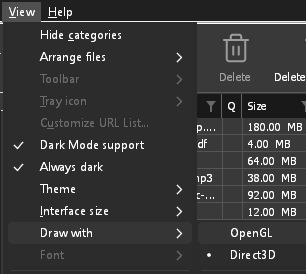
- If Direct3D, Vulkan or Metal can't start on your computer (no driver for it, some virtual machines), or its first window doesn't show within 10 seconds of its own (the time GDM spends loading your list and its icons doesn't count, however slow the computer is just after it starts), GDM draws with OpenGL, and View → Draw with says so and why. Choosing it again tries it again at the next start.
- W systemie Linux Vulkan wymaga sterownika Vulkan do karty graficznej: sterownika Mesa (
mesa-vulkan-driversw Ubuntu i Debianie,vulkan-radeonlubvulkan-intelw Arch) dla kart AMD i Intel albo własnego sterownika NVIDIA dla kart NVIDIA. - If neither can start, GDM draws with a software renderer (Microsoft's on Windows, Mesa's on Linux), so the window still opens (Remote Desktop, a virtual machine without a graphics driver). It works, but keeps the processor busier.
- If the graphics card is reset while GDM runs (a driver update), GDM starts again by itself. Lost twice in 10 minutes, it goes back to OpenGL, and View → Draw with says why.
- Aktualizacja sterownika graficznego ze strony producenta karty (Intel, AMD lub NVIDIA) rozwiązuje wiele z tych problemów.
- A freeze whose report shows the window thread inside the graphics driver as it shows a frame (
ig4icd64.dllorig9icd64.dllfor Intel,nvoglv64.dllfor NVIDIA,atio6axx.dllfor AMD, underopengl32.dll) is the driver's OpenGL stuck, not GDM: on Windows, choose View → Draw with → Direct3D (the default) and restart GDM, and update the graphics driver. If Draw with says Direct3D didn't start there, the line under it says why. - A freeze or crash report says which one was drawing, on which graphics card and driver, and why that one (chosen, the default, or the other one failing), on its
Drawing with:line near the top: include it when you report a problem. A freeze report also says whether GDM was busy, waiting, or hardly ran at all (a computer too busy to run it); see Crash reports.
The setup or GDM won't start
- Jeśli system Windows wyświetli komunikat System Windows chronił Twój komputer, kliknij Więcej informacji, sprawdź, czy plik pochodzi
MisterDownloadManager-<version>-setup.exeze strony Wydania, a następnie kliknij Uruchom mimo to. - GDM runs only once. Starting it again brings the running copy's window to the front. If nothing appears, look for GDM's icon in the notification area.
- Linux, from the AppImage or the tar.gz: if the system lacks a library GDM's window needs (such as
libxkbcommon-x11), GDM names it on the terminal and in a message box, with the command that installs it (sudo apt install libxkbcommon-x11-0, or your distribution's). The .deb and .rpm bring these libraries themselves. In a Wayland session GDM opens its window on Wayland instead. - Linux, the first start is slow: GDM looks up the system's fonts for every script once, all together, while it starts (fontconfig); a first start on a busy computer can take a few seconds more. Install your distribution's Noto fonts if some scripts or symbols show as boxes.
My antivirus or VirusTotal flags GDM
Niektóre programy antywirusowe oznaczają nowe instalatory tylko dlatego, że rzadko je widziały, a silniki uczenia maszynowego robią to najczęściej. Na VirusTotal, jeśli kilka małych silników oznacza nową instalację, podczas gdy duże pozostają czyste, jest to zazwyczaj fałszywy alarm. Zgłaszamy to dostawcom, gdy tylko to zauważymy.
Aby sprawdzić, czy Twoja kopia jest oryginalna:
- Download GDM only from the website or GitHub Releases.
- Uzyskaj SHA-256 swojego pliku. W systemie Windows uruchom
certutil -hashfile "MisterDownloadManager-0.5.0-setup.exe" SHA256; w systemie Linuxsha256sumi nazwę pliku. - Porównaj go z wierszem tego samego pliku w
SHA256SUMS.txtdanego wydania.
Jeśli się zgadzają, jest to plik, który opublikowaliśmy. Każde wydanie jest budowane na GitHubie z publicznego kodu źródłowego, więc każdy może sprawdzić, co się w nim znalazło.
If your antivirus quarantined GDM, restore it and add an exception for its folder. If it flags something other than the setup or GDM's own programs, or a copy from anywhere else, don't run it, and please tell us.
Pobieranie HTTPS kończy się błędem „brak certyfikatów” (Linux)
A minimal Linux system (often with the AppImage, the tar.gz or a build from source) may have no CA certificates, which GDM needs to check a secure server. Plain http:// and ftp:// downloads still work; each https:// or ftps:// one stops at once saying the computer has no certificates to check the server with. Install the ca-certificates package (sudo apt install ca-certificates, sudo dnf install ca-certificates), then resume the download. The .deb and .rpm bring it.
Gdzie znajdują się Twoje dane
- Zainstalowany lub zwykły zip:
%APPDATA%\misterdownloadmanager. Lista i ustawienia znajdują się wdownloads.json. - Przenośny: folder
dataobokmisterdownloadmanager.exe. - Linux:
~/.local/share/misterdownloadmanager; Mac:~/Library/Application Support/misterdownloadmanager. - Hasła (Loginy do witryn, proxy, konta debrid) znajdują się w systemowym pęku kluczy, a nie w
downloads.json; zobacz Opcje → Loginy do witryn.
To back up your list, quit GDM (Tasks → Exit) and copy downloads.json.
Aktualizacje
Help → Check for updates... tells you whether a newer version is out, and what is new in it. Check for updates at every start in that window lets GDM look by itself: a few seconds after it starts, and once a day while it stays open. When there's a new version, its window opens in front.
When there is one, Update now downloads it, checks it, puts it in place and restarts GDM; your list, settings and downloads stay as they are:
| Sposób instalacji | Co robi Aktualizuj teraz |
|---|---|
| Windows, instalator | Uruchamia nowy instalator bez wyświetlania jego okien. Instalacja dla wszystkich użytkowników wymaga zgody administratora. |
| Windows, wersja przenośna lub zwykły plik ZIP | Zastępuje programy w ich folderze (folder data kopii przenośnej jest zachowywany). |
| Mac | Zastępuje aplikację w folderze Aplikacje. |
| Linux, AppImage lub .tar.gz | Zastępuje AppImage lub programy w ich folderze. |
| Linux, plik .deb lub .rpm | Otwiera sprawdzony pakiet w instalatorze pakietów Twojego systemu, który prosi o hasło. |
| Linux, pakiet innego menedżera pakietów (pacman, ...) | Nic: okno to wskazuje, a aktualizacje systemu przynoszą nową wersję. |
GDM installs an update only when the release's list of checksums is signed by GDM's release key and the file matches it; anything else is refused, and Download opens the Releases page instead. Updating this way starts with version 0.2.1: earlier versions open the Releases page.
AppImage można też aktualizować za pomocą narzędzi AppImage (AppImageLauncher, Gear Lever, AppImageUpdate): zawiera on adresy swoich aktualizacji, a każde wydanie ma swój plik .AppImage.zsync, więc narzędzia te pobierają tylko zmienione części. Dotyczy to AppImage w wersji późniejszej niż 0.2.4.
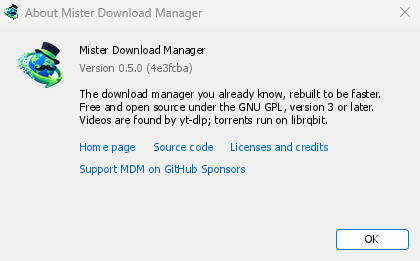
Help → About GolinksPRO Download Manager shows the version you have.
Zgłaszanie problemu
Choose Help → Report a problem. It opens the bug report form on GitHub with your GDM version, your system and its version, how GDM was installed and its interface language already filled in. Describe what happened, what you expected and the steps that make it happen. For a download, include the address if you can share it, and the reason shown under Status.
Możesz również samodzielnie otworzyć formularz; prosi on o te same szczegóły.
Następne kroki
Darmowy, open source, bez reklam, bez wersji próbnej.
Download GolinksPRO Download Manager