

Primero, comprueba qué ha pasado
Cada descarga guarda un registro de sus eventos recientes: reintentos, redirecciones, respuestas y errores del servidor.
- Coloca el cursor sobre el Estado de la descarga en la lista para verlos.
- O abre su ventana de progreso (haz doble clic en una descarga sin terminar). La tabla de conexiones muestra qué está haciendo cada conexión y el motivo de Reintentando cuando falla alguna.
- Propiedades del archivo (Alt+Enter) muestra Último intento y su Resultado.
Una descarga muestra Error
- Lee el motivo (coloca el cursor sobre Estado).
- Selecciona la descarga y haz clic en Reanudar. Muchos errores se deben a problemas puntuales del servidor o de la conexión.
- Si el enlace ha caducado (algo habitual en enlaces de sitios en los que hay que iniciar sesión o que tienen un límite de tiempo), consigue uno nuevo: haz clic con el botón derecho → Actualizar dirección de descarga. Consulta Reanudar una descarga interrumpida.
- If it says the file changed on the server, the file isn't the one GDM started with. Right-click → Redownload to start again from the beginning.
- Si aparece Google Drive no proporcionará este archivo ahora, se ha alcanzado el límite de descargas de Drive para ese archivo. Consulta Enlaces de Google Drive.
Una descarga se reinicia en lugar de reanudarse
- Look at Resume capability in the progress window. No means the server can't send a file in parts, so GDM can't continue it later.
- Algunos servidores indican una fecha nueva para el mismo archivo cada vez. Activa Opciones → Descargas → Ignorar cambios en la hora de modificación del archivo al reanudar una descarga.
Las descargas son lentas
- Comprueba que el Limitador de velocidad esté desactivado: Descargas → Limitador de velocidad → Desactivar. Comprueba también Descargas → Limitador de velocidad → Configuración... → Limitar todas las descargas juntas a, que se aplica incluso cuando el limitador está desactivado.
- Comprueba la pestaña Limitador de velocidad de la descarga en su ventana de progreso.
- Check Options → Connection. A low Default max. conn. number, or an exception for the server, means fewer connections. Rows marked (auto) are servers that refused more connections; GDM can't do more there.
- Comprueba los Límites de descarga en el Programador. Al alcanzar el límite, las descargas quedan en espera con el estado Esperando: se ha alcanzado el límite de descarga (Programador).
The browser doesn't send downloads to GDM
- Was GDM installed with the setup, with Set up browser integration ticked? A portable copy can't take browser downloads. Run the setup again to add it.
- Is the extension loaded and turned on? Look for GolinksPRO Download Manager on the browser's extensions page. In Firefox, install it from addons.mozilla.org: a temporary add-on is gone after a restart. See Browser integration.
- ¿Está activada la opción Opciones → General → Usar integración avanzada del navegador y está marcado tu navegador en Capturar descargas de los siguientes navegadores?
- Is the file's type in Options → File types? Only listed types are taken automatically. Download with GolinksPRO Download Manager on the right-click menu takes any link.
- ¿Está incluido el sitio en No iniciar descargas automáticamente desde los siguientes sitios?
When none of this helps, the browser keeps the download, so nothing is lost. The extension's toolbar button says why it couldn't reach GDM; see The browser and GDM aren't connected.
El Programador no inició la cola
- GDM must be running at that time. Closing the window is fine (it stays in the tray); Tasks → Exit is not.
- ¿Has hecho clic en Aplicar después de establecer la hora?
- La opción Diario solo se inicia los días marcados. La opción Una vez a las solo se inicia en esa fecha.
- Un equipo en reposo no ejecuta nada hasta que se activa, a menos que la cola tenga marcada la opción Reactivar el equipo para ejecutar esta cola (en Windows, necesita Permitir temporizadores de reactivación en el plan de energía; el Programador indica cuándo está desactivado). Consulta Reactivar el equipo para ejecutar una cola.
Un vídeo no se descarga
Consulta Si un vídeo no se descarga.
Un enlace magnet tarda mucho
A magnet link has to get the torrent's file list from other peers first. That can take a minute or two, and longer for torrents with few peers. If nobody answers in about three minutes, GDM gives up; try again later, or use the .torrent file if the site offers one.
GDM uses a lot of memory
El Administrador de tareas muestra varias cifras, y significan cosas distintas:
- Memory (on the Processes tab) is what GDM holds for itself alone, its private working set. With the window open and nothing downloading, that is about 70 MB.
- Working set (Details tab, add the column) adds memory shared with other programs. GDM draws its windows with the graphics card, so the graphics driver's memory counts here too, about 120 MB in all.
- Commit size is memory GDM has reserved, whether in use or not.
Closed to the notification area, GDM gives its memory back to Windows: Memory drops to under 10 MB within seconds and stays low while it waits. Downloads, queues and the scheduler go on as before. The list of every language (View → Language) loads fonts for every script while it's open; GDM lets them go when it closes.
El texto es demasiado pequeño o borroso
GDM keeps Internet Download Manager's compact sizes. On a large or high-resolution screen, choose View → Interface size (125 %, 150 %, 175 % or 200 %), or press Ctrl + and Ctrl − in any GDM window, as in a browser; Ctrl 0 goes back to 100 %. Every window follows at once, and GDM starts at that size next time. It comes on top of Windows' own display scale (Settings → System → Display → Scale).
Una ventana más grande que la pantalla a ese tamaño (Opciones al 200 % en una pantalla de 1366 × 768) se abre tan grande como la pantalla lo permite, y el resto se desplaza: con las barras de desplazamiento, la rueda del ratón o Tab al siguiente control.
GDM tells Windows it draws for each monitor's own scale, so Windows never stretches its windows into blur, and it draws Windows' fonts grid-fitted to whole pixels. If the text still looks blurred, tell us your screen's resolution and Windows' display scale when you report it.
La ventana se congela o se dibuja mal
On Windows, GDM draws its windows with Direct3D 12; on Linux and macOS, with OpenGL, or with Vulkan (Linux) or Metal (macOS) when you choose them. A graphics driver can still misbehave: a window that holds still for seconds, flickers, or shows wrong colours or blocks. Try the other one: choose View → Draw with → OpenGL (or Direct3D, Vulkan, Metal), then quit GDM (Tasks → Exit) and start it again. Choosing the first one goes back the same way.

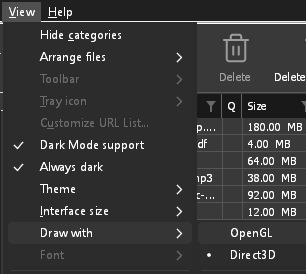
- If Direct3D, Vulkan or Metal can't start on your computer (no driver for it, some virtual machines), or its first window doesn't show within 10 seconds of its own (the time GDM spends loading your list and its icons doesn't count, however slow the computer is just after it starts), GDM draws with OpenGL, and View → Draw with says so and why. Choosing it again tries it again at the next start.
- En Linux, Vulkan necesita el controlador Vulkan de tu tarjeta gráfica: el de Mesa (
mesa-vulkan-driversen Ubuntu y Debian,vulkan-radeonovulkan-intelen Arch) para AMD e Intel, el propio controlador de NVIDIA para NVIDIA. - If neither can start, GDM draws with a software renderer (Microsoft's on Windows, Mesa's on Linux), so the window still opens (Remote Desktop, a virtual machine without a graphics driver). It works, but keeps the processor busier.
- If the graphics card is reset while GDM runs (a driver update), GDM starts again by itself. Lost twice in 10 minutes, it goes back to OpenGL, and View → Draw with says why.
- Actualizar el controlador gráfico desde el sitio del fabricante de la tarjeta (Intel, AMD o NVIDIA) soluciona muchos de estos problemas.
- A freeze whose report shows the window thread inside the graphics driver as it shows a frame (
ig4icd64.dllorig9icd64.dllfor Intel,nvoglv64.dllfor NVIDIA,atio6axx.dllfor AMD, underopengl32.dll) is the driver's OpenGL stuck, not GDM: on Windows, choose View → Draw with → Direct3D (the default) and restart GDM, and update the graphics driver. If Draw with says Direct3D didn't start there, the line under it says why. - A freeze or crash report says which one was drawing, on which graphics card and driver, and why that one (chosen, the default, or the other one failing), on its
Drawing with:line near the top: include it when you report a problem. A freeze report also says whether GDM was busy, waiting, or hardly ran at all (a computer too busy to run it); see Crash reports.
The setup or GDM won't start
- Si Windows dice Windows protegió su PC, haz clic en Más información, comprueba que el archivo es
MisterDownloadManager-<version>-setup.exede la página de Versiones y, a continuación, haz clic en Ejecutar de todos modos. - GDM runs only once. Starting it again brings the running copy's window to the front. If nothing appears, look for GDM's icon in the notification area.
- Linux, from the AppImage or the tar.gz: if the system lacks a library GDM's window needs (such as
libxkbcommon-x11), GDM names it on the terminal and in a message box, with the command that installs it (sudo apt install libxkbcommon-x11-0, or your distribution's). The .deb and .rpm bring these libraries themselves. In a Wayland session GDM opens its window on Wayland instead. - Linux, the first start is slow: GDM looks up the system's fonts for every script once, all together, while it starts (fontconfig); a first start on a busy computer can take a few seconds more. Install your distribution's Noto fonts if some scripts or symbols show as boxes.
My antivirus or VirusTotal flags GDM
Algunos antivirus marcan los instaladores nuevos simplemente porque los han visto pocas veces, y los motores de aprendizaje automático son los que más lo hacen. En VirusTotal, que un puñado de motores pequeños marquen una nueva instalación mientras los grandes no lo hacen suele ser un falso positivo. Nosotros informamos de esto a los proveedores cuando lo vemos.
Para comprobar que tu copia es la auténtica:
- Download GDM only from the website or GitHub Releases.
- Obtén el SHA-256 de tu archivo. En Windows, ejecuta
certutil -hashfile "MisterDownloadManager-0.5.0-setup.exe" SHA256; en Linux,sha256sumy el nombre del archivo. - Compáralo con la línea del mismo archivo en el
SHA256SUMS.txtde esa versión.
Si coinciden, es el archivo que publicamos. Cada versión se compila en GitHub a partir del código fuente público, así que cualquiera puede leer lo que contiene.
If your antivirus quarantined GDM, restore it and add an exception for its folder. If it flags something other than the setup or GDM's own programs, or a copy from anywhere else, don't run it, and please tell us.
Las descargas HTTPS fallan con «no hay certificados» (Linux)
A minimal Linux system (often with the AppImage, the tar.gz or a build from source) may have no CA certificates, which GDM needs to check a secure server. Plain http:// and ftp:// downloads still work; each https:// or ftps:// one stops at once saying the computer has no certificates to check the server with. Install the ca-certificates package (sudo apt install ca-certificates, sudo dnf install ca-certificates), then resume the download. The .deb and .rpm bring it.
Dónde están tus datos
- Instalado o el zip simple:
%APPDATA%\misterdownloadmanager. La lista y la configuración están endownloads.json. - Portátil: la carpeta
datajunto amisterdownloadmanager.exe. - Linux:
~/.local/share/misterdownloadmanager; un Mac:~/Library/Application Support/misterdownloadmanager. - Las contraseñas (Inicios de sesión de sitios, el proxy, cuentas de debrid) están en el llavero del sistema, no en
downloads.json; consulta Opciones → Inicios de sesión de sitios.
To back up your list, quit GDM (Tasks → Exit) and copy downloads.json.
Actualizaciones
Help → Check for updates... tells you whether a newer version is out, and what is new in it. Check for updates at every start in that window lets GDM look by itself: a few seconds after it starts, and once a day while it stays open. When there's a new version, its window opens in front.
When there is one, Update now downloads it, checks it, puts it in place and restarts GDM; your list, settings and downloads stay as they are:
| Instalación | Qué hace Actualizar ahora |
|---|---|
| Windows, el instalador | Ejecuta el nuevo instalador sin mostrar sus ventanas. Una instalación para todos los usuarios solicita permiso de administrador. |
| Windows, el zip portátil o simple | Reemplaza los programas en su carpeta (se mantiene la carpeta data de una copia portátil). |
| Mac | Reemplaza la aplicación en Aplicaciones. |
| Linux, el AppImage o el .tar.gz | Reemplaza el AppImage, o los programas en su carpeta. |
| Linux, el .deb o .rpm | Abre el paquete comprobado en el instalador de paquetes de tu sistema, que te pide tu contraseña. |
| Linux, paquete de otro gestor de paquetes (pacman, ...) | Nada: la ventana lo indica, y las actualizaciones de tu sistema traen la nueva versión. |
GDM installs an update only when the release's list of checksums is signed by GDM's release key and the file matches it; anything else is refused, and Download opens the Releases page instead. Updating this way starts with version 0.2.1: earlier versions open the Releases page.
El AppImage también se puede actualizar con herramientas de AppImage (AppImageLauncher, Gear Lever, AppImageUpdate): lleva la dirección de sus actualizaciones, y cada versión tiene su archivo .AppImage.zsync, por lo que esas herramientas solo descargan las partes que cambiaron. Esto comienza con el AppImage de la versión posterior a la 0.2.4.
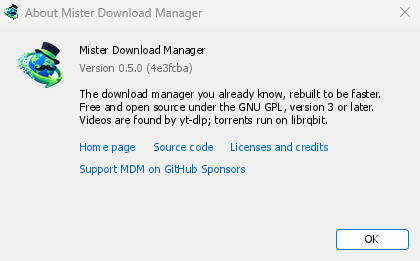
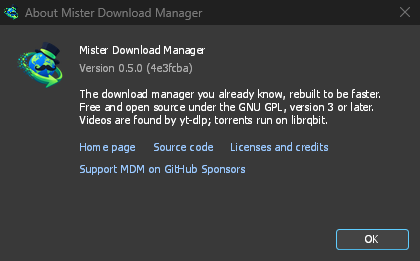
Help → About GolinksPRO Download Manager shows the version you have.
Informar de un problema
Choose Help → Report a problem. It opens the bug report form on GitHub with your GDM version, your system and its version, how GDM was installed and its interface language already filled in. Describe what happened, what you expected and the steps that make it happen. For a download, include the address if you can share it, and the reason shown under Status.
También puedes abrir el formulario tú mismo; pide los mismos datos.
Pasos siguientes
- Reanudar una descarga interrumpida →
- Integración con el navegador →
- Volver al índice de la documentación →
Gratis, código abierto, sin anuncios, sin prueba.
Download GolinksPRO Download Manager