

Zapisz wideo z YouTube, Vimeo, TikToka i wielu innych stron, w wybranej przez siebie jakości.
Kroki
- Otwórz wideo w przeglądarce i skopiuj adres strony z paska adresu.
- In GDM, click Add URL (or press Ctrl+N) and click OK. GDM sees that the address is a video's page and opens Download video from a page. (You can also open it with Tasks → Download video from a page..., paste the address and click Look up.)
- The first time, GDM needs its video helper. Click Install yt-dlp (about 23 MB). GDM downloads it from its official release and checks it before use.
- Wait while GDM looks the page up. The list of qualities appears, best first, with Audio only at the end: the sound as the site has it, then, with ffmpeg (next step), as an MP3 at its best variable bitrate or at 320, 256, 192 or 128 kbps.
- For the best qualities and MP3, GDM needs ffmpeg, which joins the picture and the sound, and makes the MP3. On Windows GDM offers to install it (about 80 MB): click Install ffmpeg if you want them. On Linux and macOS GDM uses the system's ffmpeg. Without it, you get the qualities that come with their sound.
- Wybierz jakość.
- Sprawdź ustawienia Zapisz w i Nazwa pliku. Nazwa pliku pochodzi od tytułu wideo. Możesz ją zmienić.
- Chcesz pobrać napisy? Wybierz język w polu Napisy. Napisy zostaną zapisane obok filmu lub w nim, jeśli zaznaczysz Umieść je w filmie (zobacz Napisy).
- Kliknij Pobierz teraz lub Później, aby dodać galerię do listy bez rozpoczynania pobierania.
Wideo pojawi się na liście i będzie pobierane jak każdy inny plik.
GDM lists the qualities: pick one. 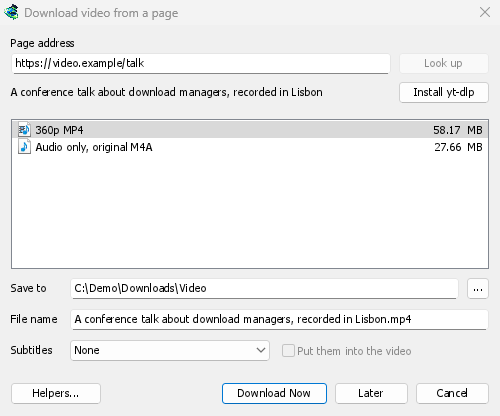

Pobiera się jak każdy inny plik. 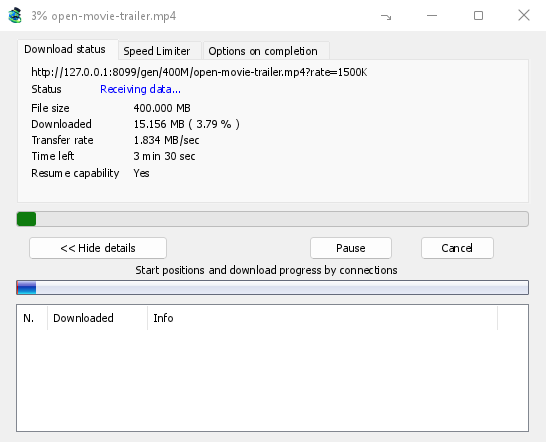
Warto wiedzieć
- Link do jednego wideo z playlisty lub miksu pobiera tylko to wideo, a nie całą listę.
- Nie można pobrać wideo chronionych DRM (większość płatnych serwisów streamingowych).
- Pobieranie może być sprzeczne z regulaminem niektórych stron; to Ty musisz to sprawdzić.
Jeśli nie możesz pobrać wideo, zobacz Pobieranie wideo.
Następne kroki
- Szczegółowe informacje o pobieraniu wideo →
- Znajdź pobieranie na długiej liście →
- Powrót do indeksu dokumentacji →
Darmowy, open source, bez reklam, bez wersji próbnej.
Download GolinksPRO Download Manager