

Salva un video da YouTube, Vimeo, TikTok e molti altri siti, nella qualità che preferisci.
Passaggi
- Apri il video nel tuo browser e copia l'indirizzo della pagina dalla barra degli indirizzi.
- In GDM, click Add URL (or press Ctrl+N) and click OK. GDM sees that the address is a video's page and opens Download video from a page. (You can also open it with Tasks → Download video from a page..., paste the address and click Look up.)
- The first time, GDM needs its video helper. Click Install yt-dlp (about 23 MB). GDM downloads it from its official release and checks it before use.
- Wait while GDM looks the page up. The list of qualities appears, best first, with Audio only at the end: the sound as the site has it, then, with ffmpeg (next step), as an MP3 at its best variable bitrate or at 320, 256, 192 or 128 kbps.
- For the best qualities and MP3, GDM needs ffmpeg, which joins the picture and the sound, and makes the MP3. On Windows GDM offers to install it (about 80 MB): click Install ffmpeg if you want them. On Linux and macOS GDM uses the system's ffmpeg. Without it, you get the qualities that come with their sound.
- Scegli una qualità.
- Controlla Salva in e Nome file. Il nome deriva dal titolo del video; cambialo se vuoi.
- Vuoi i sottotitoli? Scegli una lingua in Sottotitoli. Vengono salvati accanto al video, oppure al suo interno se selezioni Incorporali nel video (vedi Sottotitoli).
- Fai clic su Scarica ora, o su Più tardi per aggiungerlo all'elenco senza avviare il download.
Il video appare nell'elenco e viene scaricato come qualsiasi altro file.
GDM lists the qualities: pick one. 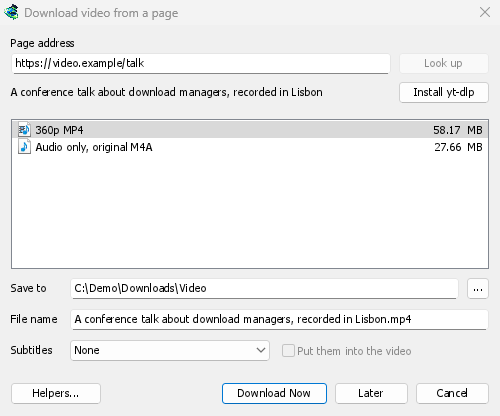

Il download avviene come per qualsiasi altro file. 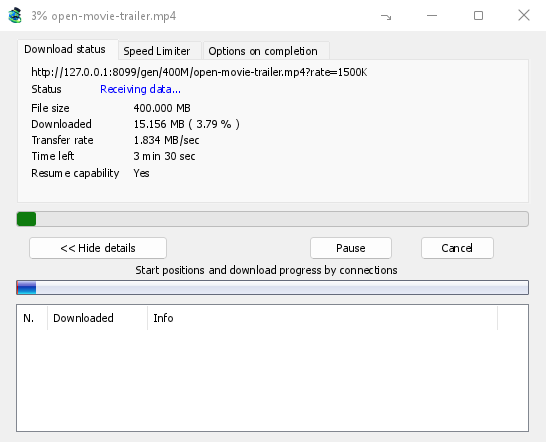
Buono a sapersi
- Un collegamento a un singolo video all'interno di una playlist o di un mix scarica solo quel video, non l'intero elenco.
- I video protetti con DRM (la maggior parte dei servizi di streaming a pagamento) non possono essere scaricati.
- Il download potrebbe essere contrario ai termini di alcuni siti; sta a te verificarlo.
Se il video non si scarica, vedi Download video.
Passi successivi
- Download video in dettaglio →
- Trovare un download in un lungo elenco →
- Torna all'indice della documentazione →
Gratuito, open source, senza pubblicità, senza periodo di prova.
Download GolinksPRO Download Manager