

Add a download from your phone, or from another computer at home, and watch it run on the
computer where GDM is: paste a link or a magnet link, send a .torrent file, see the list with
its progress, and pause, start or remove downloads. Your phone opens a small page that GDM
itself serves; nothing is installed on the phone, and no outside service is involved.
The remote control is off until you turn it on, it answers only phones and computers you paired with a code GDM shows, and it listens only on your local network (your Wi-Fi or your cable), never on an address the internet can reach.
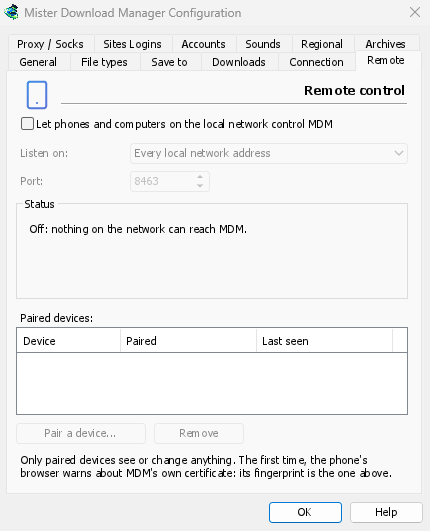
Attivalo
- Opzioni → Remoto.
- Tick Let phones and computers on the local network control GDM.
- Fai clic su OK.
La pagina mostra allora Attivo e l'indirizzo da aprire, come https://192.168.1.20:8463/.
The first time, Windows may ask whether to let GDM communicate on networks: allow it on private networks, or the phone can't reach GDM.
Associa il telefono
- Sul computer: Opzioni → Remoto → Associa un dispositivo... Mostra un codice QR, l'indirizzo e un codice di 8 cifre.
- Sul telefono, sulla stessa rete Wi-Fi: scansiona il codice QR con la fotocamera (o digita l'indirizzo).
- The browser warns that the connection's certificate isn't trusted. That is expected: GDM made its own certificate, on your computer, and no public authority knows it. To be sure the page is your GDM's, open the warning's details: the certificate's SHA-256 fingerprint is the one Options → Remote shows. Then continue to the page (Advanced → Proceed in Chrome, Show details → visit this website in Safari).
- Se hai scansionato il codice QR, il codice è già inserito; altrimenti digitalo. Dai un nome al telefono e tocca Associa. La finestra sul computer lo conferma e si chiude con Completato.
Un codice funziona una volta, per dieci minuti, e non funziona più dopo cinque tentativi errati: fai clic su Nuovo codice per averne un altro. Per tenere la pagina a portata di mano, aggiungila alla schermata iniziale del telefono (menu del browser: Aggiungi a schermata Home).
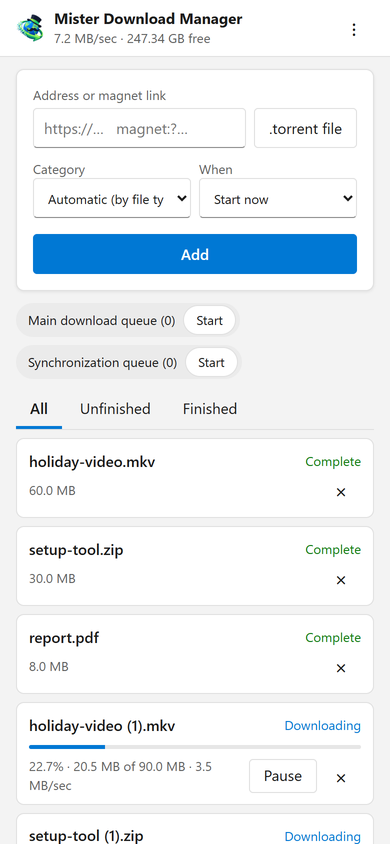
Cosa fa la pagina
- Add: a download's address or a magnet link, or a
.torrentfile from the phone. Pick a Category (or let the file's type pick it), and When: Start now, or wait in a queue. A torrent is added with all its files, once GDM has read them (a magnet link can take a moment). - L'elenco: ogni download con il suo avanzamento, velocità e dimensione, con Tutti, Non completati e Completati. Pausa e Avvia agiscono su ciascun download; × lo rimuove dall'elenco e, con Elimina anche il file, elimina il suo file dal computer.
- Le code: avvia e interrompi ciascuna.
- La barra in alto mostra la velocità totale e lo spazio libero dove vanno i tuoi download.
Downloads added from the phone are like the ones you add on the computer: they go into the category's folder, follow the queues, the Scheduler and the speed limits, and go through the network adapter you chose in Options → Proxy / Socks (and stop when it disconnects). The page shows the language your phone uses when GDM has it, and follows its light or dark mode.
I tuoi dispositivi associati
Opzioni → Remoto elenca i dispositivi associati, la data dell'associazione e l'ultimo contatto di ciascuno. Selezionane uno e fai clic su Rimuovi: viene rifiutato subito, dalla sua prossima richiesta (non serve OK). Sul telefono, nella pagina, ⋮ → Dimentica questo dispositivo fa lo stesso dal lato del telefono.
Hai perso il telefono? Rimuovilo nelle Opzioni. Per bloccare tutti contemporaneamente, deseleziona la casella: GDM smette di ascoltare in rete.
Dove ascolta
- Ascolta su: Tutti gli indirizzi della rete locale (l'impostazione predefinita) ascolta su ogni indirizzo privato del computer (
192.168.x.x,10.x.x.x,172.16–31.x.xefd…di IPv6), uno per uno, e li segue quando ti connetti a un'altra rete. Solo questo computer ascolta su127.0.0.1. Oppure scegli un indirizzo di una scheda. - Porta:
8463a meno che un altro programma non la utilizzi; in quel caso scegline un'altra (da 1024 a 65535).
Don't make GDM reachable from the internet (a router's port forwarding): the remote control is made for your home network. To reach it while away, use a VPN to your home network instead (WireGuard, Tailscale): with Tailscale, choose its address in Listen on.
Sicurezza
Cosa rende sicuro il controllo remoto, in breve:
- Disattivato per impostazione predefinita, e finché è disattivato GDM non ascolta in rete.
- Solo dispositivi associati: ogni richiesta, tranne l'associazione, richiede il token che il dispositivo ha ottenuto al momento dell'associazione. Un codice di associazione funziona una volta, per dieci minuti, con cinque tentativi, e i tentativi sono rallentati. Le impostazioni conservano un'impronta digitale di ogni token, non il token.
- Your local network only: GDM listens on the computer's private addresses, one by one, never on every address at once.
- Cifrato: HTTPS, con un certificato creato e conservato sul tuo computer; la sua impronta digitale è in Opzioni, per confrontarla con quella mostrata dal browser del telefono.
- Web pages can't use it: requests must name GDM's own address, come from its own page, and carry the token; GDM's page can't be shown inside another site.
- Solo download: un dispositivo associato elenca, aggiunge, mette in pausa, avvia e rimuove i download, e avvia e interrompe le code. Non può modificare le impostazioni, aprire finestre sul computer o vedere le cartelle (l'elenco che riceve non contiene percorsi).
Hai trovato un problema? Segnalalo privatamente, come indicato in SECURITY.md.
Gratuito, open source, senza pubblicità, senza periodo di prova.
Download GolinksPRO Download Manager