

Add a download from your phone, or from another computer at home, and watch it run on the
computer where GDM is: paste a link or a magnet link, send a .torrent file, see the list with
its progress, and pause, start or remove downloads. Your phone opens a small page that GDM
itself serves; nothing is installed on the phone, and no outside service is involved.
The remote control is off until you turn it on, it answers only phones and computers you paired with a code GDM shows, and it listens only on your local network (your Wi-Fi or your cable), never on an address the internet can reach.
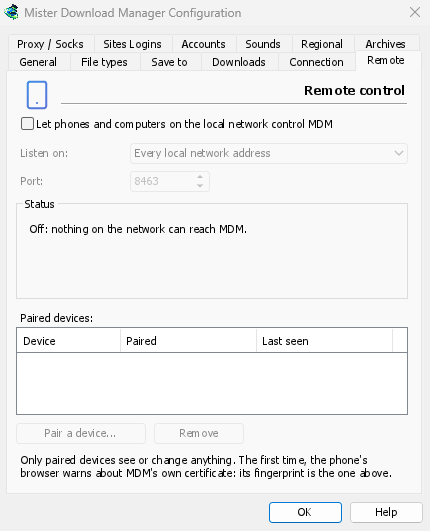
تشغيله
- الخيارات → التحكم عن بعد.
- Tick Let phones and computers on the local network control GDM.
- انقر على موافق.
ستقول الصفحة بعد ذلك تشغيل وتظهر العنوان الذي يجب فتحه، مثل https://192.168.1.20:8463/.
The first time, Windows may ask whether to let GDM communicate on networks: allow it on private networks, or the phone can't reach GDM.
إقران هاتفك
- على الكمبيوتر: الخيارات → التحكم عن بعد → إقران جهاز... يعرض رمز QR والعنوان ورمزا مكونا من 8 أرقام.
- على الهاتف، على نفس شبكة Wi-Fi: امسح رمز QR بالكاميرا (أو اكتب العنوان).
- The browser warns that the connection's certificate isn't trusted. That is expected: GDM made its own certificate, on your computer, and no public authority knows it. To be sure the page is your GDM's, open the warning's details: the certificate's SHA-256 fingerprint is the one Options → Remote shows. Then continue to the page (Advanced → Proceed in Chrome, Show details → visit this website in Safari).
- يتم ملء الرمز عند مسح رمز QR؛ وإلا فاكتبه. أعط الهاتف اسما، ثم انقر على إقران. تقول النافذة على الكمبيوتر ذلك، وتغلق بـ تم.
يعمل الرمز مرة واحدة، لمدة عشر دقائق، ولا يعمل بعد خمس محاولات خاطئة: انقر على رمز جديد للحصول على رمز آخر. للحفاظ على الصفحة بلمسة واحدة، أضفها إلى الشاشة الرئيسية للهاتف (قائمة المتصفح: إضافة إلى الشاشة الرئيسية).
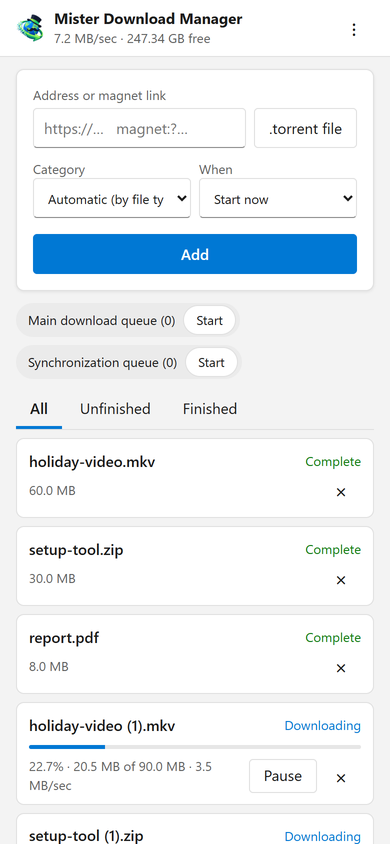
ما تفعله الصفحة
- Add: a download's address or a magnet link, or a
.torrentfile from the phone. Pick a Category (or let the file's type pick it), and When: Start now, or wait in a queue. A torrent is added with all its files, once GDM has read them (a magnet link can take a moment). - القائمة: كل تنزيل مع تقدمه وسرعته وحجمه، مع الكل، غير مكتمل ومكتمل. إيقاف مؤقت وبدء لكل واحد؛ × يزيله من القائمة، ومع حذف الملف أيضا، يحذف ملفه من الكمبيوتر.
- قوائم الانتظار: بدء وإيقاف كل واحدة.
- يعرض الشريط العلوي السرعة الإجمالية والمساحة الحرة حيث تذهب تنزيلاتك.
Downloads added from the phone are like the ones you add on the computer: they go into the category's folder, follow the queues, the Scheduler and the speed limits, and go through the network adapter you chose in Options → Proxy / Socks (and stop when it disconnects). The page shows the language your phone uses when GDM has it, and follows its light or dark mode.
أجهزتك المقترنة
الخيارات → التحكم عن بعد يسرد الأجهزة المقترنة، ومتى تم إقران كل منها ومتى شوهد آخر مرة. حدد واحدا وانقر على إزالة: يتم رفضه من طلبه التالي على الفور (لا حاجة لـ موافق). على الهاتف، ⋮ → نسيان هذا الجهاز في الصفحة يفعل الشيء نفسه من هذا الجانب.
فقدت هاتفك؟ أزله في الخيارات. لإيقاف الجميع دفعة واحدة، قم بإلغاء تحديد المربع: لا يستمع أي شيء بعد الآن.
أين يستمع
- الاستماع على: كل عناوين الشبكة المحلية (الافتراضي) يستمع على كل عنوان خاص للكمبيوتر (
192.168.x.x،10.x.x.x،172.16–31.x.x، و IPv6'sfd…)، واحدا تلو الآخر، ويتبعها عندما تنضم إلى شبكة أخرى. هذا الكمبيوتر فقط يستمع على127.0.0.1. أو اختر عنوانا واحدا لمحول واحد. - المنفذ:
8463ما لم يستخدمه برنامج آخر؛ ثم اختر آخر (1024 إلى 65535).
Don't make GDM reachable from the internet (a router's port forwarding): the remote control is made for your home network. To reach it while away, use a VPN to your home network instead (WireGuard, Tailscale): with Tailscale, choose its address in Listen on.
الأمان
ما يحافظ على أمان التحكم عن بعد، باختصار:
- متوقف افتراضيا، ولا يستمع أي شيء أثناء توقفه.
- الأجهزة المقترنة فقط: كل طلب باستثناء الإقران يحتاج إلى الرمز المميز الذي حصل عليه الجهاز عند إقرانه. يعمل رمز الإقران مرة واحدة، لمدة عشر دقائق، مع خمس محاولات، ويتم إبطاء المحاولات. تحتفظ الإعدادات ببصمة لكل رمز مميز، وليس الرمز المميز.
- Your local network only: GDM listens on the computer's private addresses, one by one, never on every address at once.
- مشفر: HTTPS، مع شهادة تم إنشاؤها على جهاز الكمبيوتر الخاص بك والاحتفاظ بها؛ بصمتها موجودة في الخيارات، للمقارنة مع تلك التي يعرضها متصفح الهاتف.
- Web pages can't use it: requests must name GDM's own address, come from its own page, and carry the token; GDM's page can't be shown inside another site.
- التنزيلات فقط: يقوم الجهاز المقترن بسرد التنزيلات وإضافتها وإيقافها مؤقتا وبدئها وإزالتها، وبدء وإيقاف قوائم الانتظار. لا يمكنه تغيير الإعدادات أو فتح النوافذ على الكمبيوتر أو رؤية المجلدات (القائمة التي يحصل عليها لا تحتوي على مسارات).
هل وجدت مشكلة؟ يرجى الإبلاغ عنها بشكل خاص، كما هو مذكور في SECURITY.md.
مجاني، مفتوح المصدر، بدون إعلانات، بدون فترة تجريبية.
Download GolinksPRO Download Manager