

If GolinksPRO Download Manager closes unexpectedly or stops responding, a crash report window opens. It shows what happened, lets you read the whole report, and can send it to the developers on GitHub. Each report helps fix the problem for everyone.
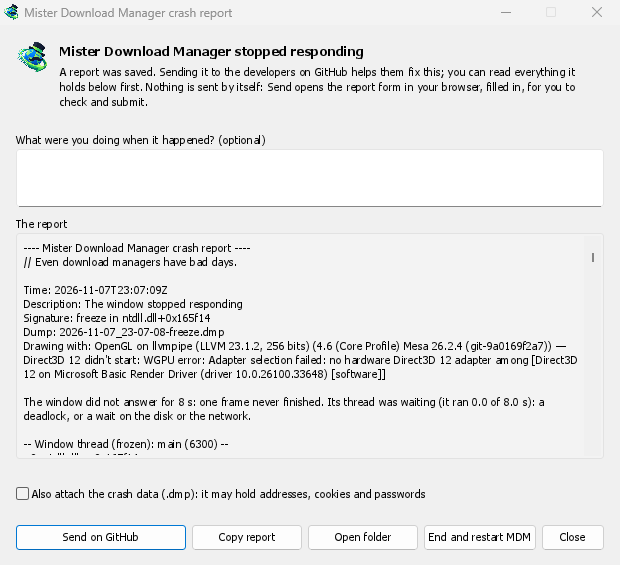
ما تراه
- GolinksPRO Download Manager closed unexpectedly: GDM crashed, or hit an internal error and closed.
- GolinksPRO Download Manager stopped responding: its window didn't answer for 8 seconds. GDM is still running, frozen. End and restart GDM closes the frozen copy and starts a new one. If GDM answers again by itself, the window says so.
في النافذة:
- ماذا كنت تفعل عندما حدث ذلك؟ هذا اختياري. بضع كلمات، مثل "فتحت إضافة URL"، تساعد كثيرا.
- التقرير يعرض كل ما سيتم إرساله. اقرأه أولا إذا أردت.
- إرسال على GitHub يفتح نموذج تقرير الأعطال الخاص بـ GitHub في متصفحك، وهو مملوء مسبقا، بالإضافة إلى المجلد الذي يحتوي على التقرير. اسحب ملف التقرير إلى النموذج، وتحقق منه، ثم أرسله. تحتاج إلى حساب GitHub. لا يتم إرسال أي شيء تلقائيا.
- إذا كان شخص ما قد أبلغ بالفعل عن نفس المشكلة، فإن النافذة تخبرك بذلك (تم الإبلاغ عنه بالفعل كمشكلة #…). فتح المشكلة المبلغ عنها يفتحها ويضع تقريرك في الحافظة، حتى تتمكن من إضافته كتعليق.
The other buttons copy the report, open its folder, or start GDM again.
ما يحتويه التقرير
- What happened: the error and the place in GDM's code where it happened.
- The stack: the place in GDM's code where it crashed or froze, and what every other part of it was doing.
- GDM's recent log: for example "command AddUrl" or "window opened: add-url".
- The system: GDM's version and how you installed it, your operating system and its version, the processor, the language and theme, and how many downloads and queues you have. These are counts only.
لا يحتوي على:
- عناوين التنزيل أو أسماء الملفات الخاصة بك؛
- اسم المستخدم الخاص بك، والذي يظهر كـ
~في مسارات المجلدات.
إذا كانت رسالة الخطأ تقتبس شيئا كتبته، فإن هذا النص موجود في التقرير، لذا اقرأه قبل الإرسال.
The crash data file (.dmp) is a snapshot of what GDM was running at that moment. It helps the developers most, but it can hold pieces of what GDM had in memory, such as download addresses, cookies and saved passwords. It is only attached when you tick Also attach the crash data.
أين يتم الاحتفاظ بالتقارير
In GDM's data folder:
crashes\: كل تقرير (.txt) وبيانات العطل الخاصة به (.dmp)؛logs\: GDM's log (mdm.log, with older ones asmdm.1.logand so on, 2 MB each).
GDM's data folder is %APPDATA%\misterdownloadmanager on Windows, ~/Library/Application Support/misterdownloadmanager on macOS, and ~/.local/share/misterdownloadmanager on Linux. In portable mode it is the data folder next to the program.
The log records what GDM does, so a report can show what led to a problem. To log more detail, start GDM with the environment variable MDM_LOG=debug.
للمطورين
How it works: a second copy of GDM, the monitor, starts beside it with --crash-monitor. The crash code lives in crates/crash and crates/app/src/crash.rs.
- Catching problems. When GDM crashes (a Windows exception, a signal on Linux, a Mach exception on macOS), panics, or freezes, it asks the monitor for a dump. A freeze is a frame of the window running more than 8 s, seen by a watchdog thread that ignores time spent asleep. It times both parts of a frame: what GDM handles (the commands that come in, the clock of downloads, queues and the Scheduler), which runs minimized too, and the drawing; never the wait between frames. The watchdog also measures how much processor time the window thread got meanwhile, and the report says what that means: it ran all along (a loop), it waited in a lock or on I/O (a deadlock), or it hardly ran in ordinary code, which is a computer too busy to run GDM or slow to load it from disk, most likely not GDM's bug (those share one signature,
freeze while the computer was busy). When the window thread is already back in the event loop by the time the dump is written, the freeze was over before the snapshot, so its stack can't explain it; those reports say so and share the signaturefreeze over before the snapshot. macOS doesn't measure it yet. The monitor then writes a minidump of every thread from outside, throughminidumperandcrash-handler. A crashed process never writes its own dump, which is how Firefox, Crashpad and Sentry do it too. - قراءة ملف التفريغ. يقرأ عارض الأعطال ملف التفريغ باستخدام
rust-minidumpمن Mozilla. ويستخدم رموز Breakpad الخاصة بالإصدار عند توفرها. يمكن للبناء من المصدر أيضا قراءة معلومات التصحيح الأصلية الموجودة بجانبه (ملف.pdbالخاص به، DWARF) عند بنائه باستخدام--features mdm-crash/native-symbols؛ أما التطبيق المنشور فلا يتضمن هذا القارئ، الذي حجمه عدة ميغابايت. تبقى بصمة التقرير (على سبيل المثالfreeze in misterdownloadmanager::winui::combo_edit) كما هي في تقارير المشكلة نفسها، وتبحث النافذة عن المشكلات الموجودة باستخدامها. - الرموز. تتضمن الإصدارات النهائية جداول الأسطر (
debug = "line-tables-only")، لكن لا يتضمن أي تنزيل معلومات التصحيح. يحول CI معلومات التصحيح إلىMisterDownloadManager-<version>-symbols-<platform>.zip(tools/installer/symbols.py، باستخدامdump_symsمن Mozilla)، ثم ينشرها بجانب الملفات الأخرى للإصدار. تجلب نافذة التقرير ملف zip الخاص بإصدارها عندما يعرض مكدس الاستدعاءات عناوين مجردة. - مقتطف
.dmpمن مشكلة:
cargo run -p mdm-crash --bin mdm-symbolicate -- crash.dmp MisterDownloadManager-<version>-symbols-windows-x64.zip
- Testing it.
cargo test -p mdm-crashruns a real freeze, panic and crash (examples/crashy.rs) and checks each report's signature. To try it in the app, start GDM withMDM_CRASH_TEST=1, then runmisterdownloadmanager /show crash-test:freeze(a deadlock; orspin, 12 s of a busy window thread,panic,crash,abort).cargo test -p mdm-app --test freeze_report -- --ignoreddoes that in a copy of the app off the screens, its window visible and minimized.
مجاني، مفتوح المصدر، بدون إعلانات، بدون فترة تجريبية.
Download GolinksPRO Download Manager