

If GolinksPRO Download Manager closes unexpectedly or stops responding, a crash report window opens. It shows what happened, lets you read the whole report, and can send it to the developers on GitHub. Each report helps fix the problem for everyone.
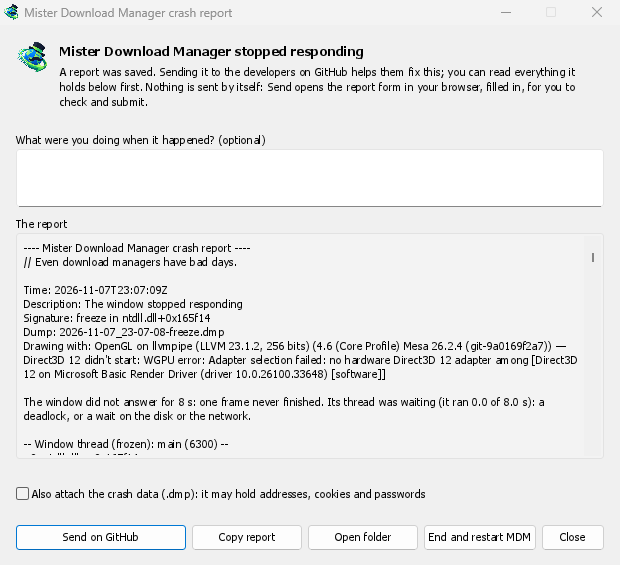
Was Sie sehen
- GolinksPRO Download Manager closed unexpectedly: GDM crashed, or hit an internal error and closed.
- GolinksPRO Download Manager stopped responding: its window didn't answer for 8 seconds. GDM is still running, frozen. End and restart GDM closes the frozen copy and starts a new one. If GDM answers again by itself, the window says so.
Im Fenster:
- Was haben Sie getan, als es passierte? ist optional. Ein paar Worte, wie „Ich habe URL hinzufügen geöffnet“, helfen sehr.
- Der Bericht zeigt alles, was gesendet würde. Lesen Sie ihn bei Bedarf zuerst.
- Auf GitHub senden öffnet das GitHub-Formular Absturzbericht in Ihrem Browser. Das Formular ist bereits ausgefüllt und der Ordner mit dem Bericht wird ebenfalls geöffnet. Ziehen Sie die Berichtsdatei in das Formular, überprüfen Sie sie und senden Sie es ab. Sie benötigen ein GitHub-Konto. Es wird nichts automatisch gesendet.
- Wenn jemand das gleiche Problem bereits gemeldet hat, wird dies im Fenster angezeigt (Bereits gemeldet als Problem #…). Gemeldetes Problem öffnen öffnet es und legt Ihren Bericht in die Zwischenablage, sodass Sie ihn als Kommentar hinzufügen können.
The other buttons copy the report, open its folder, or start GDM again.
Was ein Bericht enthält
- What happened: the error and the place in GDM's code where it happened.
- The stack: the place in GDM's code where it crashed or froze, and what every other part of it was doing.
- GDM's recent log: for example "command AddUrl" or "window opened: add-url".
- The system: GDM's version and how you installed it, your operating system and its version, the processor, the language and theme, and how many downloads and queues you have. These are counts only.
Es enthält nicht:
- Ihre Download-Adressen oder Dateinamen;
- Ihren Benutzernamen, der in Ordnerpfaden als
~angezeigt wird.
Wenn eine Fehlermeldung etwas zitiert, das Sie eingegeben haben, ist dieser Text im Bericht enthalten. Lesen Sie ihn daher vor dem Senden.
The crash data file (.dmp) is a snapshot of what GDM was running at that moment. It helps the developers most, but it can hold pieces of what GDM had in memory, such as download addresses, cookies and saved passwords. It is only attached when you tick Also attach the crash data.
Wo Berichte gespeichert werden
In GDM's data folder:
crashes\: jeder Bericht (.txt) und seine Absturzdaten (.dmp);logs\: GDM's log (mdm.log, with older ones asmdm.1.logand so on, 2 MB each).
GDM's data folder is %APPDATA%\misterdownloadmanager on Windows, ~/Library/Application Support/misterdownloadmanager on macOS, and ~/.local/share/misterdownloadmanager on Linux. In portable mode it is the data folder next to the program.
The log records what GDM does, so a report can show what led to a problem. To log more detail, start GDM with the environment variable MDM_LOG=debug.
Für Entwickler
How it works: a second copy of GDM, the monitor, starts beside it with --crash-monitor. The crash code lives in crates/crash and crates/app/src/crash.rs.
- Catching problems. When GDM crashes (a Windows exception, a signal on Linux, a Mach exception on macOS), panics, or freezes, it asks the monitor for a dump. A freeze is a frame of the window running more than 8 s, seen by a watchdog thread that ignores time spent asleep. It times both parts of a frame: what GDM handles (the commands that come in, the clock of downloads, queues and the Scheduler), which runs minimized too, and the drawing; never the wait between frames. The watchdog also measures how much processor time the window thread got meanwhile, and the report says what that means: it ran all along (a loop), it waited in a lock or on I/O (a deadlock), or it hardly ran in ordinary code, which is a computer too busy to run GDM or slow to load it from disk, most likely not GDM's bug (those share one signature,
freeze while the computer was busy). When the window thread is already back in the event loop by the time the dump is written, the freeze was over before the snapshot, so its stack can't explain it; those reports say so and share the signaturefreeze over before the snapshot. macOS doesn't measure it yet. The monitor then writes a minidump of every thread from outside, throughminidumperandcrash-handler. A crashed process never writes its own dump, which is how Firefox, Crashpad and Sentry do it too. - Dump-Datei lesen. Der Monitor liest den Dump mit Mozillas
rust-minidump. Er verwendet die Breakpad-Symbole der Veröffentlichung, sofern diese gefunden werden. Ein Build aus dem Quellcode kann auch die nativen Debug-Informationen daneben lesen (seine.pdb, DWARF), wenn er mit--features mdm-crash/native-symbolserstellt wurde; die ausgelieferte App kommt ohne diesen Reader aus, der mehrere MB groß ist. Die Signatur des Berichts (zum Beispielfreeze in misterdownloadmanager::winui::combo_edit) bleibt bei Berichten über dasselbe Problem gleich, und das Fenster sucht danach in bestehenden Issues. - Symbole. Release-Builds enthalten Zeilentabellen (
debug = "line-tables-only"), aber kein Download enthält die Debug-Informationen. CI wandelt sie inMisterDownloadManager-<version>-symbols-<platform>.zip(tools/installer/symbols.py, unter Verwendung von Mozillasdump_syms) um, die neben den anderen Dateien der Version veröffentlicht werden. Das Berichtsfenster ruft die Zip-Datei für seine eigene Version ab, wenn ein Stack nur Adressen anzeigt. - Ein
.dmpaus einem Problem:
cargo run -p mdm-crash --bin mdm-symbolicate -- crash.dmp MisterDownloadManager-<version>-symbols-windows-x64.zip
- Testing it.
cargo test -p mdm-crashruns a real freeze, panic and crash (examples/crashy.rs) and checks each report's signature. To try it in the app, start GDM withMDM_CRASH_TEST=1, then runmisterdownloadmanager /show crash-test:freeze(a deadlock; orspin, 12 s of a busy window thread,panic,crash,abort).cargo test -p mdm-app --test freeze_report -- --ignoreddoes that in a copy of the app off the screens, its window visible and minimized.
Kostenlos, Open Source, keine Werbung, keine Testversion.
Download GolinksPRO Download Manager