

Save a video from YouTube, Vimeo, TikTok and many other sites, in the quality you choose.
Steps
- Open the video in your browser and copy the page's address from the address bar.
- In GDM, click Add URL (or press Ctrl+N) and click OK. GDM sees that the address is a video's page and opens Download video from a page. (You can also open it with Tasks → Download video from a page..., paste the address and click Look up.)
- The first time, GDM needs its video helper. Click Install yt-dlp (about 23 MB). GDM downloads it from its official release and checks it before use.
- Wait while GDM looks the page up. The list of qualities appears, best first, with Audio only at the end: the sound as the site has it, then, with ffmpeg (next step), as an MP3 at its best variable bitrate or at 320, 256, 192 or 128 kbps.
- For the best qualities and MP3, GDM needs ffmpeg, which joins the picture and the sound, and makes the MP3. On Windows GDM offers to install it (about 80 MB): click Install ffmpeg if you want them. On Linux and macOS GDM uses the system's ffmpeg. Without it, you get the qualities that come with their sound.
- Pick a quality.
- Check Save to and File name. The name comes from the video's title; change it if you like.
- Want subtitles? Pick a language in Subtitles. They're saved beside the video, or inside it if you tick Put them into the video (see Subtitles).
- Click Download Now, or Later to add it to the list without starting.
The video appears in the list and downloads like any other file.
GDM lists the qualities: pick one. 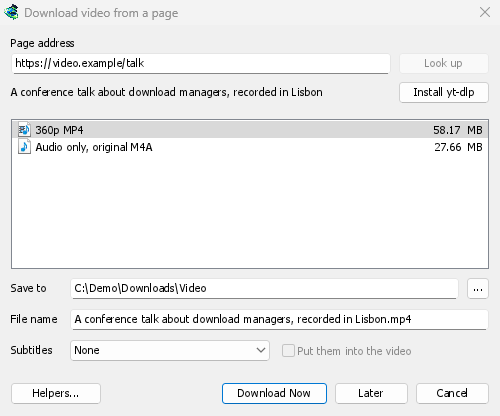

It downloads like any other file. 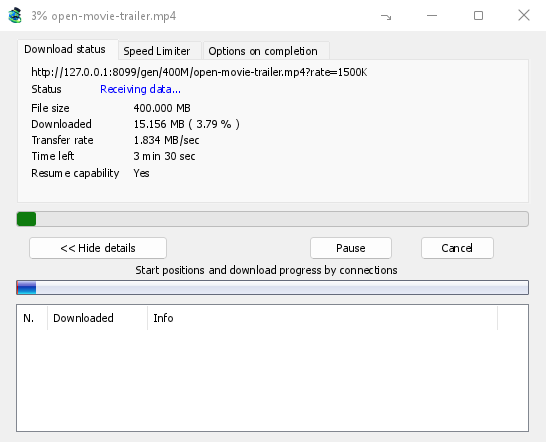
Good to know
- A link to one video inside a playlist or a mix downloads just that video, not the whole list.
- Videos protected with DRM (most paid streaming services) can't be downloaded.
- Downloading may be against some sites' terms; that is up to you to check.
If the video won't download, see Video downloads.
Next steps
Free, open source, no ads, no trial.
Download GolinksPRO Download Manager