
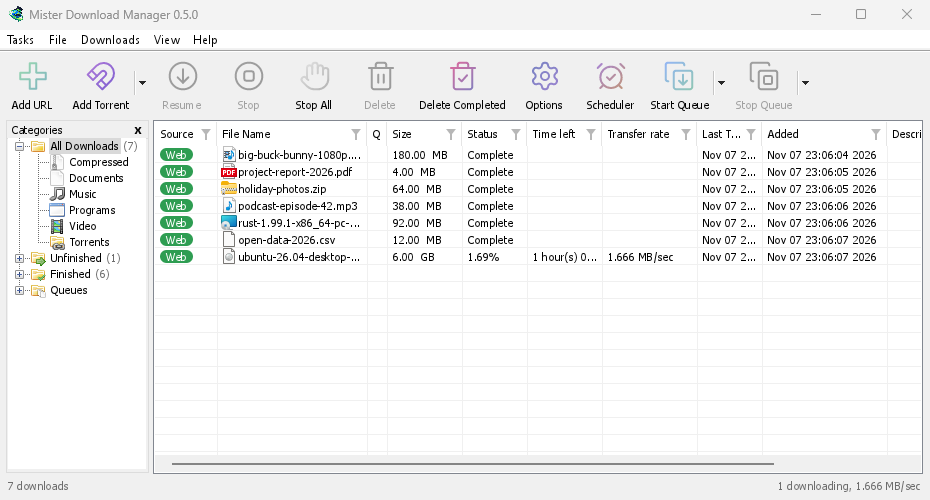
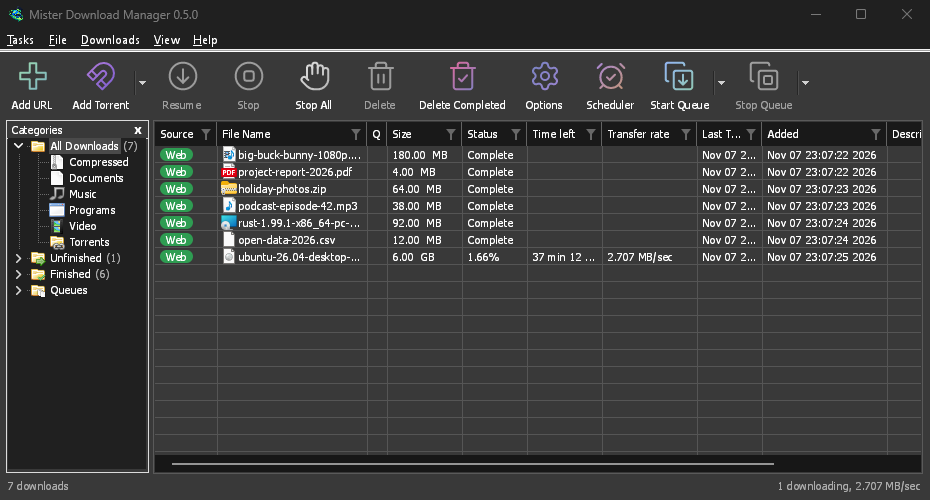
GolinksPRO Download Manager (GDM) is a free download manager for Windows and Linux (and, still experimental, macOS). It is laid out the way Internet Download Manager users expect: a toolbar, categories on the left, one list of downloads and a browser extension that hands downloads to it.
این صفحات هر بخش از برنامه را توضیح میدهند. آموزشها کارهایی را که کاربران بیشتر انجام میدهند، هر بار یک کار، قدم به قدم نشان میدهند.
از اینجا شروع کنید
- Getting started — install GDM (setup, portable or zip on Windows; the packages on Linux; the .dmg on a Mac), choose a language and find your way around the main window.
- اولین بارگیری شما — راهنمایی دو دقیقهای از کپی کردن پیوند تا باز کردن فایل.
بارگیری
- افزودن دانلودها — افزودن URL، کلیپبورد، هدف کشیدن و رها کردن، دانلودهای دستهای و لیست لینکها، و شروع دانلود در مقابل بارگیری بعدا.
- دریافتکننده پیوند و بایگانیها — چندین پیوند همزمان، در بستهها؛ بایگانیهای zip، 7z و rar پس از دانلود استخراج میشوند.
- Browser integration — the extension for Firefox (from addons.mozilla.org), Chrome, Edge, Brave, Opera and Vivaldi (from the Chrome Web Store), which downloads it takes, and what happens when GDM isn't running.
- Run GDM on a server — GDM without a window on a home server or NAS (Docker, Unraid), downloading into its folders; send it downloads from your phone or browser.
- Control GDM from your phone — add links, magnets and torrents from a phone or another computer at home, and watch and control the list.
سازماندهی
- لیست دانلود — ستونها، فیلترها، درخت دستهبندیها، انتخاب چندین دانلود، یافتن یک دانلود، و حذف دانلودها با یا بدون فایلهایشان.
- صفها و زمانبند — اجرای دانلودها به صورت چندتایی، شروع و توقف آنها بر اساس ساعت، و خاموش کردن کامپیوتر پس از اتمام.
سرعت و اتصالات
- Connections and speed — the progress window, how GDM splits a file over several connections, resuming, and the Speed Limiter.
ویدئو و تورنت
- بارگیری ویدئو — بارگیری ویدئو از صفحه آن (YouTube، Vimeo و بسیاری دیگر) با yt-dlp.
- گالری تصاویر — بارگیری تصاویر یک گالری (Wikimedia Commons، Flickr، DeviantArt و بسیاری دیگر) با gallery-dl.
- تورنتها — لینکهای مگنت و فایلهای .torrent، انتخاب فایلها، و اشتراکگذاری.
- تورنتها و امنیت شما — آنچه دیگران میتوانند ببینند، سوئیچهای شبکه، لیستهای سیاه، پراکسیها.
- حسابهای سرویس debrid — Real-Debrid، AllDebrid و Premiumize: پیوندهای فایلمیزبان از طریق حساب شخصی شما.
تنظیمات
- گزینهها — هر صفحه از پنجره گزینهها.
- پوستهها — ظاهرهای داخلی (کلاسیک، بومی، کنتراست بالا، مترو، Adwaita، Breeze، Luna، Aero، Aqua) و نحوه ساخت پوسته خودتان در یک فایل متنی.
- زبانها — 86 زبان رابط کاربری، اعداد و تاریخها، چیدمانهای راست به چپ و نحوه کمک به ترجمه.
- Portable mode — run GDM from a folder or a USB stick without installing it.
- میانبرهای صفحهکلید — هر کلیدی که پنجره اصلی به آن پاسخ میدهد و صفحهخوانها.
- خط فرمان و اتوماسیون — سوئیچهای خط فرمان IDM، ابزار
misterdownloadmanager-cli، و API اتوماسیون که برنامههای دیگر میتوانند از آن استفاده کنند. - دستیاران هوش مصنوعی (MCP) — به Claude، Cursor، VS Code یا دیگر دستیاران MCP اجازه دهید دانلودهای شما را لیست، اضافه، متوقف و حذف کنند.
آموزشها
- بارگیری فایل — کپی کردن پیوند، افزودن آن و باز کردن فایل.
- Catch downloads from your browser — set up the extension so clicked downloads go to GDM.
- بارگیری در طول شب — فایلها را در صف بگذارید تا زمانبند شبها بارگیری آنها را آغاز کند.
- ادامه بارگیری نیمهتمام — ادامه بارگیری پس از قطع اتصال، خرابی برنامه یا منقضی شدن پیوند.
- Keep some speed for everything else — cap GDM so browsing and calls stay smooth.
- بارگیری ویدئو از یک صفحه — کیفیت را انتخاب کنید و ویدئو را ذخیره کنید.
- Carry GDM on a USB stick — the portable copy, with downloads saved to the stick.
- یافتن یک دانلود در یک لیست طولانی — یافتن، یافتن بعدی و فیلترهای ستون.
راهنما
- Crash reports — what the crash report window shows when GDM closes unexpectedly or stops responding, what a report contains, and how to send it.
- عیبیابی — مواردی که باید بررسی کنید وقتی بارگیری ناموفق است، مرورگر بارگیری را به GDM نمیسپارد یا زمانبندی آغاز نمیشود.
- The browser and GDM aren't connected — what the extension's red ! means, reason by reason, and how to fix each.
- نسخهها — دریافت آخرین نسخه.
- Report a problem — or use Help → Report a problem in GDM, which fills in your version, system and how GDM was installed for you.
Screenshots in these docs show Windows and the light theme unless noted; on the website each has its dark version beside it. GDM follows the system's dark mode: when Windows (or your desktop) is set to dark, GDM is dark too.
رایگان، متنباز، بدون تبلیغات، بدون دوره آزمایشی.
Download GolinksPRO Download Manager