

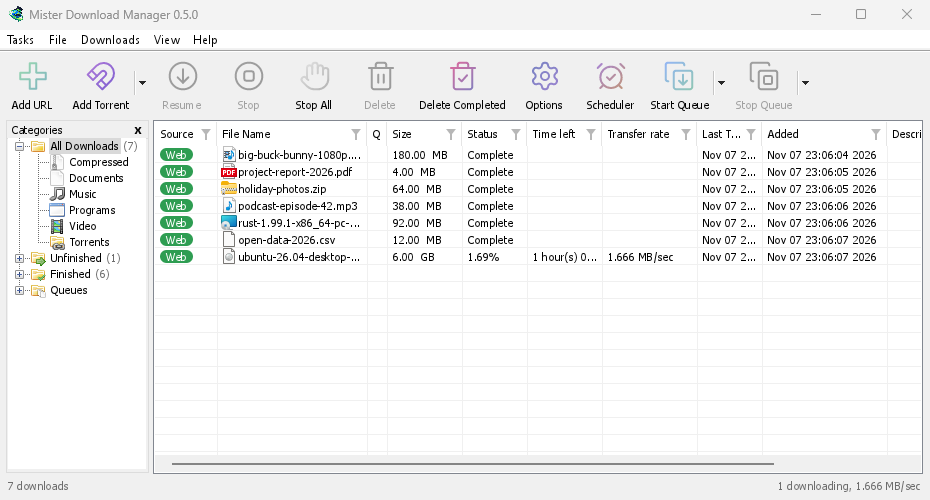
GolinksPRO Download Manager (GDM) is a free download manager for Windows and Linux (and, still experimental, macOS). It is laid out the way Internet Download Manager users expect: a toolbar, categories on the left, one list of downloads and a browser extension that hands downloads to it.
이 페이지에서는 프로그램의 각 부분을 설명합니다. 튜토리얼에서는 사람들이 자주 하는 작업을 하나씩 안내합니다.
여기서 시작
- Getting started — install GDM (setup, portable or zip on Windows; the packages on Linux; the .dmg on a Mac), choose a language and find your way around the main window.
- 첫 다운로드 — 링크를 복사한 뒤 파일을 여는 과정까지 2분 만에 안내합니다.
다운로드
- 다운로드 추가 — URL 추가, 클립보드, 드롭 대상, 일괄 다운로드와 링크 목록, 다운로드 시작과 나중에 다운로드.
- 링크 그래버 및 압축 파일 — 여러 링크를 한 번에 패키지로 다운로드하고, 다운로드가 끝나면 zip, 7z, rar 압축 파일을 자동으로 풉니다.
- Browser integration — the extension for Firefox (from addons.mozilla.org), Chrome, Edge, Brave, Opera and Vivaldi (from the Chrome Web Store), which downloads it takes, and what happens when GDM isn't running.
- Run GDM on a server — GDM without a window on a home server or NAS (Docker, Unraid), downloading into its folders; send it downloads from your phone or browser.
- Control GDM from your phone — add links, magnets and torrents from a phone or another computer at home, and watch and control the list.
정리하기
- 다운로드 목록 — 열, 필터, 카테고리 트리, 여러 다운로드 선택, 다운로드 검색, 다운로드 항목과 파일을 함께 또는 따로 삭제하기.
- 대기열 및 예약 관리자 — 한 번에 몇 개씩 다운로드하고, 시간에 맞춰 다운로드를 시작하고 중지하며, 다운로드가 끝나면 컴퓨터를 끕니다.
속도 및 연결
- Connections and speed — the progress window, how GDM splits a file over several connections, resuming, and the Speed Limiter.
비디오 및 토렌트
- 비디오 다운로드 — yt-dlp를 사용해 비디오 페이지(YouTube, Vimeo 등)에서 비디오를 다운로드합니다.
- 이미지 갤러리 — gallery-dl을 사용해 갤러리의 사진(Wikimedia Commons, Flickr, DeviantArt 등)을 다운로드합니다.
- 토렌트 — 마그넷 링크와 .torrent 파일, 파일 선택, 공유를 설명합니다.
- 토렌트와 보안 — 다른 사람이 볼 수 있는 정보, 네트워크 스위치, 차단 목록, 프록시를 설명합니다.
- 디브리드 서비스 계정 — Real-Debrid, AllDebrid 및 Premiumize: 사용자 계정을 통한 파일 호스트 링크를 지원합니다.
설정
- 옵션 — 옵션 창의 모든 페이지를 설명합니다.
- 테마 — 내장된 테마(클래식, 기본, 고대비, 메트로, Adwaita, Breeze, Luna, Aero, Aqua) 및 텍스트 파일로 나만의 테마를 만드는 방법을 설명합니다.
- 언어 — 86가지 인터페이스 언어, 숫자 및 날짜 형식, 오른쪽에서 왼쪽으로 쓰는 레이아웃, 그리고 번역에 참여하는 방법을 안내합니다.
- Portable mode — run GDM from a folder or a USB stick without installing it.
- 바로 가기 키 — 주 창에서 사용되는 모든 키보드 단축키 및 화면 판독기 사용법을 설명합니다.
- 명령줄 및 자동화 — IDM의 명령줄 스위치,
misterdownloadmanager-cli도구, 다른 프로그램에서 사용할 수 있는 자동화 API를 설명합니다. - AI 비서(MCP) — Claude, Cursor, VS Code 또는 다른 MCP 비서가 다운로드 목록을 확인하고, 다운로드를 추가하거나 일시 중지 또는 삭제할 수 있습니다.
자습서
- 파일 다운로드 — 링크를 복사하고 추가한 뒤 파일을 엽니다.
- Catch downloads from your browser — set up the extension so clicked downloads go to GDM.
- 밤새 다운로드 — 파일을 대기열에 추가하고 예약 관리자가 밤에 다운로드를 시작하도록 합니다.
- 중단된 다운로드 다시 시작 — 연결이 끊기거나 프로그램이 충돌했을 때, 또는 링크가 만료된 뒤 다운로드를 계속합니다.
- Keep some speed for everything else — cap GDM so browsing and calls stay smooth.
- 페이지에서 비디오 다운로드 — 화질을 선택하고 비디오를 저장합니다.
- Carry GDM on a USB stick — the portable copy, with downloads saved to the stick.
- 긴 목록에서 다운로드 찾기 — 찾기, 다음 찾기 및 열 필터.
도움말
- Crash reports — what the crash report window shows when GDM closes unexpectedly or stops responding, what a report contains, and how to send it.
- 문제 해결 — 다운로드가 실패하거나, 브라우저가 다운로드를 넘겨주지 않거나, 예약이 시작되지 않을 때 확인해야 할 사항.
- The browser and GDM aren't connected — what the extension's red ! means, reason by reason, and how to fix each.
- 릴리스 — 최신 버전 다운로드.
- Report a problem — or use Help → Report a problem in GDM, which fills in your version, system and how GDM was installed for you.
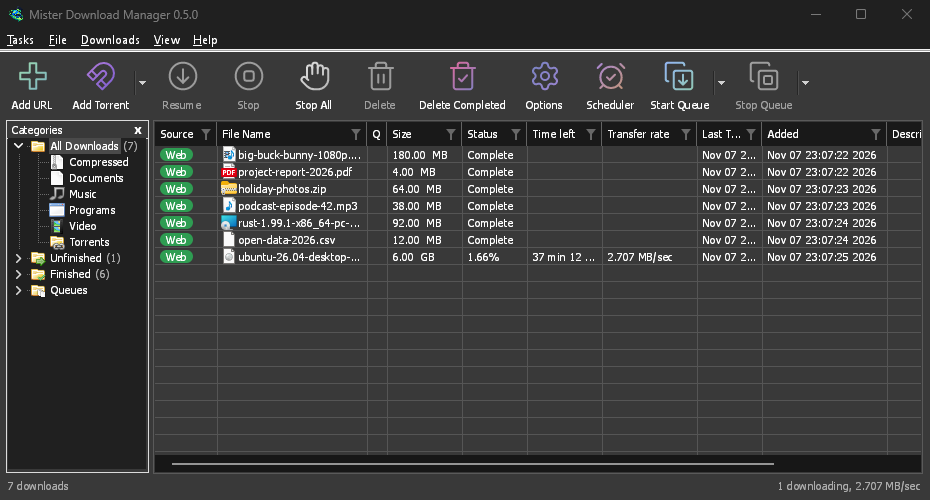
Screenshots in these docs show Windows and the light theme unless noted; on the website each has its dark version beside it. GDM follows the system's dark mode: when Windows (or your desktop) is set to dark, GDM is dark too.
무료, 오픈 소스, 광고 없음, 평가판 없음.
Download GolinksPRO Download Manager