

GolinksPRO Download Manager (GDM) is a free download manager for Windows and Linux (and, still experimental, macOS). It is laid out the way Internet Download Manager users expect: a toolbar, categories on the left, one list of downloads and a browser extension that hands downloads to it.
ये पृष्ठ प्रोग्राम के प्रत्येक भाग की व्याख्या करते हैं। ट्यूटोरियल उन चीजों को बताते हैं जो लोग सबसे अधिक करते हैं, प्रत्येक कार्य एक-एक करके।
यहां से शुरू करें
- Getting started — install GDM (setup, portable or zip on Windows; the packages on Linux; the .dmg on a Mac), choose a language and find your way around the main window.
- आपका पहला डाउनलोड — कॉपी किए गए लिंक से खोली गई फ़ाइल तक दो मिनट का वॉक-थ्रू।
डाउनलोड हो रहा है
- डाउनलोड जोड़ना — URL जोड़ें, क्लिपबोर्ड, ड्रॉप टारगेट, बैच डाउनलोड और लिंक की सूचियाँ, और डाउनलोड प्रारंभ करें बनाम बाद में डाउनलोड करें।
- लिंक ग्रैबर और आर्काइव — एक साथ कई लिंक, पैकेज में; डाउनलोड होने पर ज़िप, 7ज़ेड और रार आर्काइव एक्सट्रेक्ट हो जाते हैं।
- Browser integration — the extension for Firefox (from addons.mozilla.org), Chrome, Edge, Brave, Opera and Vivaldi (from the Chrome Web Store), which downloads it takes, and what happens when GDM isn't running.
- Run GDM on a server — GDM without a window on a home server or NAS (Docker, Unraid), downloading into its folders; send it downloads from your phone or browser.
- Control GDM from your phone — add links, magnets and torrents from a phone or another computer at home, and watch and control the list.
व्यवस्थित करना
- डाउनलोड सूची — कॉलम, फ़िल्टर, श्रेणियाँ ट्री, कई डाउनलोड का चयन करना, एक को ढूँढना, और उनकी फ़ाइलों के साथ या उनके बिना डाउनलोड हटाना।
- कतारें और शेड्यूलर — एक बार में कुछ डाउनलोड चलाएँ, उन्हें घड़ी के अनुसार शुरू और बंद करें, और जब वे पूरे हो जाएँ तो कंप्यूटर बंद कर दें।
गति और कनेक्शन
- Connections and speed — the progress window, how GDM splits a file over several connections, resuming, and the Speed Limiter.
वीडियो और टॉरेंट
- वीडियो डाउनलोड — yt-dlp के साथ उसके पृष्ठ (YouTube, Vimeo और कई अन्य) से एक वीडियो डाउनलोड करें।
- छवि गैलरी — gallery-dl के साथ किसी गैलरी की तस्वीरें (विकिमीडिया कॉमन्स, फ़्लिकर, डेविएंटआर्ट और कई अन्य) डाउनलोड करें।
- टॉरेंट — मैग्नेट लिंक और .torrent फ़ाइलें, फ़ाइलें चुनना, और साझा करना।
- टॉरेंट और आपकी सुरक्षा — दूसरे क्या देख सकते हैं, नेटवर्क स्विच, ब्लॉकलिस्ट, प्रॉक्सी।
- डीब्रिड सेवा खाते — Real-Debrid, AllDebrid और Premiumize: आपके अपने खाते के माध्यम से फ़ाइल-होस्ट लिंक।
सेटिंग्स
- विकल्प — विकल्प विंडो का हर पृष्ठ।
- थीम — अंतर्निहित रूप (क्लासिक, नेटिव, उच्च कंट्रास्ट, मेट्रो, Adwaita, Breeze, Luna, Aero, Aqua), और एक टेक्स्ट फ़ाइल में अपना खुद का कैसे बनाएं।
- भाषाएँ — 86 इंटरफ़ेस भाषाएँ, संख्याएँ और तिथियाँ, दाएँ से बाएँ लेआउट, और अनुवाद में मदद कैसे करें।
- Portable mode — run GDM from a folder or a USB stick without installing it.
- कीबोर्ड शॉर्टकट — मुख्य विंडो में हर कुंजी का जवाब, और स्क्रीन रीडर।
- कमांड लाइन और ऑटोमेशन — IDM के कमांड-लाइन स्विच,
misterdownloadmanager-cliटूल, और ऑटोमेशन API जिसका उपयोग अन्य प्रोग्राम कर सकते हैं। - AI सहायक (MCP) — Claude, Cursor, VS Code या किसी अन्य MCP सहायक को अपने डाउनलोड को सूचीबद्ध करने, जोड़ने, रोकने और हटाने दें।
ट्यूटोरियल
- एक फ़ाइल डाउनलोड करें — एक लिंक कॉपी करें, उसे जोड़ें, फ़ाइल खोलें।
- Catch downloads from your browser — set up the extension so clicked downloads go to GDM.
- रात भर डाउनलोड करें — फ़ाइलों को कतार में लगाएँ और शेड्यूलर को उन्हें रात में शुरू करने दें।
- एक टूटे हुए डाउनलोड को फिर से शुरू करें — कनेक्शन कटने, क्रैश होने या लिंक समाप्त होने के बाद जारी रखें।
- Keep some speed for everything else — cap GDM so browsing and calls stay smooth.
- एक पृष्ठ से एक वीडियो डाउनलोड करें — एक गुणवत्ता चुनें और एक वीडियो सहेजें।
- Carry GDM on a USB stick — the portable copy, with downloads saved to the stick.
- लंबी सूची में डाउनलोड ढूंढें — ढूंढें, अगला ढूंढें और कॉलम फ़िल्टर।
सहायता
- Crash reports — what the crash report window shows when GDM closes unexpectedly or stops responding, what a report contains, and how to send it.
- समस्या निवारण — डाउनलोड विफल होने, ब्राउज़र से डाउनलोड GDM को न मिलने या शेड्यूल शुरू न होने पर क्या जाँचें।
- The browser and GDM aren't connected — what the extension's red ! means, reason by reason, and how to fix each.
- रिलीज़ — नवीनतम संस्करण डाउनलोड करें।
- Report a problem — or use Help → Report a problem in GDM, which fills in your version, system and how GDM was installed for you.
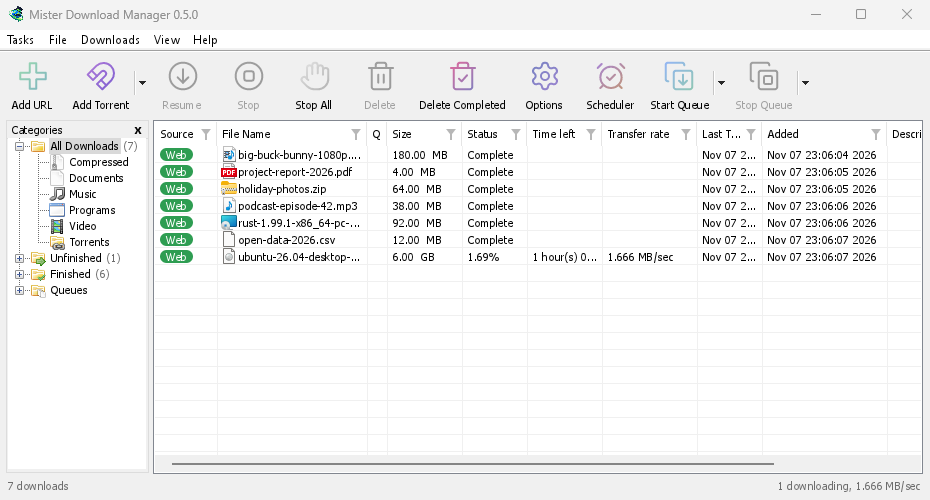
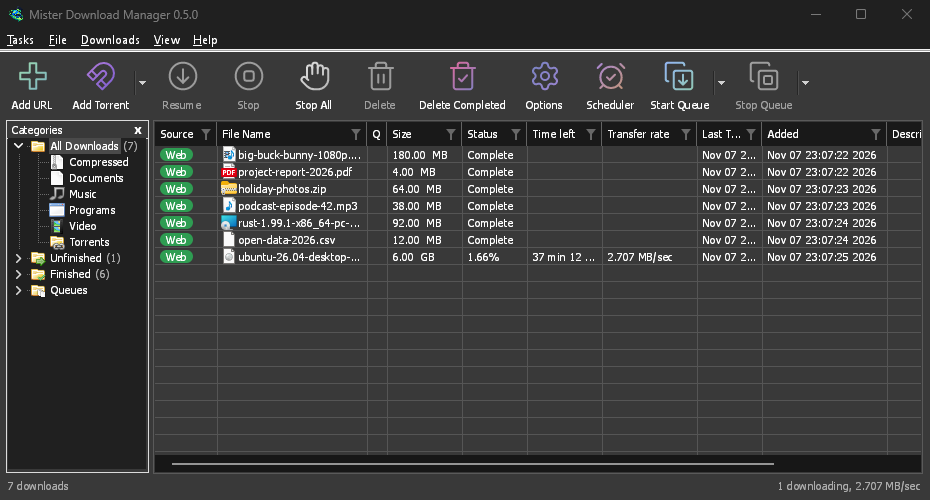
Screenshots in these docs show Windows and the light theme unless noted; on the website each has its dark version beside it. GDM follows the system's dark mode: when Windows (or your desktop) is set to dark, GDM is dark too.
मुफ़्त, ओपन सोर्स, कोई विज्ञापन नहीं, कोई ट्रायल नहीं।
Download GolinksPRO Download Manager