
- خانه
- پوستهها
یک پنجره، به سلیقهی شما
View → Theme changes how GDM looks at once and keeps everything where it was. Pick one of the built-in looks, each with a light and a dark side, or make your own in a text file.
-
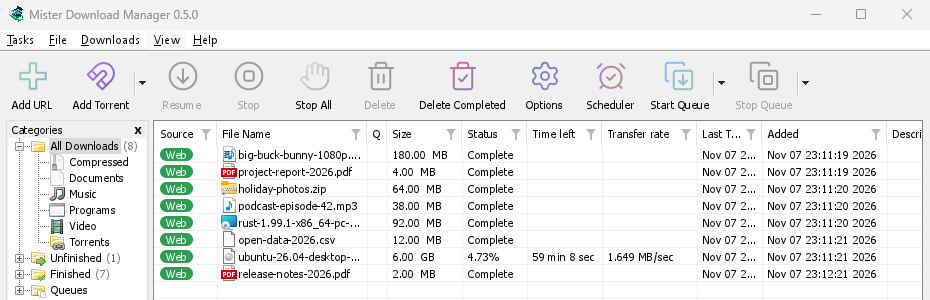

کلاسیک
GDM's own look and the default: the layout IDM users know, with Windows 11's controls.
-
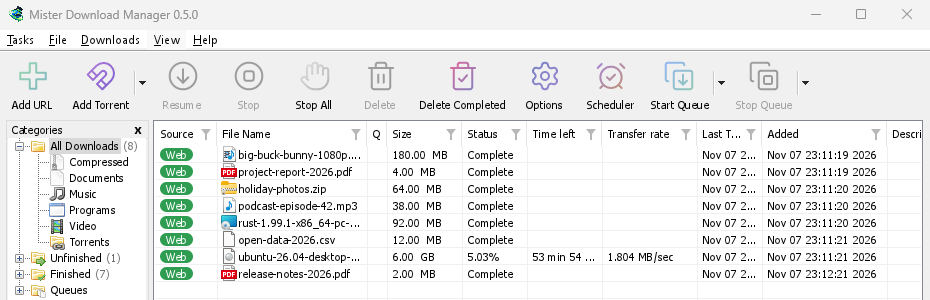

بومی
رنگ برجسته و تنظیم کنتراست سیستم شما، که با تغییر آنها در Windows، Linux و macOS دنبال میشود.
-

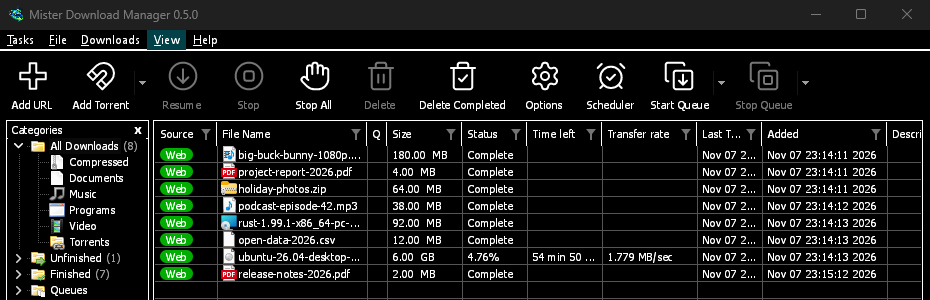
کنتراست بالا
سیاه و سفید، یک رنگ برجستهی روشن، هر لبه ترسیم شده، متن با نسبت 7:1 یا بیشتر.
-
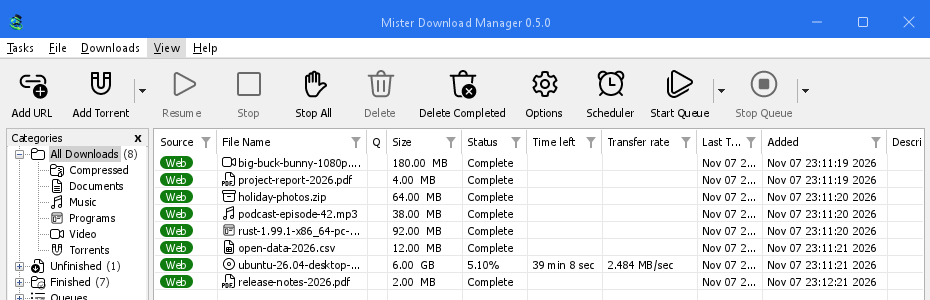

مترو
ظاهر تخت Windows 8: گوشههای مربع، دکمههای تخت و آیکونهای تکرنگ.
-
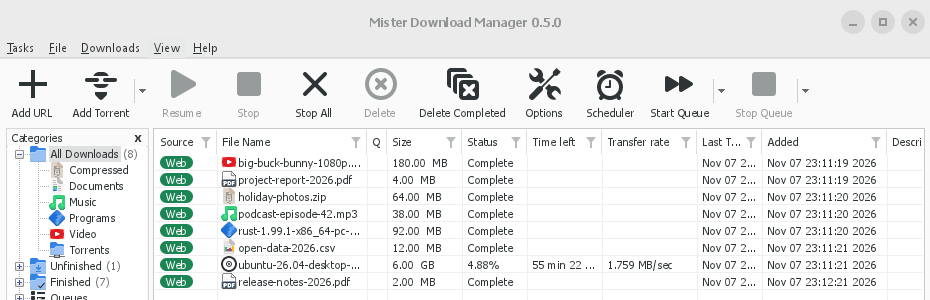
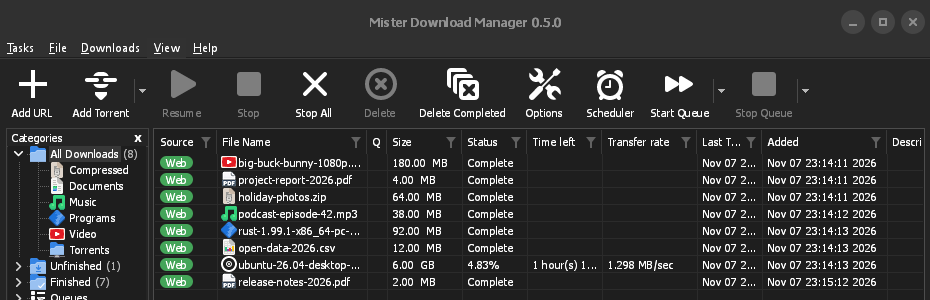
Adwaita
ظاهر GNOME: گوشههای گرد، دکمههای خاکستری تخت، حلقهی فوکوس گرد و نوار عنوان.
-
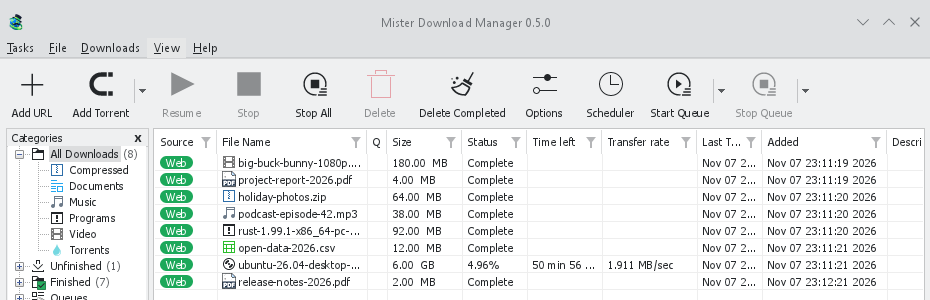

Breeze
ظاهر KDE Plasma: گوشههای گرد، کنترلهایی که لبهی رنگ برجسته را میگیرند، آیکونهای KDE.
-
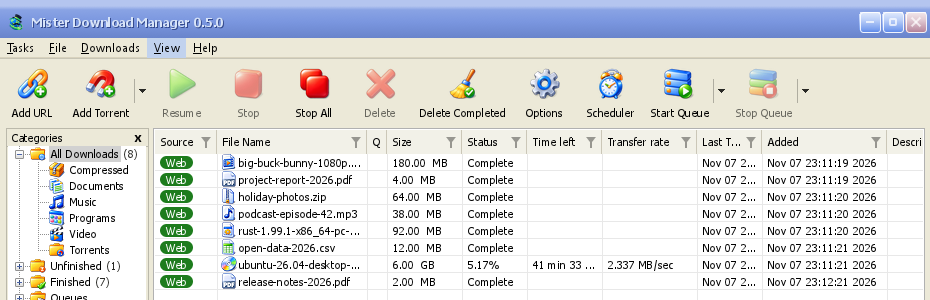
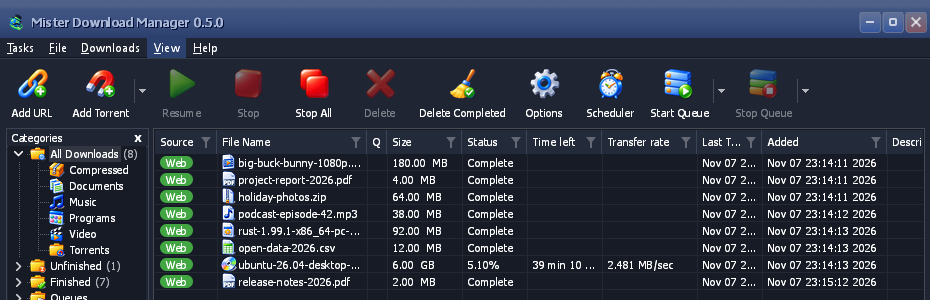
Luna
حس Windows XP: دکمههای سایهدار با درخشش نارنجی، تیکهای سبز، نوار عنوان آبی تیره.
-
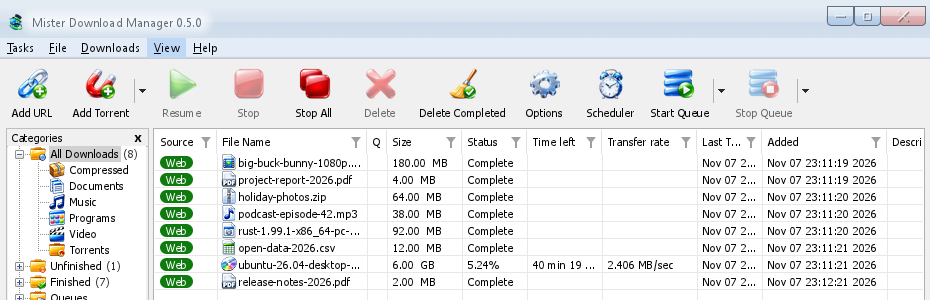
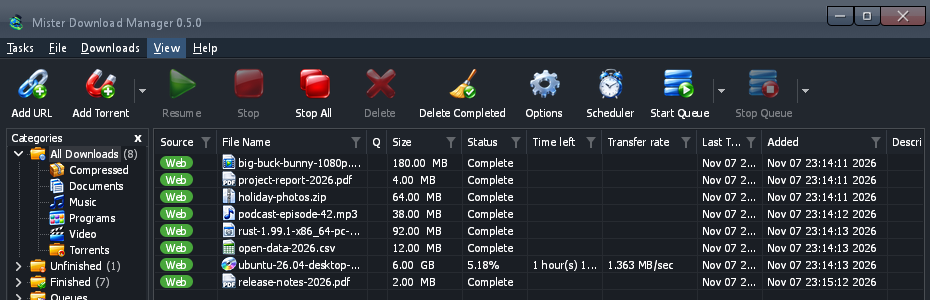
Aero
حس Windows 7: دکمههای براق، نوار عنوان شیشهای و نوار پیشرفت سبز براق.
-
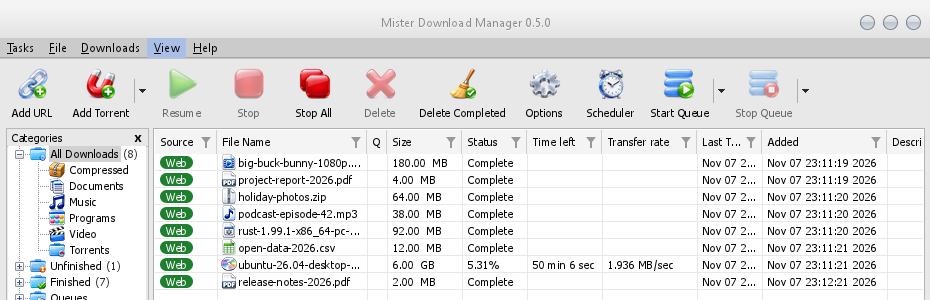

Aqua
حس Mac OS X: دکمههای ژلهای گرد در انتها، حلقهی فوکوس آبی و نوار پیشرفت ژلهای آبی.
- پوستهی خود را بسازیدیک فایل متنی از رنگها و اندازهها، که در چند ثانیه امتحان میشود. سه مرحله.
پوستهی خود را بسازید
A theme is one small text file, in TOML (or JSON). It names only what it changes; everything else comes from the theme it builds on. You don't need to build GDM or know how to program.
آن را بسازید
با چند رنگ شروع کنید، سپس به تدریج رنگهای بیشتری اضافه کنید:
name = "Harbour" inherits = "classic" icons = "color" [seeds.light] background = "#eef3f6" surface = "#ffffff" text = "#11202b" accent = "#0f6c8c" [seeds.dark] background = "#14212a" surface = "#0e171d" text = "#e8f0f4" accent = "#5cc3e6" [sizes] radius = 6 [controls] focus = "ring"inheritsپوستهای است که پوستهی شما از آن شروع میشود:classic(پیشفرض)،high-contrast،metro،adwaita،breeze،luna،aero،aqua، یا یک فایل پوستهی دیگر در همان پوشه.[seeds]are a handful of colours (background,surface,header,text,accent,selection,error,warning,success) that GDM spreads over every control.[seeds.light]and[seeds.dark]give each side its own.[colors]نقشهای تکرنگ را در هر دو حالت تنظیم میکند،[light]و[dark]فقط در یک حالت:#rrggbb، یا#rrggbbaaبا شفافیت.[sizes]شعاع گوشهها، عرض حاشیهها، اندازهی فونت و ارتفاع ردیفها، بر حسب پیکسل هستند.[controls]شکل جعبههای متن، چکباکسها، دکمهها، نوارهای پیشرفت، نوارهای اسکرول، نشانگر فوکوس و نوار عنوان را انتخاب میکند.iconsبه صورتcolor،monoیاaccentاست. یک پوسته در پوشه خودش (my-theme/theme.toml) میتواند آیکونهایش را درicons/16وicons/24بیاورد که هر کدام بر اساس چیزی که نشان میدهند نامگذاری شدهاند (tb-add-url.svg،cat-music.png)؛ آیکونهای-symbolicرنگ متن پوسته را میگیرند.contrast = "high"هر لبه و رنگ متن را در بالا تقویت میکند.
A key GDM doesn't know, or a value it can't read, is skipped and written to GDM's log (the
logsfolder beside the themes folder), so a file made for a newer GDM still loads. The built-in themes are written the same way: read them on GitHub.هر نقش رنگ (156)
کلید چه چیزی را رنگ میکند windowWindows' and dialogs' background textمتن و گلیفها text.disabledمتن غیرفعال، تنها رنگ خاکستری هر کنترل و برچسب خاکستریشده text.mutedمتن ثانویه: یادداشتها، اندازهها، نسخهها linkمتنی که چیزی را باز میکند errorمتن خطا error.strongپیام یک بررسی ناموفق در گزینهها (تستهای اتصال، مرورگر و کمککننده) warningمتن هشدار successمتن موفقیت (یک جمع کنترلی منطبق) reach.nearسرور یک بارگیری نزدیک به زمان رفت و برگشت آن (زیر 60 میلیثانیه)، در ویژگیها reach.mediumسروری با زمان رفت و برگشت متوسط (60 تا 150 میلیثانیه) reach.farسروری دور با زمان رفت و برگشت آن (بیش از 150 میلیثانیه) flag.edgeلبه نازک اطراف پرچم یک کشور accentرنگ برجسته: خطوط فوکوس، کنترلهای باز و پیشفرض، فیلترها، فوکوس پیوندها focus.ringمستطیل نقطهچین فوکوس صفحهکلید selectionپرکننده یک انتخاب: ردیفها، یک روز انتخابشده، متن انتخابشده selection.textمتن روی انتخاب selection.mutedمتن ثانویه روی انتخاب selection.inactiveیک ردیف انتخابشده در فهرستی بدون فوکوس selection.focusخطچین نقطهچین ردیف فوکوسشده روی یک ردیف انتخابشده group.lineقاب یک کادر گروه etch.shadowخط سایه یک جداکننده حکاکیشده etch.lightخط برجسته یک جداکننده حکاکیشده tab.pageبدنه یک صفحه تب tabزبانه انتخابنشده و سایه صفحه tab.hotزبانه زیر نشانگر chevronپیکان کشویی یا جعبه چرخان chevron.disabledپیکان خاکستریشده subtle.hotبخشی بدون ظاهر خاص (پیکان، سربرگ ستون) زیر نشانگر subtle.pressedچنین بخشی که فشرده یا باز شده است highlight.hotروز یا پیکان تقویم زیر نشانگر، هدف رها کردن highlight.pressedروز یا پیکان تقویم فشردهشده fieldدرون جعبه متن یا فهرست field.borderحاشیه جعبه متن field.bottomخط پایینی جعبه متن در حالت تایپ field.disabledدرون جعبه متن خاکستریشده field.disabled.borderحاشیه جعبه متن خاکستریشده field.readonlyدرون جعبه متن فقط خواندنی field.readonly.borderحاشیه جعبه متن فقط خواندنی combo.chevronعلامت پیکان کشویی combo.arrow.hotناحیه پیکان کشویی قابل ویرایش زیر نشانگر combo.arrow.pressedناحیه پیکان کشویی قابل ویرایش فشرده یا باز شده buttonظاهر دکمه button.hotظاهر دکمه زیر نشانگر button.pressedظاهر دکمه فشردهشده button.borderحاشیه دکمه button.bottomلبه پایینی دکمه button.textمتن دکمه button.text.pressedمتن دکمه فشردهشده button.default.borderحاشیه دکمه پیشفرض button.default.bottomلبه پایینی دکمه پیشفرض button.disabledظاهر دکمه خاکستریشده button.disabled.borderحاشیه دکمه خاکستریشده button.accentظاهر دکمه برجسته button.accent.hotروی دکمه برجسته زیر نشانگر button.accent.pressedروی دکمه برجسته فشردهشده button.accent.bottomلبه پایینی دکمه برجسته button.accent.textمتن دکمه برجسته button.accent.text.pressedمتن دکمه برجسته فشردهشده button.glowدرخشش داخل دکمه زیر نشانگر، در صورت وجود (Luna؛ شفاف: هیچ) glossدرخشش براق که بخشهای بالایی دکمهها، کادرها، نوارها و نوارهای عنوان به آن میرسند (Luna، Aero، Aqua) checkداخل کادر یا دکمه رادیویی انتخابنشده check.hotداخل آن زیر نشانگر check.pressedداخل آن فشردهشده check.borderحاشیه کادر یا دکمه رادیویی انتخابنشده check.border.hotحاشیه آن زیر نشانگر check.border.pressedحاشیه آن فشردهشده check.border.disabledحاشیه کادر انتخابنشده خاکستریشده check.onبرجسته کادر یا دکمه رادیویی انتخابشده check.on.hotبرجسته انتخابشده زیر نشانگر check.on.pressedبرجسته انتخابشده فشردهشده check.on.disabledپرکننده کادر انتخابشده خاکستریشده check.markعلامت تیک یا نقطه روی برجسته انتخابشده progress.trackمسیر نوار پیشرفت progress.barپرکننده نوار پیشرفت meter.trackمسیر یک متر (بخش انجامشده بارگیری) meter.edgeلبه یک متر meter.fillپرکننده یک متر listپسزمینه فهرست بارگیری list.frameخط بیرونی فهرست، جدول یا کادر gridخطوط شبکه بین ردیفهای فهرست در گفتگوها list.gridخطوط شبکه فهرست بارگیری headerسربرگهای ستون هر فهرست و جدول header.lineخط پایینی سربرگ در فهرستهای گفتگوها header.sepجداکنندههای بین عنوان ستونها table.lineجداکنندههای جدولهای «دریافتکننده پیوند» و «افزودن تورنت» header.sortedعنوان ستون مرتبشده header.sort-arrowعلامت مرتبسازی row.pressedیک ردیف فشردهشده در فهرست chip.webچیپ «وب» در فهرست بارگیری chip.torrentچیپ «تورنت» در فهرست بارگیری chip.textمتن روی چیپ list.drag-ghostیک عنوان ستون در حال کشیدهشدن list.marqueeنوار لاستیکی انتخاب ردیفها list.marquee.borderلبه نوار لاستیکی scroll.trackمسیر نوار پیمایش scroll.cornerمحل تلاقی دو نوار پیمایش scroll.thumbدسته و فلشهای نوار پیمایش scroll.thumb.hotدسته یا فلش زیر اشارهگر scroll.thumb.pressedدسته یا فلش فشردهشده یا در حال کشیدهشدن menubarنوار منو menubar.bottomآخرین ردیف نوار منو menubar.lineخط زیر نوار منو menubar.hotعنوان منو زیر اشارهگر menubar.openعنوان منوی بازشده menuپسزمینه منو menu.itemیک آیتم منو menu.hotیک آیتم منو زیر اشارهگر menu.borderقاب منو و پنجره بازشو menu.sepجداکنندههای منو menu.textمتن منو menu.glyphنقطهها، علامتهای تیک و فلشهای زیرمنو menu.text.disabledیک آیتم منوی خاکستریشده toolbar.lineخط بالای نوار ابزار toolbar.line.lightهایلایت زیر آن toolbar.hotدکمه نوار ابزار زیر نشانگر toolbar.hot.faintبخش دیگر یک دکمه تقسیمشده در حالی که یک بخش زیر نشانگر است toolbar.pressedدکمه نوار ابزار فشردهشده toolbar.hot.edgeلبه دکمه فعال نوار ابزار toolbar.hot.borderحاشیه دکمه فعال نوار ابزار (شفاف: هیچکدام) toolbar.split.shadowسایه جداکننده دکمه تقسیمشده در حالت عادی toolbar.split.lightهایلایت جداکننده toolbar.text.disabledبرچسب خاکستریشده نوار ابزار toolbar.arrowپیکان دکمه کشویی icon.disabledجوهر (شروع) آیکون خاکستریشده icon.disabled.endجوهر (پایان) آیکون خاکستریشده treeپسزمینه درخت دستهبندیها tree.linesرابطهای نقطهچین درخت tree.expanderعلامتهای پیکانی درخت، در جایی که طرح آنها را رسم میکند tree.frameقاب پنل دستهبندیها progress.statusمقدار وضعیت در پنجره پیشرفت progress.label.disabledبرچسب خاکستریشده در پنجره پیشرفت segments.borderقاب نوار قطعات segments.cornerپیکسلهای گوشه نوار قطعات pieces.haveیک قطعه تورنت که در اینجا موجود است pieces.partialمربعی که نشاندهنده قطعاتی است که بخشی از آنها در اینجا موجود است pieces.missingقطعهای که هنوز در اینجا موجود نیست captionA title bar MDM draws itself caption.textعنوان و گلیفهای آن caption.text.inactiveعنوان و گلیفهای آن در حالی که پنجره فعال نیست، و عنوان و گلیفهای دکمه خاکستریشده caption.hotدکمه عنوان زیر نشانگر (یک رنگمایه روی نوار) caption.pressedدکمه عنوان فشردهشده (یک رنگمایه روی نوار) caption.buttonدکمه عنوان در حالت عادی، در جایی که سبک آن را نشان میدهد (یک رنگمایه روی نوار؛ شفاف: هیچکدام) caption.closeبستن زیر نشانگر caption.close.textنماد بستن زیر اشارهگر caption.inactiveA title bar MDM draws, while its window isn't the active one (transparent: as when active) drop-target.edgeلبه ناحیه رهاسازی در حالت عادی egui.panelپسزمینه پنل egui egui.windowپسزمینه راهنماها egui.window.borderحاشیه راهنماها egui.textمتن راهنماها egui.selection.textرنگ متن انتخابشده در کادرهای egui egui.extremeتیرهترین (یا روشنترین) پسزمینه egui egui.faintپسزمینه محو egui egui.widgetابزارکهای egui در حالت عادی egui.widget.borderحاشیه آنها (شفاف: بدون حاشیه) همه اندازهها (26)
کلید چه چیزی را تنظیم میکند radiusشعاع گوشه دکمهها، کادرهای متنی و منوهای کشویی radius.buttonشعاع گوشه یک دکمه فشاری براق (Luna، Aero؛ Aqua در انتها گرد است) radius.partشعاع گوشه یک بخش رنگی (ناحیه فلش، دکمه چرخشی) radius.checkشعاع گوشه یک چکباکس radius.flyoutشعاع گوشه یک پنجره بازشو در یک پنجره (تقویم، کادر فیلتر) radius.menu-itemشعاع گوشه یک آیتم منو زیر اشارهگر radius.eguiشعاع گوشه ابزارکهای خود egui radius.popupشعاع گوشه راهنماها borderعرض حاشیه یک کنترل focus-lineارتفاع خط برجسته یک کادر متنی متمرکز chevron.widthضخامت خط فلش منوی کشویی font.dialogمتن گفتگو (Tahoma در گفتگوهای IDM) font.dialog.boldعنوان صفحات گزینهها font.titleعنوان اصلی یک پنجره (Tahoma Bold): افزونه مرورگر، کمککنندهها font.codeکد ورود برای تایپ در صفحه یک سرویس font.uiمتن منوها و پنجره اصلی (Segoe UI) font.ui.boldعنوانهای برجسته در پنجره اصلی font.smallمتن کوچک egui font.bodyمتن اصلی egui: راهنماها، کادرهای چندخطی font.headingعنوانهای egui list.rowارتفاع یک ردیف در فهرست بارگیریها list.headerارتفاع سربرگ ستونهای فهرست بارگیری tooltip.widthمحل شکستن خط متن راهنما tooltip.margin-xفاصله داخلی چپ و راست یک راهنما tooltip.margin-topفاصله داخلی بالای یک راهنما tooltip.margin-bottomفاصله داخلی پایین یک راهنما همه سبکهای کنترل (7)
کلید سبکهای آن field-focusخط، حاشیه، حلقه checkفلوئنت، مربع، ادوایتا، بریز، لونا، آئرو، آکوا buttonفلوئنت، بریز، لونا، آئرو، آکوا progressخط، نوار، بلوک، براق scrollروکش، کلاسیک captionسیستم، مترو، ادوایتا، بریز، لونا، آئرو، آکوا focusنقطهچین، حلقه، قاب یا بگذارید یک دستیار هوش مصنوعی آن را بنویسد
این دستور را در دستیار هوش مصنوعی خود کپی کنید و در پایان آن، ظاهری را که میخواهید توصیف کنید. این کار به دستیار قالب، کلیدها و قوانین را میدهد: متن خوانا و فوکوس قابل مشاهده در هر دو طرف، و هیچ چیز کپی شده از آثار هنری دیگران. قبل از به اشتراک گذاشتن نتیجه، هر دو طرف را خودتان بررسی کنید.
You are making a theme file for GolinksPRO Download Manager (GDM), a free, open-source download manager. Write one TOML file, named after the theme in lower case with dashes (for example harbour.toml). Reply with the file only, in one code block, then one line on how to install it.

THE FORMAT
A theme names only what it changes; everything else comes from the theme it inherits.
- name = "Display name"
- inherits = "classic" (the default), "high-contrast", "metro", "adwaita", "breeze", "luna", "aero" or "aqua"
- icons = "color" | "mono" | "accent"
- contrast = "high" (optional: strengthens every edge and text colour)
- [seeds] a few colours GDM spreads over every control: background, surface, header, text, accent, selection, error, warning, success. Use [seeds.light] and [seeds.dark] to give each side its own.
- [colors] single colour roles for both sides; [light] and [dark] for one side only. Role names are dotted and must be quoted when they contain a dot, e.g. "button.hot" = "#e5f1fb". Useful roles: window, text, text.muted, link, accent, focus.ring, selection, selection.text, field, field.border, button, button.hot, button.pressed, button.border, button.text, check.on, check.mark, progress.bar, list, header, menubar, menu, menu.hot, menu.text, toolbar.hot, tree, caption, caption.text, scroll.thumb, gloss (the shine glossy parts blend toward), button.glow. "segments.done" takes one colour or a list of 13 (top to bottom).
- [sizes] in pixels, 0 to 400: radius, radius.button, radius.check, radius.menu-item, radius.popup, border, focus-line, list.row, list.header, font.ui, font.dialog.
- [controls] shapes: field-focus = line | border | ring; check = fluent | square | adwaita | breeze | luna | aero | aqua; button = fluent | breeze | luna | aero | aqua; progress = line | bar | blocks | gloss; scroll = overlay | classic; focus = dotted | ring | frame; caption = system | metro | adwaita | breeze | luna | aero | aqua.
- Colours are "#rrggbb" or "#rrggbbaa". Unknown keys are skipped, so only use the names above.

THE RULES
1. Make both a light and a dark side: give [seeds.light] and [seeds.dark] (or [light] and [dark]) their own colours, and check each side on its own.
2. Text must be easy to read: at least 4.5:1 contrast for text against its background (text on window and field, button.text on button, menu.text on menu, selection.text on selection, caption.text on caption), in both sides.
3. The keyboard focus must be easy to see: accent and focus.ring at least 3:1 against what they sit on.
4. Disabled text stays readable but clearly dimmer than normal text.
5. Clean room: no artwork, icons, logos, fonts or text copied from any other program or company. If the theme needs icons, describe original ones to draw, never copy existing ones, and note their source and licence in a SOURCES.txt.
6. Keep the layout: a theme changes colours, sizes and control shapes only.

After the file, list each text and background pair you checked with its contrast ratio, for both sides.

THE LOOK I WANT:
Try it, without building GDM
Put the file in GDM's themes folder. View → Theme → Open themes folder opens it, and makes it the first time. It is in GDM's data folder:
- Windows
%APPDATA%\misterdownloadmanager\themes- Linux
~/.local/share/misterdownloadmanager/themes- macOS
~/Library/Application Support/misterdownloadmanager/themes- نسخه قابل حمل
data\themesکنار برنامه
ظرف دو ثانیه در نما → پوسته، زیر پوستههای داخلی، با
nameکه خودش میدهد، نمایش داده میشود. آن را انتخاب کنید و کل پنجره بلافاصله تغییر میکند. پس از ویرایش فایل، دوباره آن را در نما → پوسته انتخاب کنید تا تغییر را ببینید. نما → پشتیبانی از حالت تاریک و همیشه تیره بین حالت روشن و تاریک آن جابجا میشوند.View → Theme → Add a theme file… does it for you: pick the file anywhere, and GDM copies it into the themes folder and uses it at once.
آیا از قبل طرح Base16 یا pywal دارید؟
It's a theme already. A Base16 or Base24 scheme (
.yaml) or pywal'scolors.json, added the same way, changes GDM's colours and nothing else: the scheme's backgrounds behind the list and the windows, its text kept readable (4.5:1 or more), its blue on the focus, the selection and the progress bar. Oncewalhas run, View → Theme lists pywal, read from~/.cache/wal/colors.json(%USERPROFILE%\.cache\wal\colors.jsonon Windows), and GDM follows each new wallpaper's colours within two seconds. The guide shows which colour goes where.
رایگان، متنباز، بدون تبلیغات، بدون دوره آزمایشی.
Download GolinksPRO Download Manager