
De draagbare versie werkt rechtstreeks vanaf een USB-stick en bewaart daar de lijst en instellingen. Met een paar instellingen slaat het ook uw downloads op de stick op.
1. Put GDM on the stick
- Download
MisterDownloadManager-<version>-portable.zipvan Releases. - Pak het uit op de stick, bijvoorbeeld in
E:\GDM. - Check that there is a
datafolder next tomisterdownloadmanager.exe. That folder is what makes GDM portable. Don't delete it. - Start
misterdownloadmanager.exeen kies uw taal.
2. Downloads op de stick opslaan
Standaard gaan downloads naar de map Downloads van de computer die u gebruikt. Om ze op de stick te bewaren:
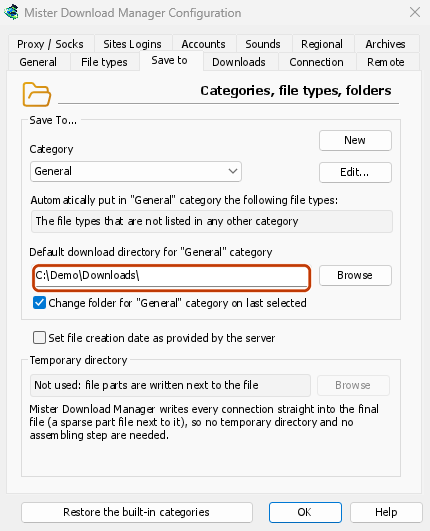
- Open Downloads → Opties en het tabblad Opslaan in.
- Kies onder Categorie voor Standaard.
- Klik in Standaard downloadmap voor categorie "Standaard" op Bladeren en kies een map op de stick, bijvoorbeeld
E:\Downloads. - Kies de volgende categorie (Gecomprimeerd, Documenten, Muziek, Programma's, Video, Torrents) en doe hetzelfde, bijvoorbeeld
E:\Downloads\Video. - Klik op OK.

3. Gebruiken
- Voeg downloads toe met URL toevoegen, het klembord (Opties → Algemeen → Aanbieden om koppelingen te downloaden die naar het klembord zijn gekopieerd) of het doelgebied (Taken → Doelgebied weergeven).
- De browserextensie kan geen downloads naar een draagbare versie sturen, omdat daarvoor het installatieprogramma nodig is.
- Before you unplug the stick, quit GDM with Tasks → Exit so it saves everything. Closing the window only hides it in the tray.
Op een andere computer
Windows may give the stick another drive letter, such as F: instead of E:. The folders you set, and the downloads already in the list, still point at the old letter. Check Options → Save to and change the folders if needed. When GDM is about to save into a folder that doesn't exist, it asks whether to create it.
Volgende stappen
- Draagbare modus in detail →
- Alle manieren om een download toe te voegen →
- Terug naar de documentatie-index →
Gratis, open source, geen advertenties, geen proefversie.
Download GolinksPRO Download Manager