

GDM downloads BitTorrent files from magnet links and .torrent files. Torrents appear in the same list as other downloads, marked Torrent in the Source column, and can be queued and scheduled like them.
トレントを追加する
- ツールバーのTorrent を追加をクリックして
.torrentファイルを選択します。または、その横の矢印をクリックしてtorrent ファイルを開く...またはマグネット リンクの追加...を選択します(タスクの下にもあります)。 - Torrent を追加が開きます。「トレント」にマグネットリンクを貼り付けるか、「...」をクリックして
.torrentファイルを選択し、「検索」をクリックします。 - GDM reads the torrent and shows its files as a folder tree. A
.torrentfile is read at once. A magnet link first has to get the file list from other peers, usually within seconds. While it waits, Add torrent shows how many peers it found, from the trackers, the DHT or your local network, and how many answered. After 30 seconds without an answer, it says what may be in the way: a link with no trackers while the DHT is off, or a firewall, a VPN or a network that blocks BitTorrent. - 不要なフォルダーやファイルのチェックを外します。すべて選択と選択解除は、大きなトレントに役立ちます。選択済みは、選択したファイルの数とデータ量を示します。
- 保存先を確認します。ファイルはここに保存されますは正確なフォルダーを示します。トレントには独自のカテゴリがあるため、デフォルトでは
Downloads\Torrentsです。 - ダウンロード中に動画を視聴するには、順番にダウンロードにチェックを入れます(順番にダウンロードを参照)。
- 今すぐダウンロードをクリックするか、開始せずにリストに追加するには後でをクリックします。
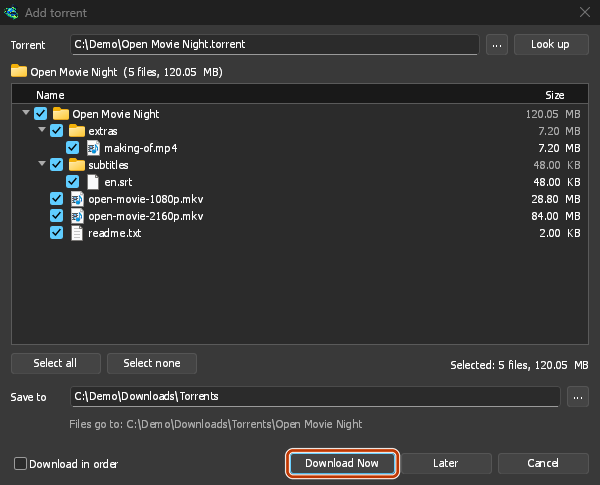
不要なもののチェックを外してから、「今すぐダウンロード」をクリックします。 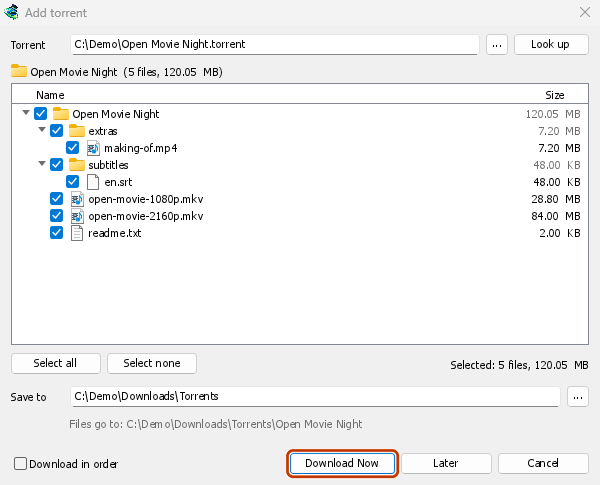
その進捗ウィンドウ:各ファイルと、そのうちどれだけがここにあるか。 
ピース:トレントのマップが埋まっていく様子。 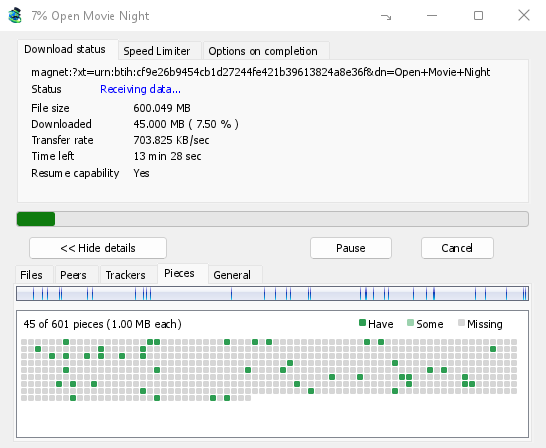
You can also paste a magnet link into Add URL, or drop a magnet link or a .torrent file on the drop target (Tasks → Show drop target). If a torrent is already in the list, GDM says so instead of adding it twice.
A .torrent file's web address works too: paste it into Add URL or Torrent, or let the browser hand the download over. GDM fetches the file, with the browser's cookies when the browser sent it, and Add torrent shows what it holds. The browser hands .torrent downloads over because TORRENT is in Options → File types. It's there by default; a list you had before this version keeps what it had, so add TORRENT to it yourself. Download with GolinksPRO Download Manager on a link always hands it over. A command line with /n (silent) saves the .torrent file itself, like any file. GDM fetches at most 10 MB: anything bigger isn't a .torrent file.
If some of the torrent's files are already in the folder, GDM asks before using them. Yes keeps them for the torrent: GDM checks them, keeps what matches the torrent and downloads the rest, which is how you continue a download started elsewhere or share files you already have. No (the default) goes back, so you can choose another folder and nothing of yours is overwritten.
GDM refuses a torrent with file names your system can't write safely, says which name, and writes nothing. What others can see, the network switches in Torrent settings, blocklists and proxies: Torrents and your security.
ダウンロード中
リスト内のトレントをダブルクリックして、その進行状況ウィンドウを開きます。通常のステータスに加えて、トレントのウィンドウには5つのタブがあります。
- ファイル — 各ファイル、そのサイズ、完了した割合。チェックを外したファイルはスキップ済みと表示されます。トレントの実行中でも、ファイルのボックスにチェックを入れたり外したりして、ダウンロードする内容を変更できます。少なくとも1つのファイルはチェックされたままになります。まだ不足しているすべてのファイルのチェックを外すと、トレントは完了します。実行中でない完了したトレントにファイルが戻された場合、再開するまで停止したままになり、何も見えないままダウンロードされることはありません。
- ピア — ダウンロード元のコンピューターと、それぞれから受信および送信した量。
- トラッカー — トレントのトラッカー。トラッカーがない場合、ピアは DHT および他のピアから取得されます。
- ピース — トレントのピースのマップ:そこにある、部分的にそこにある、または不足している。
- General — the info hash, pieces, peers, how much was sent, the share ratio, how long it has been shared and the folder. What was sent and the time shared add up over all of the torrent's runs: they don't start again at 0 after a pause or a restart of GDM.
トレントが完了した後も、共有されている間はタブが残ります。
トレントのウィンドウの速度制限タブには、ダウンロード制限の他に、選択した速度にアップロードを制限する設定があります。この制限はトレントと共に保持され、トレントが実行または共有されるたびに再び適用されます。いずれの場合も、トレントを16 KB/秒未満に制限することはできません。
トレントコマンド
リスト内のトレントを右クリックし、トレントを開きます。
- ファイルの再確認 — トレントのファイルのすべてのピースを読み取り、チェックします。例えば、ファイルを移動した後やディスクにエラーがあった場合などです。実行中のトレントはその後も続行し、不足しているものをフェッチします。停止中のトレントは停止したままです。イベントログには見つかった量が示されます。破損したピースを持つ完了したトレントは停止状態になり、再開するとそのピースが再度フェッチされます。
- 再アナウンス — 次のラウンドを待つ代わりに、今すぐトレントのトラッカーにピアを再度要求します。トレントが実行中または共有中に機能します。
- Add trackers... — adds trackers, one address a line (
http,httpsorudp). They are kept with the torrent, after the ones it has, and the Trackers tab shows them. A tracker on your computer or your local network is refused: GDM never contacts those (why). - 順番にダウンロード — トレントのファイルを最初からダウンロードします(下記参照)。もう一度クリックすると、最も希少なピースを優先する設定に戻ります。
- 最初と最後のピースを優先 — 順番にダウンロードが有効な場合、各ファイルの最初と最後のピースが他のピースより先にダウンロードされます。これはデフォルトでオンになっています。
- マグネットリンクをコピー — トレントのマグネットリンクを、そのトラッカーと共にコピーします。
各コマンドの結果はトレントのイベントログに入ります。リストの状態セルにカーソルを合わせると読むことができます。
順番にダウンロード
By default GDM downloads the pieces that the fewest peers have first, as BitTorrent programs usually do. That way a piece only one peer has is fetched before that peer leaves, and GDM can pass it on to others sooner. On GDM's test swarms it finished just as fast as downloading in order, and it was the only order that finished when a scarce piece's only holder left.
順番にダウンロードは、代わりにファイルの先頭を最初に取得するため、ダウンロード中に動画を視聴できます。最初の部分がダウンロードされたら、プレーヤーで開いてください。トレントを追加でチェックを入れるか、リストの右クリックメニューでトレント → 順番にダウンロードをいつでも、実行中でも選択できます。次に要求されるピースは新しい順序に従います。
- 最初と最後のピースを優先(デフォルトでオン)を有効にすると、各ファイルの最後のピースも早くダウンロードされます。ほとんどの動画ファイルはインデックスを最後に保持しており、プレーヤーは再生する前にそれを読み取ります。
- 複数のファイルは、名前順に1つずつダウンロードされます。
- 遅いピアは少し先のピースを取得するため、先頭がそれらを待つことはありません。
順番にダウンロードするトレントは、完了が速くなるわけではなく、スワームへの貢献も少なくなります。今すぐ視聴したいものにのみ使用してください。
RSS フィード
Many sites publish their new torrents as an RSS or Atom feed. GDM can watch feeds, list what they hold, and add the new torrents you want by itself. Choose Tasks → RSS feeds..., or click the arrow next to Add Torrent.
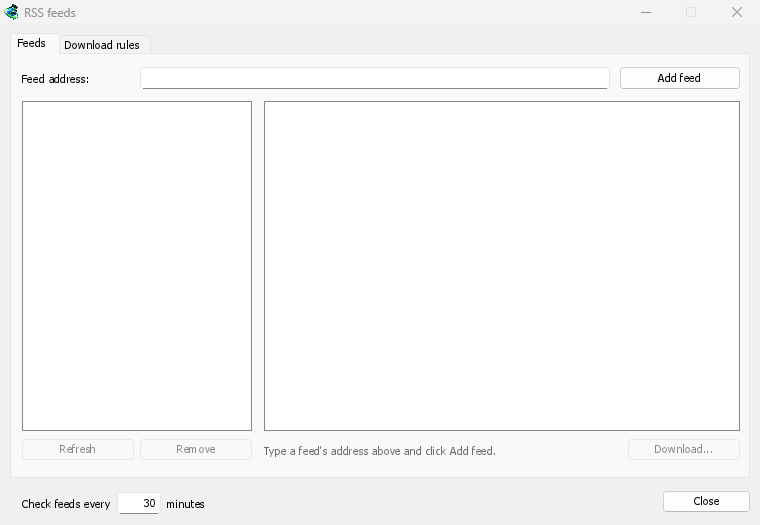
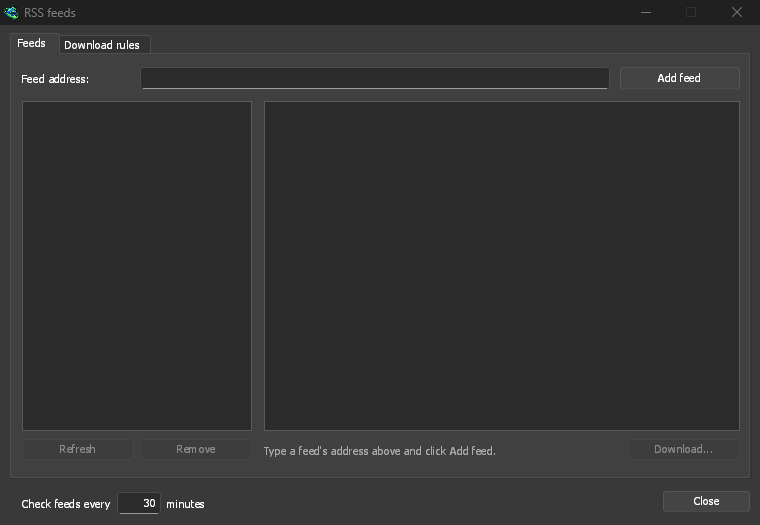
フィード タブ:
- Type a feed's address into Feed address and click Add feed. GDM fetches it at once, then every 30 minutes; change that under Check feeds every ... minutes, 5 at the least.
- 左側でフィードを選択すると、その記事が表示されます。トレントを含む記事は、フィードが提供する場合、トレントアイコンとそのサイズを表示します。記事をダブルクリックするか、選択して ダウンロード... をクリックすると、他のマグネットリンクや
.torrentアドレスと同様に、トレントを追加 が開きます。 - 更新 は選択したフィードを今すぐ取得します。削除 はその監視を停止します。読み取れないフィードは赤色で表示され、下部の行にその理由が表示されます。
ダウンロード ルール タブ: ルールは、タイトルが一致する新しい記事のトレントを、確認なしで追加します。
- 含む必要がある: タイトルに含まれる必要がある単語で、すべてが任意の順序で含まれている必要があります。
|は選択肢 (1080p|2160p) を区切り、*と?はワイルドカードです。大文字と小文字は区別されません。 - 含んではならない: ルールが記事をスキップする原因となる単語で、同じ方法で記述します。
- 正規表現: 2 つのボックスに正規表現を代わりに保持します。
- エピソード: タイトル内の
S01E05または1x05から読み取られる、取得するエピソード。1x2はシーズン 1 エピソード 2、1x5-8はエピソード 5 から 8、2x1-はシーズン 2 エピソード 1 以降のすべて、3はシーズン 3 のすべてで、;で区切られます。空の場合: 任意のエピソード。ルールは各エピソードを一度だけ取得します。既に追加されたエピソードの 2 回目のリリースはスキップされます。 - 保存先: トレントが保存されるフォルダー。空の場合、トレントカテゴリのフォルダー。開始せずにそれらを追加する は、後でダウンロード と同じように追加します。
- フィード: 監視するフィード。何もチェックされていない場合、すべてのフィード。
Rules only look at articles that are new since the feed was last fetched, and a feed's first fetch only lists what is there. So adding a feed or a rule never downloads a whole backlog. Matches ... articles now shows which of the articles the feeds hold now the rule matches, to check it; download those by hand. A torrent the list already has isn't added again, and neither is one whose files are already in the folder: GDM never writes into files it didn't make without asking. The bottom line of the tab says what the rules did last, and a torrent a rule added says so in its event log.
Feeds and rules are kept in rss.json in GDM's data folder. GDM reads at most 5 MB of a feed.
トレント設定
タスク → トレント設定...(またはTorrent を追加の横の矢印)を選択します。
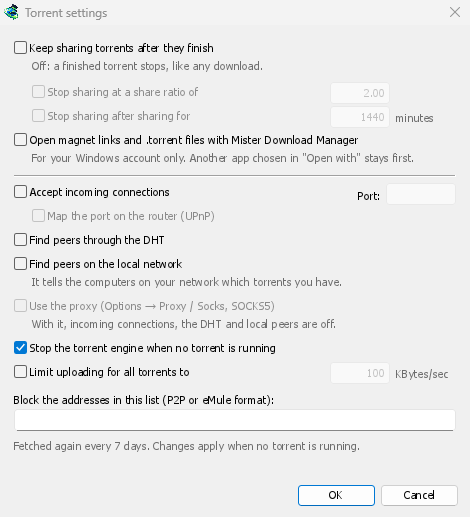

- 完了後もトレントを共有し続ける — デフォルトではオフです。完了したトレントは、他のダウンロードと同様に停止します。ダウンロード完了後も他のピアへのアップロードを続けるには、オンにします。
- 共有比率が次の値で共有を停止する — 完了したトレントは、ダウンロードした量の何倍かを送信し終えると共有を停止します(2.00: 2倍)。デフォルトではオフです。
- 共有後に共有を停止する … 分 — または、すべての実行を通じてその時間共有された後に停止します。デフォルトではオフです。
A torrent stopped by one of these says so in its event log, and isn't shared again when GDM starts. Raise or turn off the limit to share it again.
- Limit uploading for all torrents to — off by default. Caps what all your torrents together send to other peers, while they download and while they share. A torrent's own upload limit, in its progress window, applies on top of it.
- Open magnet links and .torrent files with GolinksPRO Download Manager — Windows then opens magnet links in your browser and .torrent files in Explorer with GDM. This is for your Windows account only; a program you chose in Windows' Open with stays first. The setup can turn it on for you.
同じウィンドウに、ネットワーク設定 (受信接続、ポート、UPnP、DHT、SOCKS5 プロキシ) とブロックリストがあります。トレントとセキュリティ を参照してください。
GDM starts its torrent engine the first time you add a torrent. If you never use torrents, it never listens for peers.
On a Linux system without CA certificates (a minimal install without the ca-certificates package), torrents still work: peers, the DHT and http:// trackers. An https:// tracker can't be checked there, so GDM skips it; install that package to use those too.
With a debrid account, torrents and magnet links can go to the service instead of to peers, and GDM downloads the files from it over HTTP: see Torrents through the service.
次のステップ
無料、オープンソース、広告なし、試用期間なし。
Download GolinksPRO Download Manager