

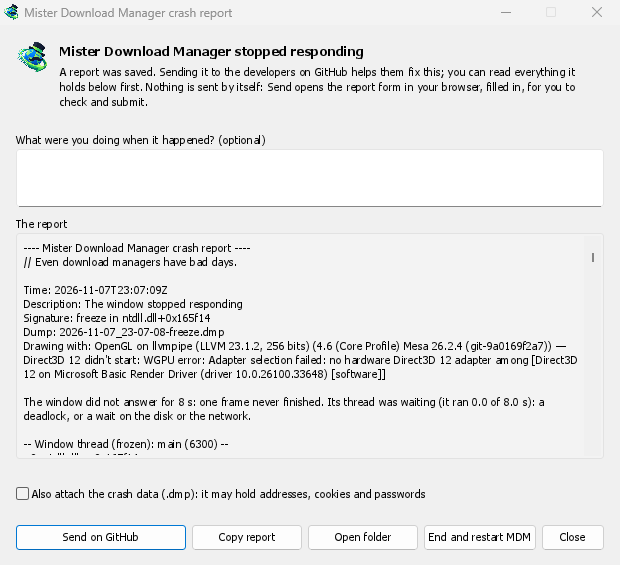
خرابی یا توقف از چشم پنهان نمیماند
A second copy of GDM watches the first. When GDM crashes, the report window says Mister Download Manager closed unexpectedly. When its window hasn't answered for 8 seconds, it says GolinksPRO Download Manager stopped responding, and End and restart GDM closes the frozen copy and starts a fresh one. If GDM comes back by itself, the window says so.
The report names what happened and where in GDM's code, so the problem can be found and fixed. It works on Windows, Linux and macOS.
شما ابتدا آن را میخوانید و سپس ارسال میکنید
هر آنچه که قرار است ارسال شود، در پنجره، زیر گزارش قرار دارد. میتوانید چند کلمه زیر هنگام وقوع چه کاری انجام میدادید؟ اضافه کنید، مثلا «افزودن URL را باز کردم».
ارسال در GitHub فرم گزارش خرابی GitHub را در مرورگر شما باز میکند، که از قبل پر شده و شامل پوشهای است که گزارش را در خود جای داده است. شما آن را بررسی کرده و ارسال میکنید. این کار به یک حساب GitHub نیاز دارد. هیچ چیز خودبهخود ارسال نمیشود: هیچ آپلود پسزمینه و سرویس گزارشی وجود ندارد، فقط مرورگر شما و GitHub.
اگر کسی قبلا همین مشکل را گزارش کرده باشد، پنجره این را اعلام میکند و باز کردن مشکل گزارششده شما را به آنجا میبرد، با گزارش شما در کلیپبورد برای اضافه کردن به عنوان یک نظر.
آنچه حذف میشود
A report holds the error, where it happened, GDM's recent log, and your system: GDM's version, how it was installed, your operating system, the processor, the language and theme, and how many downloads and queues you have, as counts only.
این گزارش شامل آدرسهای بارگیری یا نام فایلهای شما نیست و نام کاربری شما به صورت ~ در مسیرهای پوشه نمایش داده میشود. اگر یک پیام خطا چیزی را که شما تایپ کردهاید نقل قول کند، آن متن در گزارش وجود دارد، به همین دلیل است که شما ابتدا آن را میخوانید.
The crash data file (.dmp) helps the developers most, but it can hold pieces of what GDM had in
memory, such as addresses, cookies and saved passwords. It is attached only when you tick Also
attach the crash data.
گزارشهای توقف که نوع توقف را نشان میدهند
A freeze report will say whether GDM's window ran all along (a loop), waited (on a lock, the disk or the network), or hardly ran at all. That last kind usually means a computer too busy to run GDM, most likely not a bug in GDM, and those reports share one signature so they find one issue instead of many. macOS doesn't measure this yet. The window's title will be in GDM's language too, and the report will keep its own lines in every language, left to right in Arabic and Persian.
رایگان، متنباز، بدون تبلیغات، بدون دوره آزمایشی.
Download GolinksPRO Download Manager