
ข้อขัดข้องหรือการค้างจะไม่ถูกมองข้าม
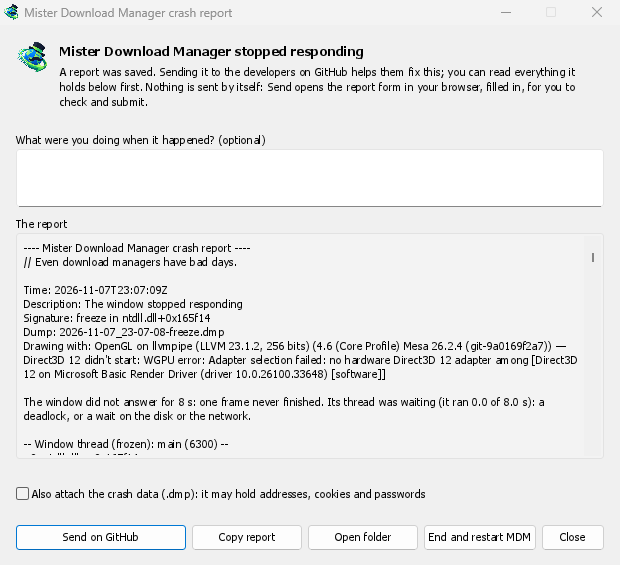
A second copy of GDM watches the first. When GDM crashes, the report window says Mister Download Manager closed unexpectedly. When its window hasn't answered for 8 seconds, it says GolinksPRO Download Manager stopped responding, and End and restart GDM closes the frozen copy and starts a fresh one. If GDM comes back by itself, the window says so.
The report names what happened and where in GDM's code, so the problem can be found and fixed. It works on Windows, Linux and macOS.
คุณอ่านก่อน แล้วคุณค่อยส่ง
ทุกสิ่งที่ต้องการส่งอยู่ในหน้าต่าง ใต้ รายงาน คุณสามารถเพิ่มข้อความสั้นๆ ใต้ คุณกำลังทำอะไรอยู่เมื่อเกิดเหตุการณ์นี้ขึ้น? เช่น “ฉันเปิด เพิ่ม URL”
ส่งบน GitHub จะเปิดแบบฟอร์มรายงานข้อขัดข้องของ GitHub ในเบราว์เซอร์ของคุณ ซึ่งกรอกข้อมูลไว้แล้ว พร้อมโฟลเดอร์ที่เก็บรายงาน คุณตรวจสอบและส่งได้ ซึ่งต้องมีบัญชี GitHub ไม่มีการส่งข้อมูลเอง: ไม่มีอัปโหลดเบื้องหลังและไม่มีบริการรายงาน มีเพียงเบราว์เซอร์ของคุณและ GitHub เท่านั้น
หากมีคนรายงานปัญหาเดียวกันแล้ว หน้าต่างจะแจ้งให้ทราบและ เปิดปัญหาที่รายงาน จะพาคุณไปยังหน้านั้น พร้อมรายงานของคุณในคลิปบอร์ดเพื่อเพิ่มเป็นความคิดเห็น
สิ่งที่ไม่ได้รวมอยู่
A report holds the error, where it happened, GDM's recent log, and your system: GDM's version, how it was installed, your operating system, the processor, the language and theme, and how many downloads and queues you have, as counts only.
ไม่เก็บที่อยู่ดาวน์โหลดหรือชื่อไฟล์ของคุณ และชื่อผู้ใช้ของคุณจะแสดงเป็น ~ ในเส้นทางโฟลเดอร์ หากข้อความแสดงข้อผิดพลาดอ้างอิงสิ่งที่คุณพิมพ์ ข้อความนั้นจะอยู่ในรายงาน ซึ่งเป็นเหตุผลที่คุณควรอ่านก่อน
The crash data file (.dmp) helps the developers most, but it can hold pieces of what GDM had in
memory, such as addresses, cookies and saved passwords. It is attached only when you tick Also
attach the crash data.
รายงานการค้างที่บอกประเภทของการค้าง
A freeze report will say whether GDM's window ran all along (a loop), waited (on a lock, the disk or the network), or hardly ran at all. That last kind usually means a computer too busy to run GDM, most likely not a bug in GDM, and those reports share one signature so they find one issue instead of many. macOS doesn't measure this yet. The window's title will be in GDM's language too, and the report will keep its own lines in every language, left to right in Arabic and Persian.
ฟรี, โอเพนซอร์ส, ไม่มีโฆษณา, ไม่มีช่วงทดลองใช้
Download GolinksPRO Download Manager