

- Strona główna
- Funkcje
- Raporty o awariach
Gdy coś się zepsuje, widzisz dlaczego.
If GDM closes unexpectedly or stops responding, a window opens with a report of what happened. You can read all of it, and send it to the developers on GitHub if you want to.
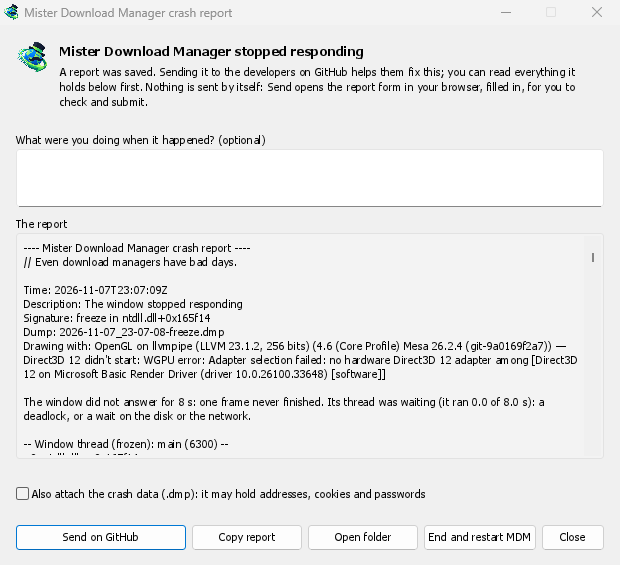
Awaria lub zawieszenie nie pozostaje niezauważone
A second copy of GDM watches the first. When GDM crashes, the report window says Mister Download Manager closed unexpectedly. When its window hasn't answered for 8 seconds, it says GolinksPRO Download Manager stopped responding, and End and restart GDM closes the frozen copy and starts a fresh one. If GDM comes back by itself, the window says so.
The report names what happened and where in GDM's code, so the problem can be found and fixed. It works on Windows, Linux and macOS.
Najpierw czytasz, potem wysyłasz
Wszystko, co zostanie wysłane, znajduje się w oknie, pod Raport. Możesz dodać kilka słów pod Co robiłeś, gdy to się stało?, na przykład „Otworzyłem Dodaj URL”.
Wyślij na GitHub otwiera w przeglądarce formularz zgłaszania awarii GitHub, już wypełniony, ze wskazaniem folderu zawierającego raport. Sprawdzasz go i przesyłasz. Wymaga to konta GitHub. Nic nie jest wysyłane automatycznie: nie ma przesyłania w tle ani usługi raportowania, tylko Twoja przeglądarka i GitHub.
Jeśli ktoś już zgłosił ten sam problem, okno o tym informuje, a Otwórz zgłoszony problem przenosi Cię tam, z Twoim raportem w schowku, aby dodać go jako komentarz.
Czego nie zawiera
A report holds the error, where it happened, GDM's recent log, and your system: GDM's version, how it was installed, your operating system, the processor, the language and theme, and how many downloads and queues you have, as counts only.
Nie zawiera adresów pobierania ani nazw plików, a Twoja nazwa użytkownika jest wyświetlana jako ~ w ścieżkach folderów. Jeśli komunikat o błędzie cytuje coś, co wpisałeś, ten tekst się w nim znajduje, dlatego najpierw go czytasz.
The crash data file (.dmp) helps the developers most, but it can hold pieces of what GDM had in
memory, such as addresses, cookies and saved passwords. It is attached only when you tick Also
attach the crash data.
Raporty o zawieszeniach, które wskazują rodzaj zawieszenia
A freeze report will say whether GDM's window ran all along (a loop), waited (on a lock, the disk or the network), or hardly ran at all. That last kind usually means a computer too busy to run GDM, most likely not a bug in GDM, and those reports share one signature so they find one issue instead of many. macOS doesn't measure this yet. The window's title will be in GDM's language too, and the report will keep its own lines in every language, left to right in Arabic and Persian.
Darmowy, open source, bez reklam, bez wersji próbnej.
Download GolinksPRO Download Manager