

A download that stopped halfway doesn't have to start over. GDM keeps what it has and continues from there.
Sau khi mất kết nối
When the connection drops, GDM retries on its own. In the progress window, the connection table shows Retrying and the reason. Usually the download goes on by itself once the connection is back.
Nếu GDM dừng thử và hiển thị Lỗi:
- Chọn lượt tải xuống trong danh sách.
- Nhấp Tiếp tục trên thanh công cụ (hoặc nhấp chuột phải → Tiếp tục tải xuống).
Sau khi gặp sự cố hoặc khởi động lại
GDM saves each download's progress as it goes, so a Windows crash, a power cut or closing GDM loses at most the last moments.
- Start GDM. The download is in the list under Unfinished.
- Chọn mục đó rồi nhấp Tiếp tục.
Khi liên kết hết hạn
Nhiều trang web cung cấp liên kết chỉ hoạt động trong một thời gian hoặc chỉ khi bạn đã đăng nhập. Khi đó, không thể tiếp tục tải xuống vì địa chỉ cũ không còn phản hồi.
- Nhấp chuột phải vào lượt tải xuống và chọn Làm mới địa chỉ tải xuống.
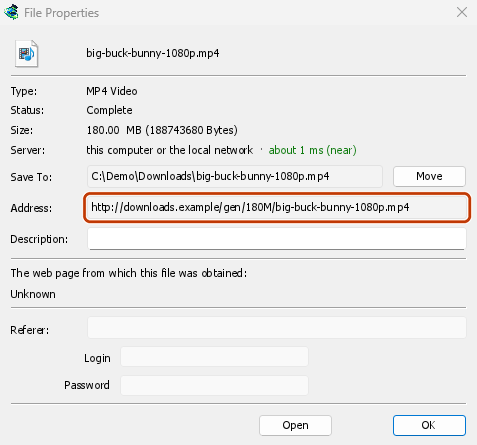
- GDM opens the web page the link came from (when it knows it), and the download's File Properties.
- On the web page, start the download again, or copy the new download link (right-click → Copy link). If the browser hands the new download to GDM, cancel it there: you only need the address.
- Dán liên kết mới vào Địa chỉ trong Thuộc tính tệp rồi nhấp OK.
- Nhấp Tiếp tục. Quá trình tải xuống tiếp tục từ điểm đã dừng, bằng địa chỉ mới.
The new address has to point at the same file. If it doesn't, GDM stops with the file changed on the server.
Khi tệp trên máy chủ đã thay đổi
If the site replaced the file with a new version, the parts GDM has don't fit any more. Right-click the download and choose Redownload to start again from the beginning. A finished file is only replaced when the new download completes.
Khi không thể tiếp tục tải xuống
Look at Resume capability in the progress window. No means the server can't send a file in parts. GDM then uses one connection, and a download that stops has to start over. For such servers, avoid stopping the download, and avoid a very low speed limit, which can make the server drop the connection.
Các bước tiếp theo
Miễn phí, mã nguồn mở, không quảng cáo, không dùng thử.
Download GolinksPRO Download Manager