

- Главная
- Возможности
- Область уведомлений
Не мешает. Загружает.
GDM can start with your computer and wait in the notification area, its window closed and its downloads running. A download's progress window can go there too, with one click.

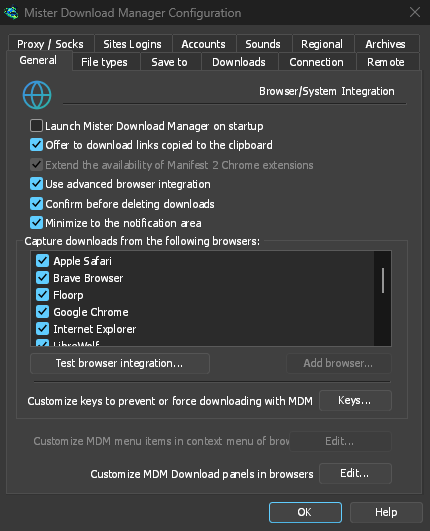
Запуск вместе с компьютером, не мешая работе
Tick Launch GolinksPRO Download Manager on startup in Options → General and GDM starts when you sign in, hidden, its icon in the notification area. Its downloads, queues, the Scheduler and downloads from the browser all run from there. Click the icon, or start GDM again, and the window opens as usual.
The option is off until you tick it. On Linux and macOS GDM starts with your session the same way. A portable copy can't start with Windows, since that needs the registry, so the option is greyed there.
Одним щелчком скрывает окно загрузки
Окно хода выполнения загрузки имеет кнопку Скрыть в область уведомлений: короткий дефис со стрелкой вниз в угол. В Windows она находится в строке заголовка, слева от кнопки Свернуть, и в меню строки заголовка (Alt+Space). В Linux и macOS она находится в конце ряда вкладок. Загрузка продолжается.
Чтобы снова увидеть его, щёлкните правой кнопкой мыши по иконке в трее и выберите его в разделе Загрузки в процессе, где перечислены все запущенные загрузки. Двойной щелчок по загрузке в списке также вернёт её окно.
Свернуть также отправляет окна в трей
With Minimize to the notification area on in Options → General (it is on by default), Minimize hides the main window, and a progress window, in the notification area instead of leaving them on the taskbar. Closing the main window does the same: GDM keeps running until you choose Tasks → Exit or Exit in the tray menu.
В меню трея также есть Добавить новую загрузку, Добавить пакетную загрузку, Ограничитель скорости, Планировщик, основная очередь загрузок и Параметры.
Лёгкий в ожидании
Hidden in the notification area, GDM hands the memory it isn't using back to the system. Task Manager's Memory for GDM drops from about 50 MB to under 10 MB there, and GDM gives memory back again every 10 minutes while it stays hidden. On Linux it does the same with its free memory.
Где нет трея
All of this needs a notification area that shows GDM's icon. Windows and macOS have one, and so do most Linux desktops (KDE, GNOME with its AppIndicator extension, waybar's tray). On a desktop without one, GDM starts minimized instead, closing the window quits GDM, and Minimize to the notification area is greyed. In a Wayland session the main window stays minimized in the dock, because Wayland can't hide a window.
Бесплатно, с открытым исходным кодом, без рекламы, без пробного периода.
Download GolinksPRO Download Manager