


邪魔にならずにコンピューターと同時に起動
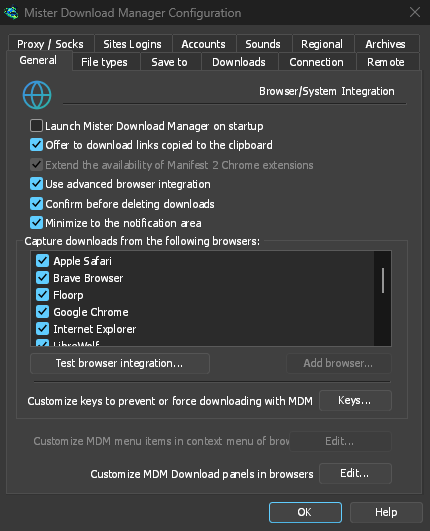
Tick Launch GolinksPRO Download Manager on startup in Options → General and GDM starts when you sign in, hidden, its icon in the notification area. Its downloads, queues, the Scheduler and downloads from the browser all run from there. Click the icon, or start GDM again, and the window opens as usual.
The option is off until you tick it. On Linux and macOS GDM starts with your session the same way. A portable copy can't start with Windows, since that needs the registry, so the option is greyed there.
ワンクリックでダウンロード ウィンドウを隠す
ダウンロードの進行状況ウィンドウには、隅に下向きの矢印が付いた短いダッシュの通知領域に隠すボタンがあります。Windows では、タイトル バーの最小化の左側にあり、タイトル バーのメニュー (Alt+Space) にもあります。Linux と macOS では、タブ行の最後にあります。ダウンロードは継続されます。
再度表示するには、トレイ アイコンを右クリックし、実行中のすべてのダウンロードを一覧表示する進行中のダウンロードの下で選択します。リスト内のダウンロードをダブルクリックしても、ウィンドウが戻ります。
最小化でもウィンドウをトレイに送る
With Minimize to the notification area on in Options → General (it is on by default), Minimize hides the main window, and a progress window, in the notification area instead of leaving them on the taskbar. Closing the main window does the same: GDM keeps running until you choose Tasks → Exit or Exit in the tray menu.
トレイ メニューには、新しいダウンロードを追加、バッチ ダウンロードを追加、速度制限、スケジューラ、メイン ダウンロード キュー、オプションもあります。
待機中は軽量
Hidden in the notification area, GDM hands the memory it isn't using back to the system. Task Manager's Memory for GDM drops from about 50 MB to under 10 MB there, and GDM gives memory back again every 10 minutes while it stays hidden. On Linux it does the same with its free memory.
トレイがない場合
All of this needs a notification area that shows GDM's icon. Windows and macOS have one, and so do most Linux desktops (KDE, GNOME with its AppIndicator extension, waybar's tray). On a desktop without one, GDM starts minimized instead, closing the window quits GDM, and Minimize to the notification area is greyed. In a Wayland session the main window stays minimized in the dock, because Wayland can't hide a window.
無料、オープンソース、広告なし、試用期間なし。
Download GolinksPRO Download Manager