

- Home
- Funzionalità
- Controllo remoto
Aggiungi un download dal divano.
Your phone opens a small page that GDM itself serves on your home network. Paste a link, a magnet link or a torrent file, and watch it download on the computer. Nothing to install on the phone, and no outside service.
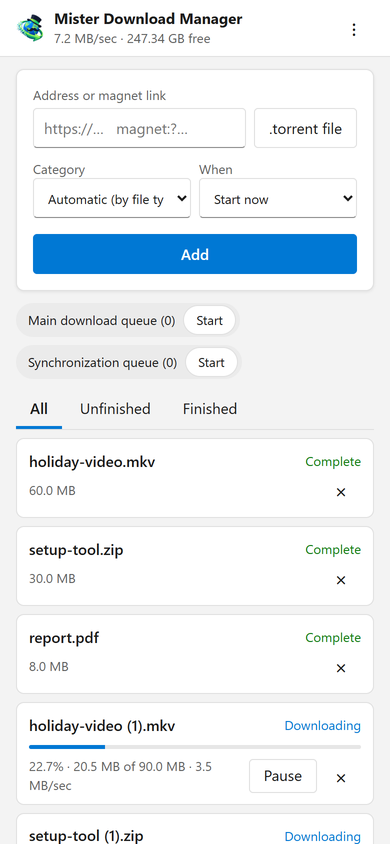
I tuoi download, in tasca
La pagina aggiunge l'indirizzo di un download, un link magnet o un file .torrent dal telefono, con una Categoria e Quando: avvio immediato o attesa in una coda. Elenca ogni download con il suo avanzamento, velocità e dimensione, mette in pausa e avvia ciascuno, e lo rimuove, con il suo file se lo chiedi. Avvia e interrompe anche le code. La barra in alto mostra la velocità totale e lo spazio libero dove vanno i tuoi download.
Downloads added from the phone behave like any other: they go to the category's folder and follow the queues, the Scheduler and the speed limits. The page speaks your phone's language when GDM has it, and follows its light or dark mode.
Associato una volta, con un codice
Attivalo in Opzioni → Remoto, poi fai clic su Associa un dispositivo.... Scansiona il codice QR con la fotocamera del telefono, oppure digita l'indirizzo e il codice di 8 cifre. Un codice funziona una volta, per dieci minuti.
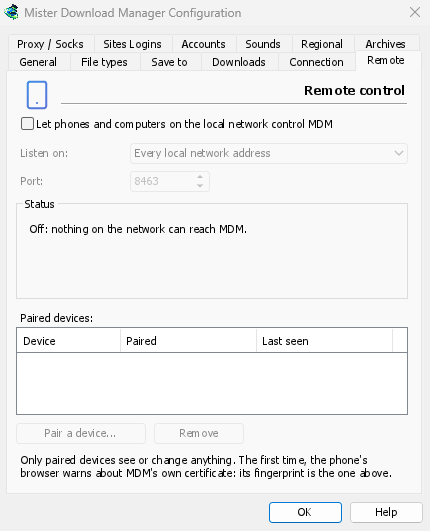
The first time, the phone's browser warns about the certificate. That is expected: GDM made it on your computer, and no public authority knows it. Options → Remote shows its fingerprint to compare. Add the page to the phone's home screen to keep it one tap away.
Solo i tuoi dispositivi, solo a casa
Il controllo remoto è disattivato finché non lo attivi. Risponde solo ai dispositivi che hai associato, ciascuno rimovibile subito in Opzioni, e ascolta solo sugli indirizzi di rete privati del computer, mai su uno raggiungibile da internet. Tutto avviene tramite HTTPS e le pagine web non possono usarlo.
Un telefono associato gestisce download e code, nient'altro: non può modificare le impostazioni, aprire finestre sul computer o vedere le tue cartelle.
Lontano da casa
Don't open it to the internet through your router. To reach it while you're away, use a VPN to your home network, such as WireGuard or Tailscale; with Tailscale, choose its address under Listen on. The first time, Windows may ask whether GDM may use the network: allow it on private networks, or the phone can't reach GDM.
To run GDM on a home server instead, see Server mode.
Gratuito, open source, senza pubblicità, senza periodo di prova.
Download GolinksPRO Download Manager