

- Startseite
- Funktionen
- Fernzugriff
Downloads bequem von der Couch hinzufügen
Your phone opens a small page that GDM itself serves on your home network. Paste a link, a magnet link or a torrent file, and watch it download on the computer. Nothing to install on the phone, and no outside service.
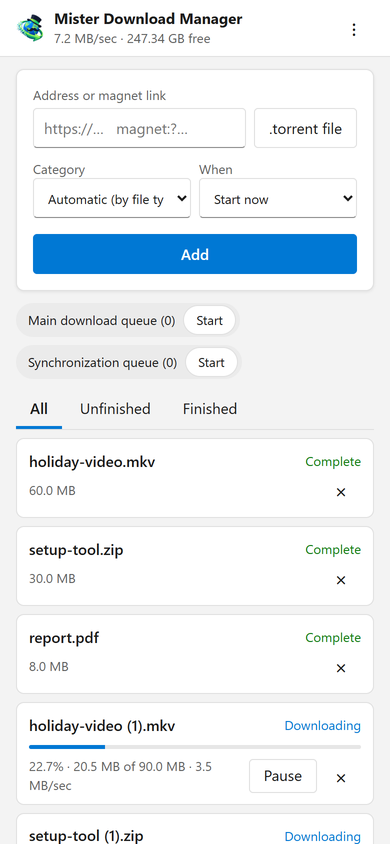
Ihre Downloads, immer dabei
Die Seite fügt eine Download-Adresse, einen Magnet-Link oder eine .torrent-Datei vom Smartphone hinzu, mit einer Kategorie und Wann: sofort starten oder in einer Warteschlange warten. Sie listet jeden Download mit Fortschritt, Geschwindigkeit und Größe auf, pausiert und startet jeden einzelnen und entfernt ihn auf Wunsch mit seiner Datei. Sie startet und stoppt auch die Warteschlangen. Die Leiste oben zeigt die Gesamtgeschwindigkeit und den freien Speicherplatz für Ihre Downloads an.
Downloads added from the phone behave like any other: they go to the category's folder and follow the queues, the Scheduler and the speed limits. The page speaks your phone's language when GDM has it, and follows its light or dark mode.
Einmal gekoppelt, mit einem Code
Schalten Sie es unter Optionen → Fernzugriff ein und klicken Sie dann auf Gerät koppeln.... Scannen Sie den QR-Code mit der Kamera Ihres Smartphones oder geben Sie die Adresse und den 8-stelligen Code ein. Ein Code funktioniert einmalig für zehn Minuten.
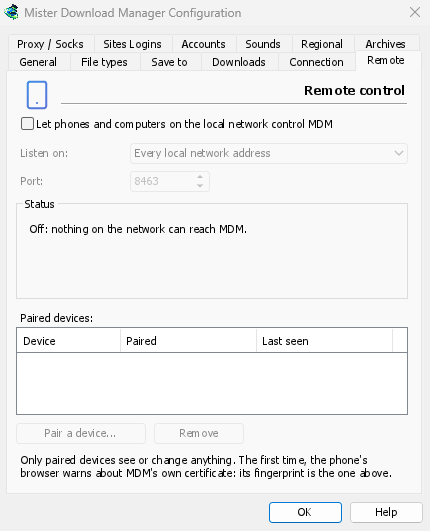
The first time, the phone's browser warns about the certificate. That is expected: GDM made it on your computer, and no public authority knows it. Options → Remote shows its fingerprint to compare. Add the page to the phone's home screen to keep it one tap away.
Nur Ihre Geräte, nur zu Hause
Die Fernsteuerung ist ausgeschaltet, bis Sie sie aktivieren. Sie antwortet nur auf die von Ihnen gekoppelten Geräte, die jeweils sofort in den Optionen entfernt werden können, und lauscht nur auf den privaten Netzwerkadressen des Computers, niemals auf einer, die das Internet erreichen kann. Alles läuft über HTTPS, und Webseiten können es nicht nutzen.
Ein gekoppeltes Smartphone verwaltet Downloads und Warteschlangen, nichts weiter: Es kann keine Einstellungen ändern, Fenster auf dem Computer öffnen oder Ihre Ordner einsehen.
Unterwegs
Don't open it to the internet through your router. To reach it while you're away, use a VPN to your home network, such as WireGuard or Tailscale; with Tailscale, choose its address under Listen on. The first time, Windows may ask whether GDM may use the network: allow it on private networks, or the phone can't reach GDM.
To run GDM on a home server instead, see Server mode.
Kostenlos, Open Source, keine Werbung, keine Testversion.
Download GolinksPRO Download Manager