

आपके डाउनलोड, आपकी जेब में
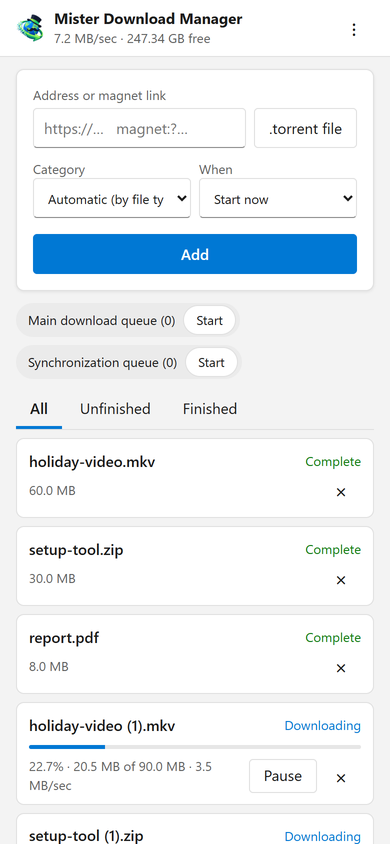
यह पेज फ़ोन से डाउनलोड का पता, एक मैग्नेट लिंक या एक .torrent फ़ाइल जोड़ता है, जिसमें एक श्रेणी और कब का विकल्प होता है: अभी शुरू करें, या कतार में प्रतीक्षा करें। यह हर डाउनलोड को उसकी प्रगति, गति और आकार के साथ सूचीबद्ध करता है, हर एक को रोकता और शुरू करता है, और यदि आप चाहें तो उसकी फ़ाइल के साथ उसे हटा देता है। यह कतारों को भी शुरू और बंद करता है। ऊपर की पट्टी कुल गति और उस खाली जगह को दिखाती है जहाँ आपके डाउनलोड जाते हैं।
Downloads added from the phone behave like any other: they go to the category's folder and follow the queues, the Scheduler and the speed limits. The page speaks your phone's language when GDM has it, and follows its light or dark mode.
एक बार युग्मित, एक कोड के साथ
विकल्प → रिमोट में इसे चालू करें, फिर डिवाइस युग्मित करें... पर क्लिक करें। फ़ोन के कैमरे से QR कोड स्कैन करें, या पता और 8-अंकीय कोड टाइप करें। एक कोड एक बार, दस मिनट के लिए काम करता है।
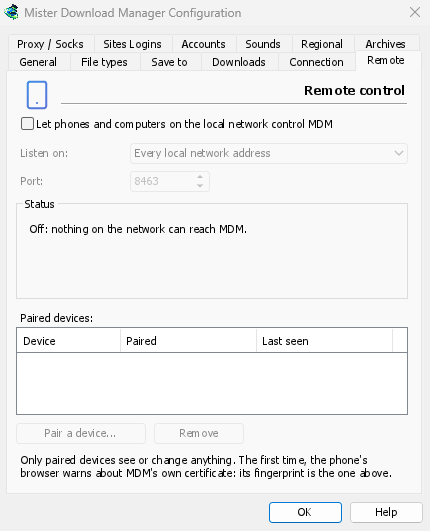
The first time, the phone's browser warns about the certificate. That is expected: GDM made it on your computer, and no public authority knows it. Options → Remote shows its fingerprint to compare. Add the page to the phone's home screen to keep it one tap away.
केवल आपके डिवाइस, केवल घर पर
रिमोट कंट्रोल तब तक बंद रहता है जब तक आप इसे चालू नहीं करते। यह केवल उन डिवाइसों का जवाब देता है जिन्हें आपने युग्मित किया है, प्रत्येक को विकल्प में तुरंत हटाया जा सकता है, और केवल कंप्यूटर के निजी नेटवर्क पतों पर सुनता है, कभी भी इंटरनेट तक पहुँचने वाले पर नहीं। सब कुछ HTTPS पर होता है, और वेब पेज इसका उपयोग नहीं कर सकते।
एक युग्मित फ़ोन डाउनलोड और कतारों को संभालता है, और कुछ नहीं: यह सेटिंग्स नहीं बदल सकता, कंप्यूटर पर विंडो नहीं खोल सकता या आपके फ़ोल्डर नहीं देख सकता।
घर से दूर
Don't open it to the internet through your router. To reach it while you're away, use a VPN to your home network, such as WireGuard or Tailscale; with Tailscale, choose its address under Listen on. The first time, Windows may ask whether GDM may use the network: allow it on private networks, or the phone can't reach GDM.
To run GDM on a home server instead, see Server mode.
मुफ़्त, ओपन सोर्स, कोई विज्ञापन नहीं, कोई ट्रायल नहीं।
Download GolinksPRO Download Manager