

- Home
- Funzionalità
- Limitatore di velocità
Download veloci che lasciano spazio a tutto il resto.
A download manager can fill your whole connection. The Speed Limiter caps GDM so that browsing, video calls and games stay smooth, and can give it full speed again while you're away from the computer.
One cap for all of GDM
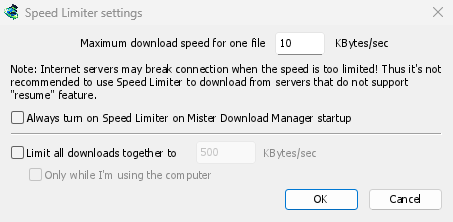
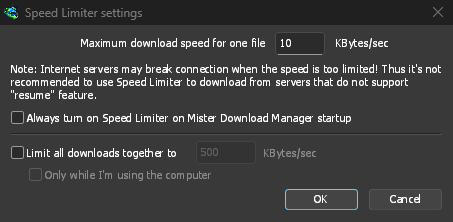
In Download → Limitatore di velocità → Impostazioni..., seleziona Limita il totale di tutti i download a e digita una velocità in KB/sec. Indipendentemente dal numero di file in download, la loro velocità combinata resterà al di sotto del limite. Funziona da solo: non c'è altro da attivare. Circa due terzi della velocità della tua connessione è un buon punto di partenza.
Tick Only while I'm using the computer and the cap applies only while you use the mouse or keyboard. After a minute without input, GDM goes back to full speed.
Un limite per file, o per un singolo download
Maximum download speed for one file holds each download to the same speed. Set it first, since it starts at a very slow 10 KBytes/sec, then choose Downloads → Speed Limiter → Turn on. Turn off gives full speed back, and Always turn on Speed Limiter on Mister Download Manager startup keeps it on from the start.
To slow down a single download, open its progress window and the Speed Limiter tab. The new limit applies at once, and the other downloads keep their speed. With Remember Speed Limiter settings for this file on download stop/resume, the limit comes back when you resume the file, even after restarting GDM.
Alcuni server interrompono la connessione quando la velocità è molto bassa. Evita un limite troppo basso per un server che non supporta la ripresa: la finestra di avanzamento mostra Ripresa supportata: No per questi.
I torrent condividono equamente il limite
Ogni torrent riceve un proprio limite, come qualsiasi altro download, e un limite memorizzato si applica di nuovo quando riprende. Sotto Limita il totale di tutti i download a, i torrent e gli altri download condividono il limite: ogni parte riceve almeno la metà, e di più quando l'altra parte ha bisogno di meno. Un torrent non può essere mantenuto al di sotto di 16 KB/sec, perché un limite inferiore faceva sì che i torrent perdessero i loro peer e si bloccassero.
Un limite sui dati, non sulla velocità
On an internet plan with a data cap, the amount matters more than the speed. The Scheduler's Download limits stops GDM after a set number of megabytes every few hours, and lets it carry on when the period is over: see Scheduler and queues.
Mantenere un po' di velocità per tutto il resto illustra le impostazioni passo dopo passo.
Gratuito, open source, senza pubblicità, senza periodo di prova.
Download GolinksPRO Download Manager