

One cap for all of GDM
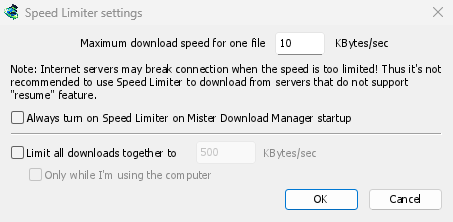
डाउनलोड → गति सीमित करने वाला → सेटिंग्स... में, सभी डाउनलोड को एक साथ सीमित करें पर टिक करें और KB/सेकंड में गति टाइप करें। चाहे कितनी भी फ़ाइलें डाउनलोड हो रही हों, वे एक साथ इसके नीचे रहेंगी। यह अपने आप काम करता है: चालू करने के लिए और कुछ नहीं है। आपके कनेक्शन की गति का लगभग दो-तिहाई एक अच्छी शुरुआत है।
Tick Only while I'm using the computer and the cap applies only while you use the mouse or keyboard. After a minute without input, GDM goes back to full speed.
प्रति फ़ाइल, या एक डाउनलोड के लिए एक सीमा
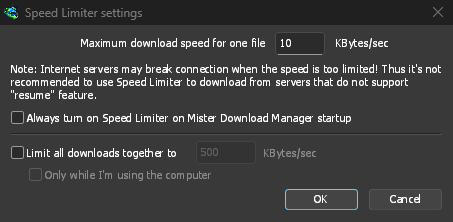
Maximum download speed for one file holds each download to the same speed. Set it first, since it starts at a very slow 10 KBytes/sec, then choose Downloads → Speed Limiter → Turn on. Turn off gives full speed back, and Always turn on Speed Limiter on Mister Download Manager startup keeps it on from the start.
To slow down a single download, open its progress window and the Speed Limiter tab. The new limit applies at once, and the other downloads keep their speed. With Remember Speed Limiter settings for this file on download stop/resume, the limit comes back when you resume the file, even after restarting GDM.
कुछ सर्वर बहुत कम गति होने पर कनेक्शन छोड़ देते हैं। ऐसे सर्वर के लिए कड़ी सीमा से बचें जो फिर से शुरू नहीं हो सकता है: प्रगति विंडो उन लोगों के लिए फिर से शुरू करने की क्षमता: नहीं दिखाती है।
टॉरेंट सीमा को समान रूप से साझा करते हैं
प्रत्येक टॉरेंट को अपनी एक सीमा मिलती है, किसी भी अन्य डाउनलोड की तरह, और एक याद की गई सीमा फिर से लागू होती है जब वह फिर से शुरू होता है। सभी डाउनलोड को एक साथ सीमित करें के तहत, टॉरेंट और अन्य डाउनलोड सीमा साझा करते हैं: प्रत्येक पक्ष को कम से कम आधा मिलता है, और जब दूसरे पक्ष को कम की आवश्यकता होती है तो अधिक मिलता है। एक टॉरेंट को 16 KB/सेकंड से कम नहीं रखा जा सकता है, क्योंकि कम सीमा ने टॉरेंट को अपने साथियों को छोड़ने और रुकने पर मजबूर कर दिया था।
गति से नहीं, डेटा से सीमित
On an internet plan with a data cap, the amount matters more than the speed. The Scheduler's Download limits stops GDM after a set number of megabytes every few hours, and lets it carry on when the period is over: see Scheduler and queues.
बाकी सब के लिए कुछ गति रखें सेटिंग्स को चरण-दर-चरण बताता है।
मुफ़्त, ओपन सोर्स, कोई विज्ञापन नहीं, कोई ट्रायल नहीं।
Download GolinksPRO Download Manager