

One cap for all of GDM
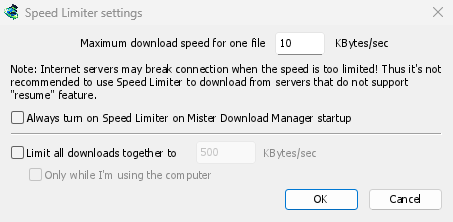
在下载 → 速度限制器 → 设置...中,勾选将所有下载总计限制为,并输入一个以千字节/秒为单位的速度。无论有多少文件正在下载,它们的总速度都会保持在此限制之下。它会自动生效,无需额外开启。建议将速度设置为您网络连接速度的大约三分之二。
Tick Only while I'm using the computer and the cap applies only while you use the mouse or keyboard. After a minute without input, GDM goes back to full speed.
按文件或按下载任务限制速度
Maximum download speed for one file holds each download to the same speed. Set it first, since it starts at a very slow 10 KBytes/sec, then choose Downloads → Speed Limiter → Turn on. Turn off gives full speed back, and Always turn on Speed Limiter on Mister Download Manager startup keeps it on from the start.
To slow down a single download, open its progress window and the Speed Limiter tab. The new limit applies at once, and the other downloads keep their speed. With Remember Speed Limiter settings for this file on download stop/resume, the limit comes back when you resume the file, even after restarting GDM.
某些服务器在速度非常低时会断开连接。对于无法恢复的服务器,请避免设置过低的限制:进度窗口会显示恢复功能:否。
种子下载公平共享限速
每个种子下载任务都有自己的速度限制,就像其他下载任务一样,并且记住的限制会在恢复时再次生效。在将所有下载总计限制为下,种子下载任务和其他下载任务共享总限速:每方至少获得一半,当另一方需求较少时则获得更多。种子下载任务的速度不能低于 16 千字节/秒,因为更低的限制会导致种子下载任务断开对等连接并停滞。
按数据量而非速度限制
On an internet plan with a data cap, the amount matters more than the speed. The Scheduler's Download limits stops GDM after a set number of megabytes every few hours, and lets it carry on when the period is over: see Scheduler and queues.
为其他活动保留一些速度将逐步引导您完成设置。
免费、开源、无广告、无试用版。
Download GolinksPRO Download Manager