


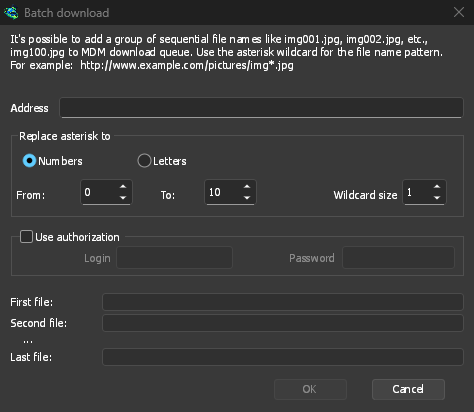
一个星号,一个完整系列
选择任务 → 添加批量下载,并在文件不同之处写入一个星号:https://example.com/photo*.jpg。在将星号替换为下,选择数字或字母,然后选择从和到。对于数字,通配符大小设置位数:如果设置为 3,文件将是photo001.jpg、photo002.jpg等等。
在点击确定之前,窗口会显示第一个文件、第二个文件和最后一个文件,这样在下载开始前就能发现输入错误。如果服务器需要登录,请勾选使用授权。已经复制了地址?任务 → 从剪贴板添加批处理下载会自动填写。
直接进入队列
The files go to a queue, not all at once. GDM asks which one, and that question can be turned off in Options → Downloads. From there the queue runs as many files at a time as you set, and the Scheduler can start it at night. See Queues and the Scheduler.
来自文件的链接列表
已经有文本文件中的链接了?任务 → 导入 → 从文本文件会读取其中的每个网址,您可以取消勾选不想要的链接。从 IDM 导出文件会读取一个.ef2列表,其中包含每个下载的引用页和 Cookie,因此从 IDM 导出的列表会随其下载所需的信息一同导入。您也可以将.txt或.ef2列表拖放到下载列表中。
反向操作也同样有效:任务 → 导出 → 导出到文本文件会每行写入一个地址,而导出到 IDM 文件会写入一个.ef2列表。
When an address is already in the list, GDM asks what to do, or follows the answer you chose in Options → Downloads → If a duplicate download link is added.
导入时显示更多信息
导入的列表会在链接抓取器中打开:链接被分类到不同的包中,每个链接都会在线检查其真实名称和大小,离线链接则会被取消勾选。当文件托管服务支持时,从文件托管服务批量下载的链接会通过您的去限制账户。
免费、开源、无广告、无试用版。
Download GolinksPRO Download Manager